
SeedProd plugin: the WordPress landing page builder you need.
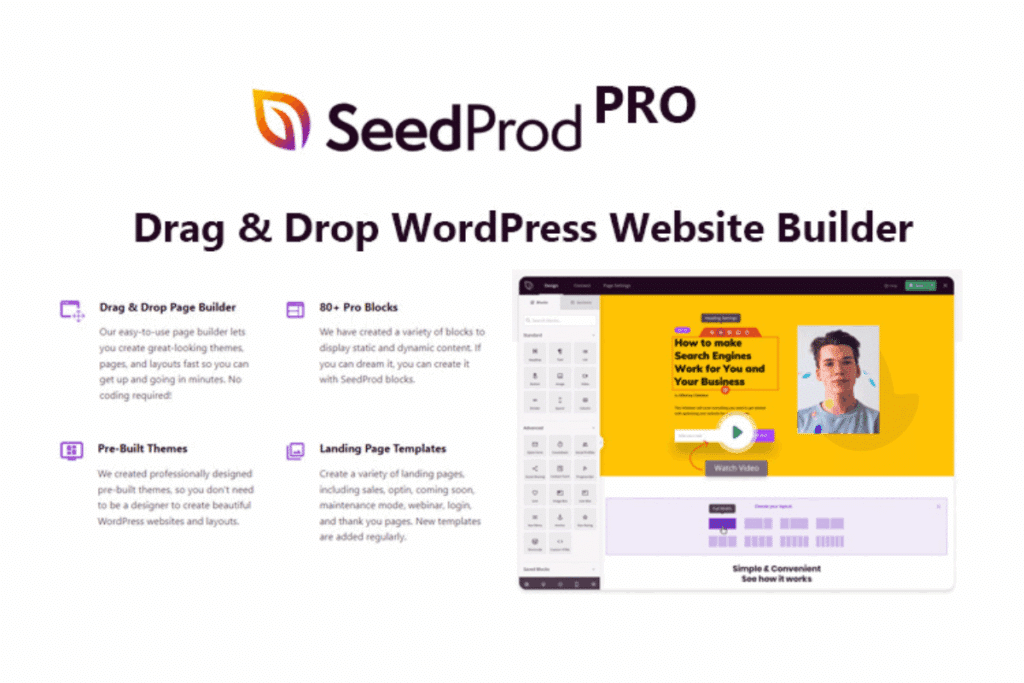
If you want to capture leads, sell more and launch campaigns in record time without touching code, SeedProd is one of the best allies for your WordPress site. It's a drag & drop page builder designed to create professional landing pages - from sales and lead generation pages to “coming soon”, maintenance and custom 404s - with a minimal learning curve and advanced features when you need them.
👉 Find SeedProd Coming Soon Page Pro in Pillbanana: seedprod - coming soon page pro
- What is Seedprod
- Why choose Seedprod for your landing pages?
- SeedProd: main features in detail
- SeedProd landing page: how to create a landing page step by step
- SeedProd plugin: converting templates, blocks and sections
- SeedProd coming soon: activate a “coming soon” page within minutes
- Customized 404 and maintenance pages with SeedProd
- SeedProd integrations with email marketing and automation
- Recommended use cases
- SeedProd vs. other page builders (coming soon)
- Conclusion: launch high-converting pages without complication
- Frequently asked questions about SeedProd
What is Seedprod

SeedProd is a tool designed for those who need to create attractive and effective WordPress landing pages without technical knowledge. Its operation is based on a drag-and-drop visual editor, where each element -text, buttons, images or forms- can be added and customized in a matter of seconds.
What makes it really valuable is that it is not limited to design: it incorporates intelligent blocks and sections that help build conversion-focused pages, such as calls to action, countdowns, testimonials or progress bars. This way, even users with no previous web design experience can achieve professional results.
In addition, it comes ready to integrate with email marketing platforms and has an integrated subscriber management system within your WordPress dashboard. This means that, from day one, you can connect your site to your sales funnel or lead capture without relying on additional tools.
In short, plugin SeedProd combines design, marketing and simplicity in a single plugin, making it ideal for both entrepreneurs launching their first project and professionals looking to optimize campaigns quickly and efficiently.
Why choose Seedprod for your landing pages?

- Speed of creation: drag and drop blocks; edit text and images with one click.
- Professional templates: more than 100+ base designs that you can customize to 100%.
- Specific blocks for conversion: counters, star ratings, progress bars, subscription forms, buttons, FAQs, testimonials and more.
- Integrated image library: access to millions of free stock photos to use on your pages.
- Full control of site states: modes coming soon, maintenance y 404 in one click.
- Native and Zapier integrations: connects with the most used email services.
- Optimized code (bloat-free): lightweight pages that load fast and help SEO.
- Live preview + history: easily test, undo and revert to previous versions.
- Subscriber management: view and export leads from your own WordPress.
🚀 WordPress Maintenance Plugin: Your complete guide to optimizing and securing your website
SeedProd: main features in detail
The drag & drop editor of SeedProd is one of its strongest points. It allows you to build complete sections, organize columns and adjust margins, fonts or colors in real time, all without writing a single line of code.
For those who are looking for speed, the plugin includes more than 100 professional landing page templates ready to use. There are options for sales, webinars, lead capture, thank you pages, modes, etc. coming soon, or even 404 errors. You can customize them to your liking and save them as favorites for easy reuse.
Another advantage is the intelligent sections and special blocks. These include headers, calls to action, FAQs, testimonials, countdowns, progress bars, star ratings or subscription forms, as well as social media icons to encourage interaction.
The live preview allows you to check how the page will look on both desktop and mobile devices. And if you're not happy with a change, the revision history gives you the option to go back with a single click.
On the strategic side, SeedProd offers a integrated subscriber management directly from the WordPress dashboard, where you can visualize and export the captured leads. In addition, it connects natively with the main email marketing platforms such as ActiveCampaign, Mailchimp, GetResponse or MailPoet, and via Zapier opens up the possibility of integration with thousands of additional applications.
Security is no slouch either: it is possible to restrict access with roles, authorized IPs or private links, and to add reCAPTCHA to avoid bots and spam registrations. Finally, the plugin is designed with a focus on optimized code (bloat-free), which guarantees fast loading, better user experience and an extra boost in SEO positioning.
SeedProd landing page: how to create a landing page step by step

Create a landing page with SeedProd is a quick and very intuitive process. Here is a practical guide:
Install and activate the plugin
Download and install SeedProd from your WordPress dashboard. Once activated, you will see a new menu in the sidebar that will give you access to all its functions.
2. Access the page builder
Go to SeedProd → Landing Pages and click on Add New Landing Page. From there you can start working on your first design.
3. Choose a template
SeedProd offers more than 100 pre-designed templates for different purposes: sales, lead generation, webinars, thank you, coming soon pages and much more. If you prefer, you can also start from scratch with a blank canvas.
4. Customize your design
With the drag & drop editor you can change texts, images, colors, fonts and add new sections. Everything is modified in real time, which makes it easy to adjust every detail until the page looks exactly the way you want.
5. Connect your subscription form
Integrate your landing page with your email marketing tool from the tab Integrations. In this way, every lead that registers will be saved in your contact list without any additional steps.
6. Review in mobile view and save
Before publishing, check how the page will look on mobile devices. SeedProd allows you to preview and fine-tune details to ensure an optimal experience on any screen.
7. Publish your landing page
When you are satisfied, click on Publish and your page will be instantly active.
💡 Practical advice: To increase conversion, include customer testimonials in your landing page, along with clear benefits and a prominent call to action. These elements build trust and can make the difference between a visitor and a new customer.
🚀 10 tips to increase sales by optimizing the checkout process
SeedProd plugin: converting templates, blocks and sections
✨ Professional templates (100+)
You have at your disposal ready-made designs for sales, lead generation, webinars, events, web pages, etc. coming soon ⏳, maintenance, 404 errors or even thank you pages.
🧩 Key blocks
Includes headings, subheadings, paragraphs, images, videos, buttons, social icons, subscription forms ✉️, counters, star ratings, progress bars, carousels and accordion FAQs.
📐 Predesigned sections
You can insert in seconds a home hero, feature listings, prices, calls to action, FAQs, testimonials or footers. Adjust styles and publish without complications.
SeedProd coming soon: activate a “coming soon” page within minutes

With SeedProd it is very easy to show your visitors that your project is on its way, even before your website is finished. The Coming Soon“ mode” allows you to create a professional temporary page that, in addition to generating expectation, helps you capture leads from day one.
To activate it, go to SeedProd → Landing Pages and locate the option Coming Soon Mode. You just need to turn on the switch and choose one of the predesigned templates exclusively for this purpose.
Then, customize the design with your message, add a subscription form to collect emails, include a countdown to the launch date and place buttons to your social networks to keep your audience connected.
A very useful feature is the restricted access feature: while visitors see the “coming soon” page, you and your team can continue working on the actual site privately.
This mode is ideal to capture subscribers before launching, test marketing messages and start building buzz around your brand without having to have the final website ready.
Customized 404 and maintenance pages with SeedProd
When your site needs internal adjustments, SeedProd allows you to activate a maintenance page in seconds. So, instead of displaying an error or a messy look, your visitors will see a professional notice that conveys seriousness and maintains confidence in your brand.
In the same way, you can design a customized 404 page to turn a mistake into an opportunity. Instead of the classic “Page not found” message, you can add an internal search engine, links to key sections of your website and a call to action that guides the user to where you really want to take them.
The best part is the simplicity: both the maintenance mode and the 404 page are activated or deactivated with a simple switch from the SeedProd panel, without complicated configurations.
SeedProd integrations with email marketing and automation
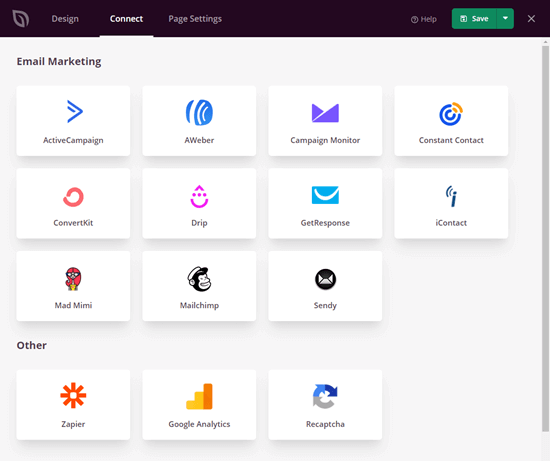
One of the great differentials of SeedProd is that it is not just about the visual design of the landing page: it also integrates natively with the main email marketing platforms. You will be able to connect your forms directly with services such as ActiveCampaign, Mailchimp, AWeber, Drip, GetResponse, Campaign Monitor or MailPoet, among others. This means that every lead that registers on your page will automatically go to your contact list without any intermediate steps.
And if you use a different CRM or tool, no problem: thanks to Zapier, SeedProd connects to more than 1,000 additional apps. So you can send leads to Google Sheets for manual tracking, to Slack for instant notifications, or directly to your CRM to start an automated sales flow.
In practice, these integrations translate into fewer manual tasks and the ability to have automated marketing funnels from day one, allowing you to save time and focus on what matters most: growing your business.
🚀 Duplicator Pro: the best backup and migration plugin for WordPress
Recommended use cases
Sales Landing: ideal for promoting a specific product or service.
Lead capture: offer a lead magnet such as an e-book, checklist or demo to increase your contact base.
🎥 Webinar or event: create a registration page with automatic email reminders.
⏳ Coming Soon: generate buzz and start capturing mailings before a launch.
🔧 Maintenance page: displays a professional notice while you perform internal updates.
🚫 Personalized 404 page: turn an error into an opportunity by guiding the user with useful links or an attractive CTA.
SeedProd vs. other page builders (coming soon)
| Feature | SeedProd 🚀 | Other builders (Elementor, Divi, Beaver...) |
|---|---|---|
| Main focus | Landing pages + special modes (coming soon, maintenance, 404) | General pages and complete site design |
| Ease of use | Very simple, designed for fast campaigns (drag & drop optimized) | More complex, requires more adjustments and learning curve |
| Templates | +100 conversion and marketing specific templates | Varied templates, but more oriented to complete web design. |
| Conversion-oriented blocks | Counters, testimonials, progress bars, FAQs, subscription forms | Some include them, but they are not always focused on conversion. |
| Subscriber management | Embedded within WordPress, with direct export | Not usually available, you need an extra plugin |
| Integrations | Connect natively with email marketing + Zapier (1000+ apps) | Generally basic integrations or via paid add-ons |
| Performance | Lightweight (bloat-free) code, very fast pages | Can add extra weight and slow down loading |
| Site status | Coming soon, maintenance and 404 customizable in 1 click | Normally not included, external extensions required |
Conclusion: launch high-converting pages without complication
SeedProd brings together the essentials for creating fast, beautiful and effective landing pages in WordPress. Its visual editor, ready-made templates, conversion blocks and email integrations allow you to go from idea to publication in a matter of minutes. If you're looking for agility, performance and results, this SeedProd plugin is a safe bet.
✅ Get SeedProd Coming Soon Page Pro at Pillbanana and get started today:
seedprod - coming soon page pro
Frequently asked questions about SeedProd
What is the difference between SeedProd free and pro?
Free version allows you to create basic landing pages with drag & drop editor and a limited set of templates/blocks. Pro unlocks more premium templates, advanced conversion blocks, coming soon/maintenance/404 modes, subscriber management and native integrations with major email services.
How do I activate the “seedprod coming soon” mode?
From SeedProd → Landing Pages, activate Coming Soon Mode with the switch, choose a template, customize texts/image/counter and add a subscription form to capture emails before launch.
Does SeedProd plugin affect speed or seo?
SeedProd generates bloat-free code, which helps pages load fast and improves the user experience. Better speed often correlates with better SEO signals.
Can I connect SeedProd with my email marketing provider?
Yes, it includes direct integrations with platforms like ActiveCampaign, Mailchimp, AWeber, GetResponse, Drip, MailPoet, Campaign Monitor, Constant Contact, and more. Plus, with Zapier you can link thousands of additional apps.
Does SeedProd work with any Wordpress theme?
Yes, SeedProd is compatible with most modern themes and can also work with your own base theme to maximize speed on standalone landing pages.
Si quieres conocer otros artículos parecidos a SeedProd plugin: el constructor de landing pages en WordPress que necesitas puedes visitar la categoría Plugins Wordpress.
 Español Español
  English
  Português do Brasil
Leave a Reply