
Elementor vs. WPBakery Page Builder [2025]
Don't miss this incredible, comprehensive comparison of Elementor vs. WPBakery Page Builder, two powerful website builders. Discover their features and everything Elementor and WPBakery Page Builder have to offer.
Elementor It's a page builder that can be used with any theme. It comes with its own theme that you can download for free; it's the Topic: Hello.
The very Elementor It includes more than 300 ready-made demos you can use to get started—they're just as good as the best themes. You don't need another theme with Elementor. The Hello theme itself is more than enough.
In this review of Elementor, we discuss the latest improvements that keep this theme/page builder at the top of its game.
It's important to note that Elementor was launched in 2016 and has already been installed on more than 8 million sites, which, of course, sets it apart. It's not just a page builder, but a refined drag-and-drop tool for building websites very quickly and easily.
Elementor vs. WPBakery Page Builder: Elementor Review
Check out the video below—it'll probably give you an idea of how you can get started with the page editor/builder on your own. Here you can find All the information about the Elementor Editor.

Browser
This new tool can be used as a dock on the right side of the screen or can float anywhere on your spreadsheet.
Just right-click on an item or block in your worksheet and select "Browser" to open it.
The Browser significantly increases job satisfaction and the speed at which you can work.

Ready-to-Use Demo Designs
Let's talk about the main features of the page builder Elementor. That said, the beautiful demo designs are certainly part of it.
We mentioned earlier that Elementor is essentially a theme because of the wide selection of demo content you can use to get your website started.
Similar to Divi There are more than 200 designs available for every possible niche. Think businesses, online stores, hospitality, gyms, coffee shops, fashion, lodging, photography, architecture, lifestyle, travel, and fashion.
Also, there are many third-party providers who create beautiful designs for Elementor. You can use these designs as a starting point for your work, but of course, there will be additional costs.
Save Jobs
Who wants to do the same task over and over again? Elementor lets you save blocks of content and reuse them on other pages, posts, and even other websites.
Compared to the way people used to work, this tool saves you a lot of time. The animation below gives you a pretty good idea of what to expect.
Revision Editor
Like other top-tier page builders, this product wasn't entirely satisfied with the built-in editor in WordPress and decided to launch its own, improved version.
As you probably know, WordPress's default editor for revisions is often useless; it was always a nightmare when you had to re-enter something.
WooCommerce Builder
Elementor, like most of the best themes, is perfect for creating online stores. WooCommerce product pages and category pages can look great.
In the past, it took a lot of technical knowledge to customize the store's pages, which is why WooCommerce It has become the most widely used e-commerce plugin for WordPress.
Discover here A video and more information about the WooCommerce Builder.
Mobile version
With Elementor, you can customize everything separately for mobile, tablet, and desktop. Of course, it's responsive "out of the box," but it's always good to be able to make specific adjustments for a particular device if necessary.
However, all the best themes and page builders also have this feature.
Colors
In our review, we give the text color editor a perfect score—it's practically as amazing as the one in PC software like Photoshop.
According to the Elementor, it is currently the only one with a “pixel-perfect design.” You can use all possible colors and also create gradients with them.
Learn more here
Header & Footer
With this tool, you'll have complete control over all the headers and footers on your website.
All top-tier page builders can do this, but it's very important to have this feature in a theme.
Basics
Pro Elements

Elements of the Topic
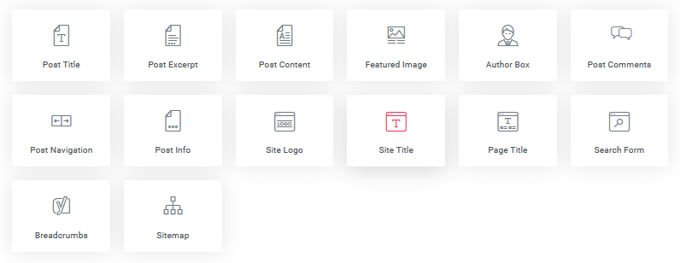
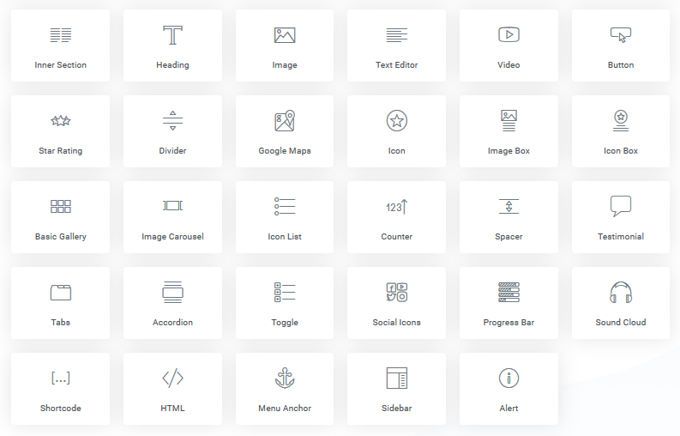
The building blocks for designing your pages are the elements and Elementor It has a lot to offer. Let's just say they've thought of just about everything.
Plus, it comes with built-in pop-ups—and they're really impressive—so you can forget about your pop-up plugin from now on. You don't need it anymore.
Find out all the details about the more than 90 Elementor Widgets.
Pop-ups
Beautiful pop-ups that are easy to set up, too—a wonderful tool. The best page builders copy everything from each other.
Pop-ups are perfect for calls to action and conversion.
Prices
Elementor's pricing is shown in the image above. In terms of quality, Elementor is worth three times what it costs, especially when compared to other premium themes that offer much less and are even more expensive.
Now we really want to share some good news with you: on our website, you can purchase Elementor Pro (with all its amazing PRO features) at an insane price: $4.99
You might be interested in: Everything you need to know about Elementor, the best visual builder for WordPress
Elementor vs. WPBakery Page Builder: WPBakery Page Builder Review

In this comparison of Elementor vs. WPBakery Page Builder, we'll continue with the latter page builder.
It has actually been installed 4,300,000 times. That's a little more than Elementor, but we should remember that WPBakery Page Builder has been around longer and was the only real page builder at the time.
Assessment
The plugin has been available for purchase since May 2011 at CodeCanyon on the marketplace (Envato). Over the years, it has sold 391,000 times there. The rating was based on reviews from 21,258 buyers.
The average rating is 4.64 out of 5. At first glance, that's a good rating. Do you know why WP Bakery PageBuilder was installed far more often than it was sold? For years, this page builder has been bundled with a number of best-selling WordPress themes as part of package deals.
You've probably noticed the WP Bakery Page Builder in the themes, since it worked much better than the standard WordPress editor.
Front-End and Back-End Developer
WPBakery Page Builder It has a front-end editor and a back-end editor. The front-end editor could be significantly improved when compared to other editors such as Divi or Elementor. Although dragging elements—and, of course, moving them between columns—is sometimes a little clunky.
The back-end editor, on the other hand, is a very user-friendly tool for building pages correctly and quickly. By the way, you can switch between the front end and the back end as many times as you like. It's important to save everything before switching, or you'll lose the work you've done.
Elements
The page builder has many different elements you can use. To access even more elements, there are several plugins available for this purpose. By the way, there are many video, form, and other plugins for WPBakery Page Builder available for purchase on the same website.
WooCommerce
Like any good page builder, WPBakery Page Builder is designed to work with the popular WooCommerce e-commerce plugin.
Not only that, but there are many extra features specifically for WooCommerce in the editor, which you can see in the image below.
Designs and Demo Templates
The demos are integrated into the page builder, which you can use to create all kinds of pages. It's very convenient because you don't have to start from scratch. Most themes offer ready-made demo pages, but you can never have enough starting material.
Prices
This product costs $64. If that price seems too high, don't worry! You can download it from our website for $4.99 and enjoy all these benefits:
- Free updates for one year
- 100% files that are clean and virus-free
- Use in unlimited domains
I want to try WPBakery Page Builder for WordPress right now!
Evaluation
WPBakery Page Builder may be installed on many sites, mainly because it was one of the first page builders and because of its partnerships with many themes that include the page builder for free.
Overall, it's a solid page builder that works well, but it's expensive and has become a bit outdated.
However, you have nothing to lose by giving it a try.
Conclusion: Elementor vs. WPBakery Page Builder
First of all, thank you for reading our comparison of Elementor vs. WPBakery PageBuilder all the way to the end.
In conclusion, we can say that Elementor has had a total of 2 to 4 million installations over the past year and is booming. On the other hand, WPBakery Page Builder is practically sold out.
In our opinion, Elementor outperforms WPBakery Page Builder in every conceivable way. If you need a page builder, we recommend Elementor, but you can also try them out and see for yourself.
Download them from our website for a fraction of their value ($4.99 each) and get a year of FREE updates!
Find out which one you like best and try out all the features we've mentioned in this post.
If you want to keep saving, we suggest you subscribe to our monthly membership for $5.99, and you'll have access to more than 3,200 products. Remember, you can also choose our annual membership.
👉WPBakery Page Builder for WordPress
Si quieres conocer otros artículos parecidos a Elementor vs WPBakery Pagebuilder [2025] puedes visitar la categoría Plugins Wordpress.
 Español Español
  English
  Português do Brasil
Leave a Reply