
GiveWP Review: Pros and Cons in 2025

Are you trying to decide if GiveWP is the best plugin for your organization's fundraising or donation efforts? In our hands-on review of GiveWP, we'll help you make the right decision about this popular fundraising plugin.
In general, we believe that GiveWP It is the best option for organizations with significant fundraising needs, such as the ability to run full-scale fundraising campaigns, manage donors, and perhaps even set up peer-to-peer fundraising campaigns.
However, if you just want the option to create a basic donation form for one-time or recurring donations, you might be better off using a form plugin such as Gravity Forms.
📚 To help you make a decision for your organization, here's everything we'll cover in our GiveWP review:
- ✏️ A quick summary table of the main pros and cons, features, and other details.
- ⚙️ A Practical Look at GiveWP's Key Features and User Experience
- 💰 Details on GiveWP Pricing
- 👍👎 GiveWP: Pros and Cons in More Detail
- 🙋 Frequently Asked Questions
- 🤔 Final Thoughts on GiveWP, Including When You Should Consider Using an Alternative to GiveWP
✏️ Summary of the GiveWP Review
If you want a practical and detailed overview of GiveWP You should keep reading our full review of GiveWP. But if you're in a hurry, here's a quick summary of what you can expect from GiveWP.
| Pros | 👍 Popular and well-supported 👍 Flexible payment options 👍 No technical jargon 👍 Excellent donor management 👍 Peer-to-peer fundraising |
| Cons | 👎 It can be a little expensive if you need all the features 👎 There aren't many styling options (unless you use custom CSS). |
| Free version? | Free basic version on WordPress.org |
| Premium Version | 35+ premium add-ons |
| Price for Pro | - 149 $ for the Basic Supplements - 349 $ to add Pro add-ons - 499 $ to add Peer-to-Peer Fundraising - Option to purchase individual add-ons |
| Additional costs? | Premium Version: No additional fees on any payment gateway. Free version: Additional 2% fee for one-time donations via Stripe (removed in the Premium version). No additional fee for PayPal payments. |
| Unlimited donation forms | ✅ |
| Custom Fields in Donation Forms | ✅ |
| Types of Donations | - One-time donations - Recurring donations (supports custom frequencies) |
| Donation Amounts | - One or more preset amounts - Custom amounts (Donors can choose) - Credit Card Fee Refunds (Let donors choose whether to cover the payment processing fee) |
| Payment Processor/Payment Methods | - Stripe (and compatible Stripe payment gateways, such as Apple Pay) - PayPal - Plaza - Braintree - Mollie - Autorizar.net - 2Checkout - Offline donations - Text-to-give (donate via text message) ...many other payment processors—complete list. |
| Campaign Fundraising Goals | ✅ |
| Peer-to-Peer Fundraising | ✅ |
| Donor Management | ✅ |
| Reports and Analysis | ✅ |
| CRM / Email Marketing Integrations | - Salesforce - Mailchimp - ActiveCampaign - ConvertKit - AWeber - Constant contact |
| Automation/Integration Support | - Zapier - Webhooks - WP Merge (from third parties) - Uncanny Automator (from third parties) |
| Alternatives to GiveWP | - Charitable - Gravity Forms |
⚙️ Exploring Six Key Features of GiveWP
To kick off our hands-on review of GiveWP, let's take a look at some of GiveWP's most important features.
Next, in the following section, we'll walk you through the basic process of setting up GiveWP so you can get a feel for the user experience.
1. Unlimited fundraising campaigns with useful enhancements
To help you optimize your fundraising efforts, GiveWP lets you create an unlimited number of fundraising campaigns.
Each fundraising campaign can have its own dedicated page, its own fundraising goals, etc.
For example, instead of (or in addition to) Instead of having a single donation form for your organization, you could create dedicated donation forms for each campaign you run.
2. Flexible payment amounts and methods
To help you optimize your fundraising efforts and allow donors to contribute in the way that works best for them, GiveWP offers a great deal of flexibility in terms of donation amounts and payment methods.
For starters, GiveWP supports just once y recurring donations.
One of the things GiveWP does really well is let donors choose how they want to give.
For example, in addition to offering preset donation amounts, you can also offer a "Custom Amount" option that allows donors to enter any amount.
But where GiveWP really stands out is that it also allows donors to choose a custom recurring schedule (for recurring donations).
Although most other WordPress donation plugins support recurring donations, it's rare to see this option to customize the frequency.
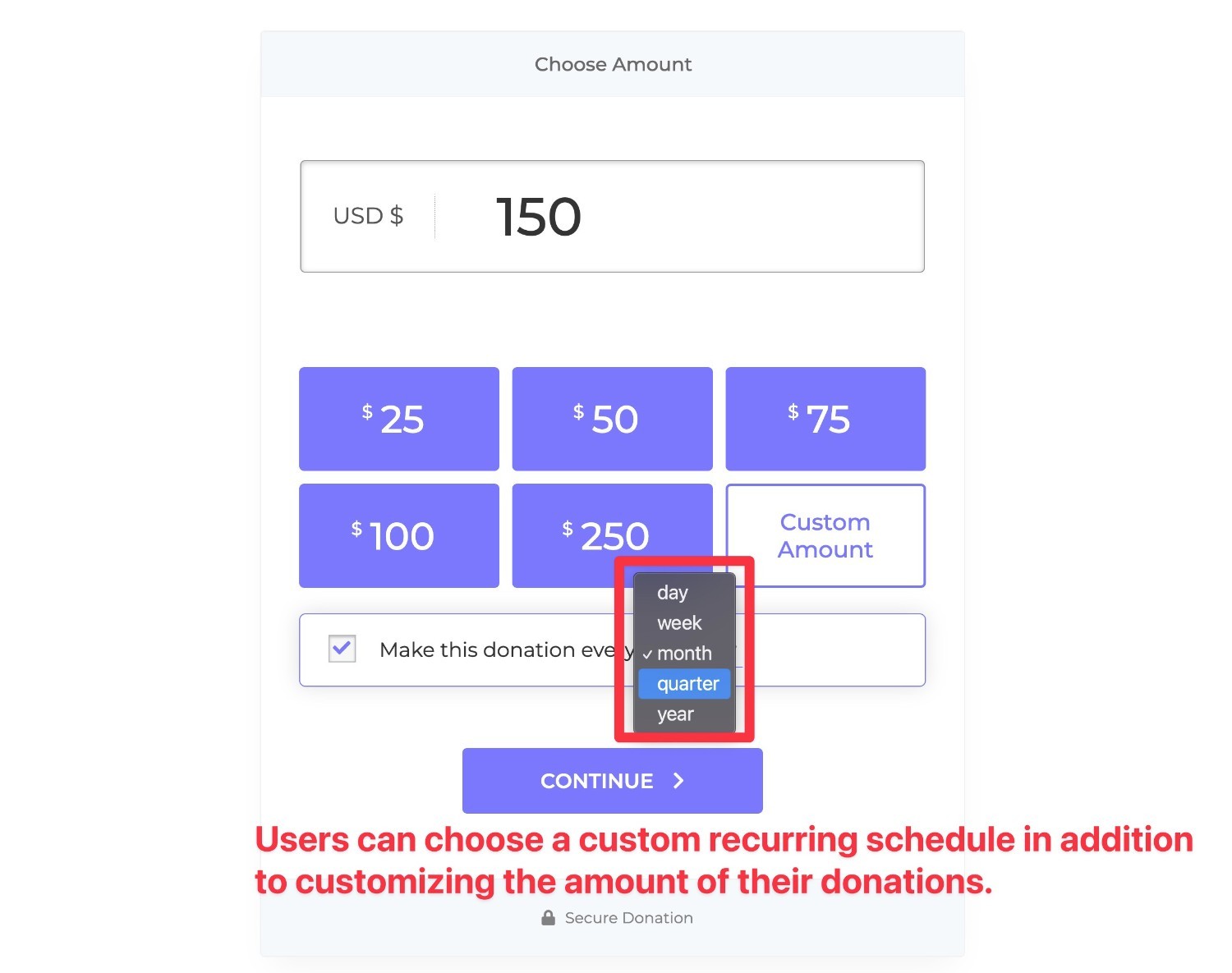
You can also add a fee reimbursement option so that donors can choose to cover the payment processing fee.
Speaking of payment processing, GiveWP also supports a wide variety of payment processors: more than 18 different payment gateways in total.
This includes all the big names:
- Stripe (In addition to credit and debit cards, you can also enable other Stripe options such as Apple Pay, Google Pay, and Plaid for direct bank payments)
- PayPal
- Braintree
- Square
- Autorizar.net
- Mollie
There is also a "text-to-donate" add-on that allows people to donate via SMS, powered by Twilio and Stripe.
3. Donation Form Builder
To help you customize your fundraising form, GiveWP offers a no-code donation form builder that lets you add custom fields to your form to collect information specific to your organization.
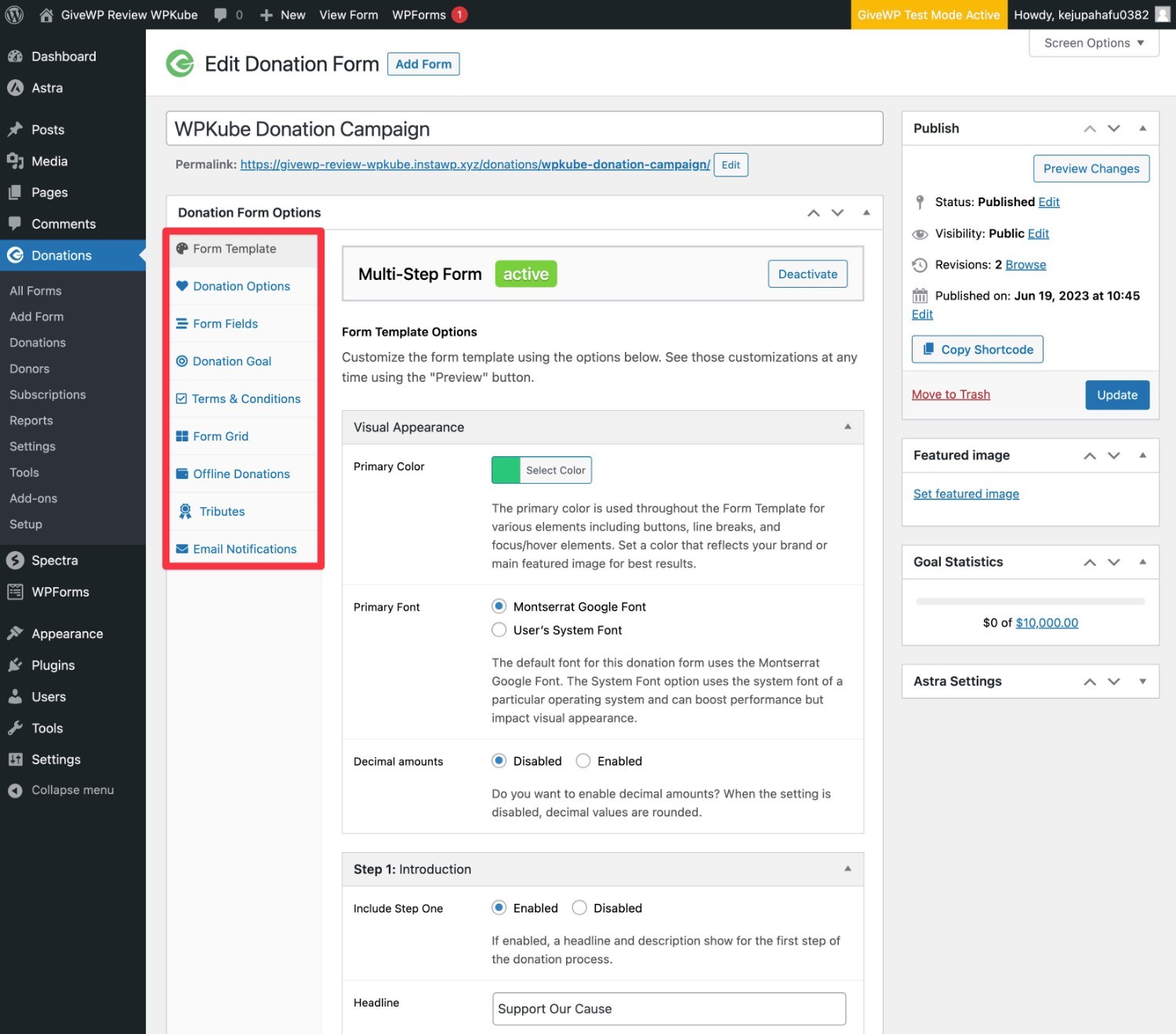
Right now, it's not very easy to customize the donation form beyond the built-in designs, which is one of the few complaints you'll hear about GiveWP.
If you don't like the default style, you'll probably need to use the legacy form template and style it with custom CSS.
The good news is that GiveWP is working on a solution.
GiveWP will introduce a new visual form builder that will allow you to design and style fully customized donation forms right from the WordPress block editor. You'll be able to Try it now in beta on a test site (Just don't install it on a live site).
Based on what we've seen, this will make it easier to create custom donation forms a lot easier.
4. Donor Management and Reporting
Another area where GiveWP goes far beyond a more limited WordPress donation form plugin is in donor management and reporting.
To start with, there's a section dedicated to donor management where you can view detailed profiles of each donor, along with their donation history.
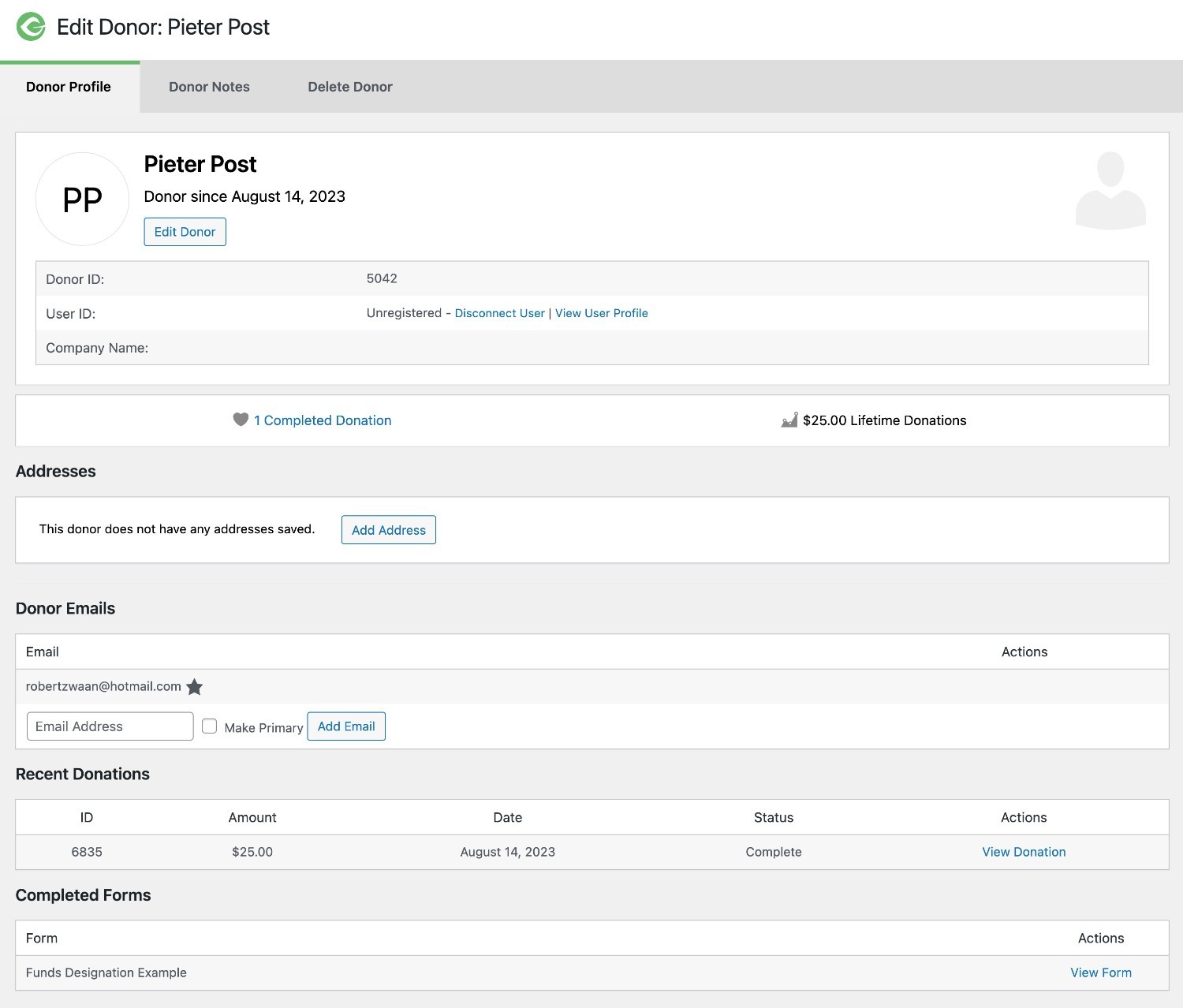
You can also quickly access key details, such as a tax receipt that you can manually send to donors if they lose track of the one GiveWP automatically provides.
In addition to donor management, you also have access to reporting features to track the progress and data of your various fundraising campaigns.
If you want to go even deeper, GiveWP also offers a tracking plugin for Google Analytics so you can track donor conversion rates in Google Analytics using Enhanced E-commerce Tracking.
5. Tons of options for automation and integrations (Zapier, Webhooks, and more)
If you want to automate tasks related to your fundraising and integrate them with other tools and services your organization uses, GiveWP offers two really useful plugins:
- Zapier
- Webhooks
With the GiveWP Zapier add-on, you can connect to any of the more than 6,000 apps available on Zapier. For example, you could trigger specific actions in connected apps every time someone makes a donation on your website.
The webhooks plugin works similarly, but it allows you to use webhooks directly instead of having to use Zapier as an intermediary (although Zapier still supports webhooks).
As if that weren't enough, GiveWP's popularity means that many of the most well-known WordPress automation plugins are also compatible with GiveWP. For example, you can use the plugin Uncanny Automator to further automate GiveWP and connect it to other plugins.
In addition to working with these types of tools, GiveWP also offers direct integrations with more than 6 well-known marketing services:
6. Peer-to-Peer Fundraising
The latter won't be necessary for all organizations... but for some time, one of the drawbacks of GiveWP compared to other tools was that GiveWP didn't allow peer-to-peer fundraising.
In late 2025, this changed when GiveWP launched a dedicated plugin Peer-to-Peer.
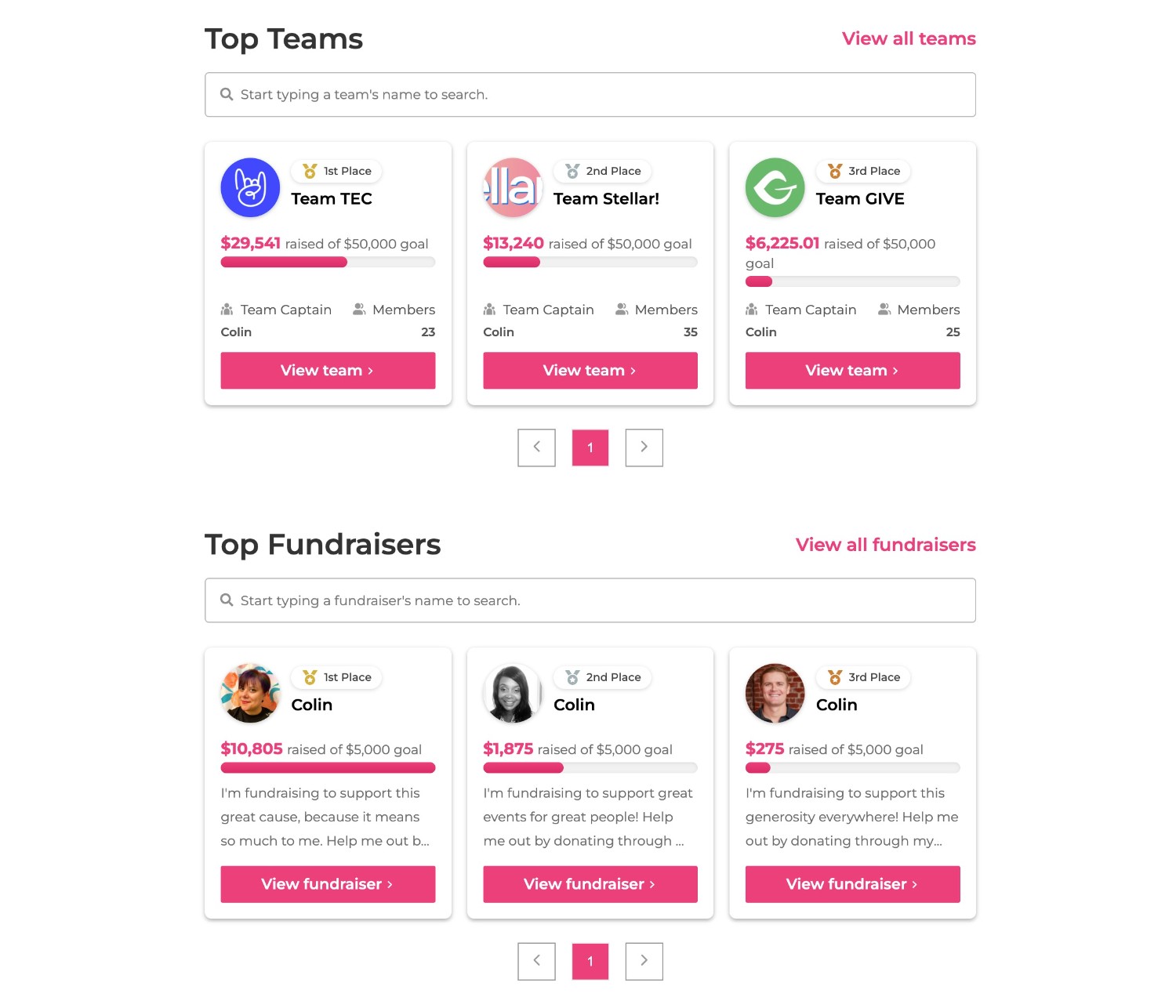
If you're not familiar with this term, the basic idea behind peer-to-peer fundraising is that individuals (or teams) can help raise money for the cause.
One of the most common examples would be a charity run, in which individual runners (or teams of runners) raise funds on their own, but all the money still goes toward the overall cause.
In addition to giving each individual and/or team their own page to raise donations, you can also add some fun gamification to your campaigns by displaying leaderboards that show how much different people and teams have raised.
🚀Kadence: In-depth Theme Analysis
User Experience: How to Create Your First Fundraising Campaign with GiveWP
To help you understand the basic user experience in GiveWP, Next, let's take a quick look at what it's like to create your first fundraising campaign with GiveWP.
Overall, GiveWP is very easy to use and requires no technical knowledge.
GiveWP offers an easy-to-use setup wizard to help you configure important basic settings. From there, you can create campaigns and manage your fundraising efforts using equally easy-to-use dashboards.
Let's go over it...
GiveWP Setup Wizard
When you install and activate GiveWP for the first time, a setup wizard will automatically launch to help you create important pages and configure the basic settings.
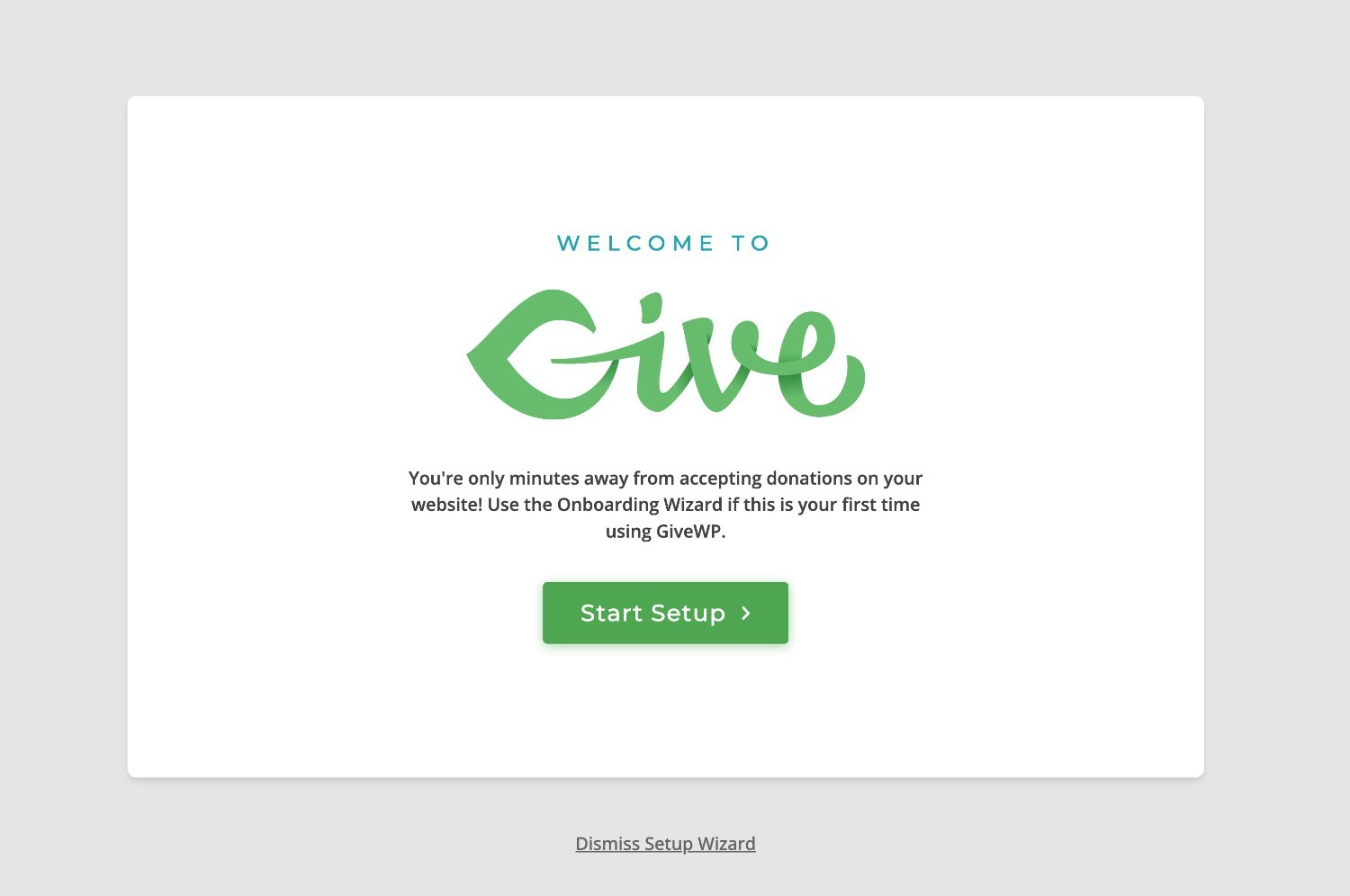
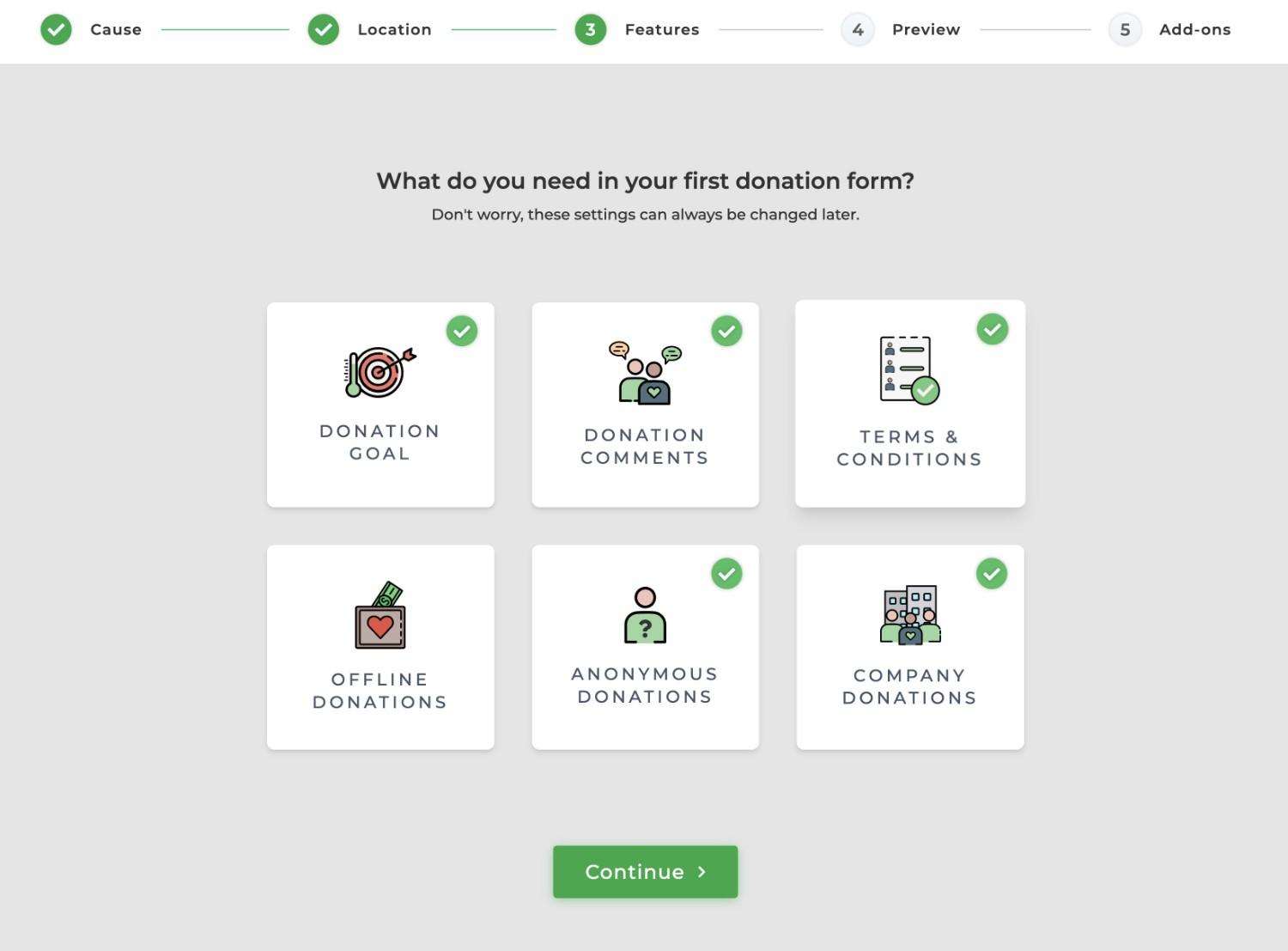
Here are some of the basic tasks you'll be doing:
- Set your physical location and default currency.
- Choose which features you want to enable.
- View a preview of a basic donation form that GiveWP generated based on your answers (You can fully customize it).
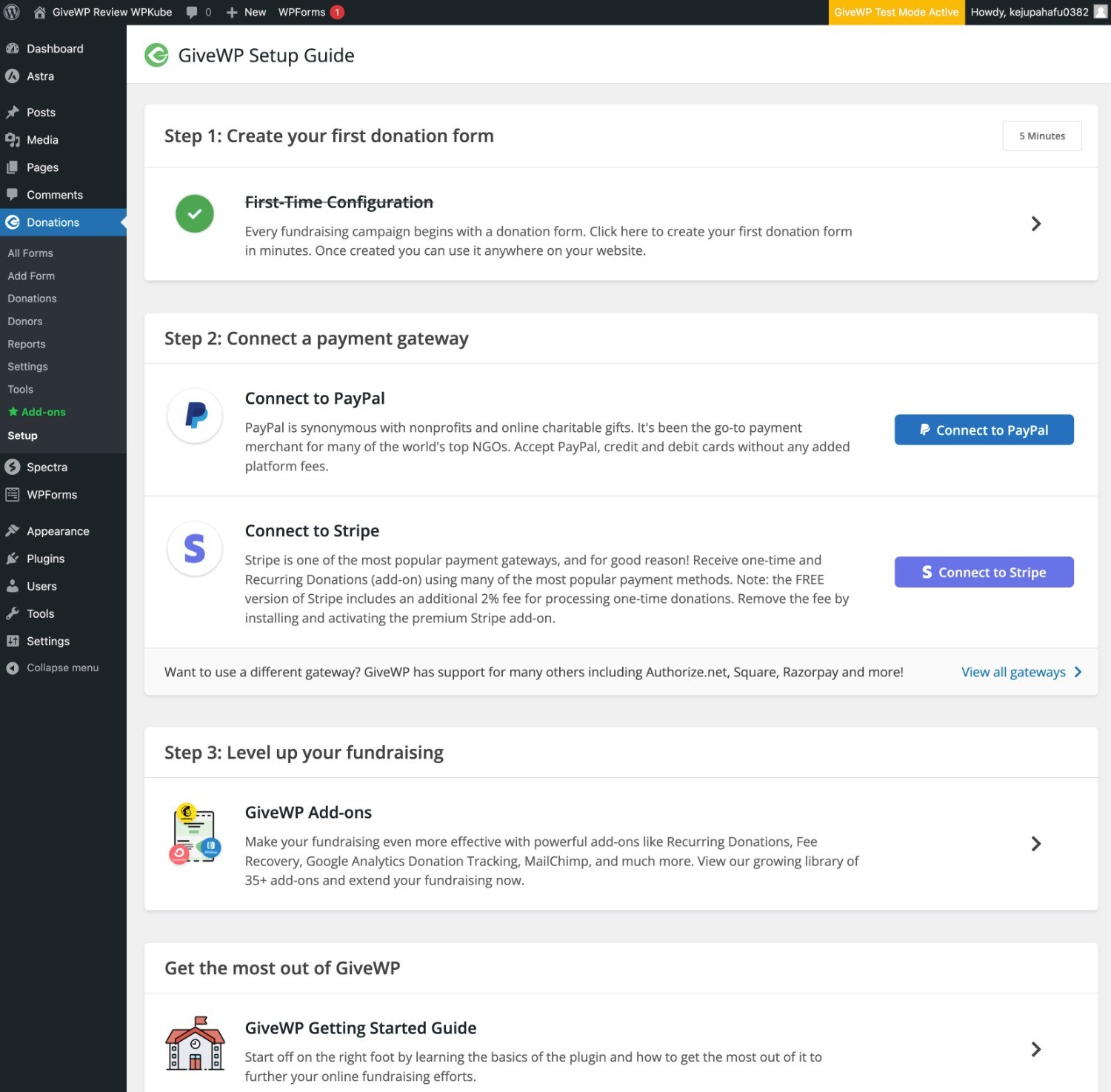
Once you complete the setup wizard, GiveWP will take you to a more comprehensive setup guide that includes instructions for configuring your preferred payment gateway.
Overall, the onboarding experience is quite pleasant and a cut above most WordPress plugins.
🚀 Best WordPress plugins in 2025
Configure more advanced options
Before you start working on your first donation form, you might want to explore the entire GiveWP settings area.
This section uses the configuration wizard to help you access more advanced settings related to payment gateways, default behavior, the emails your site sends to donors, and much more.
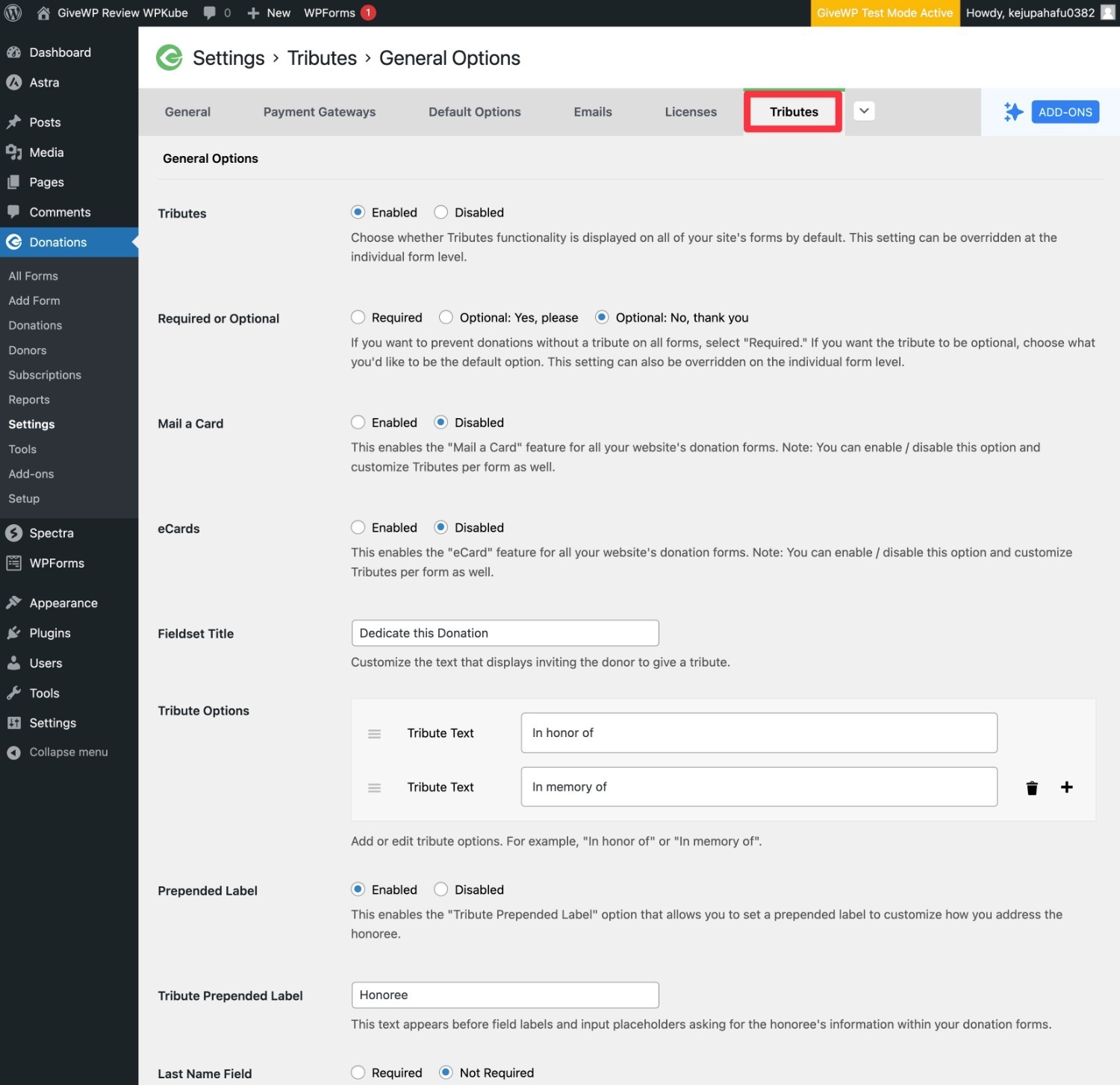
You can access it by going to Donations → Settings:
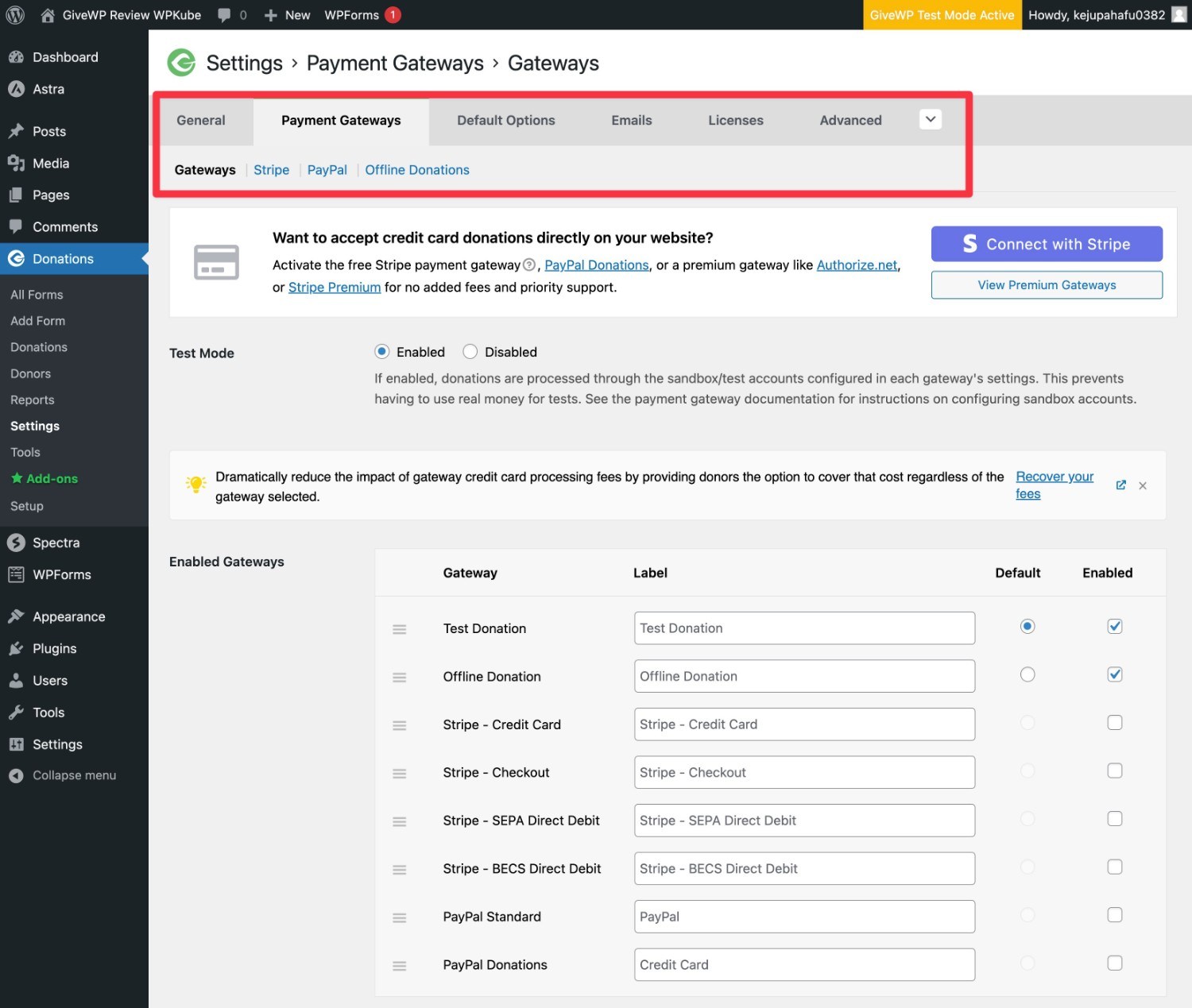
If you've installed any of the premium plugins offered by GiveWP, you'll also be able to view the settings for many of those plugins in this interface.
For example, if you install the Tributes add-on, you'll find a wide range of settings to control the default behavior of the tributes (Although you are also free to adjust these settings for individual donation forms).
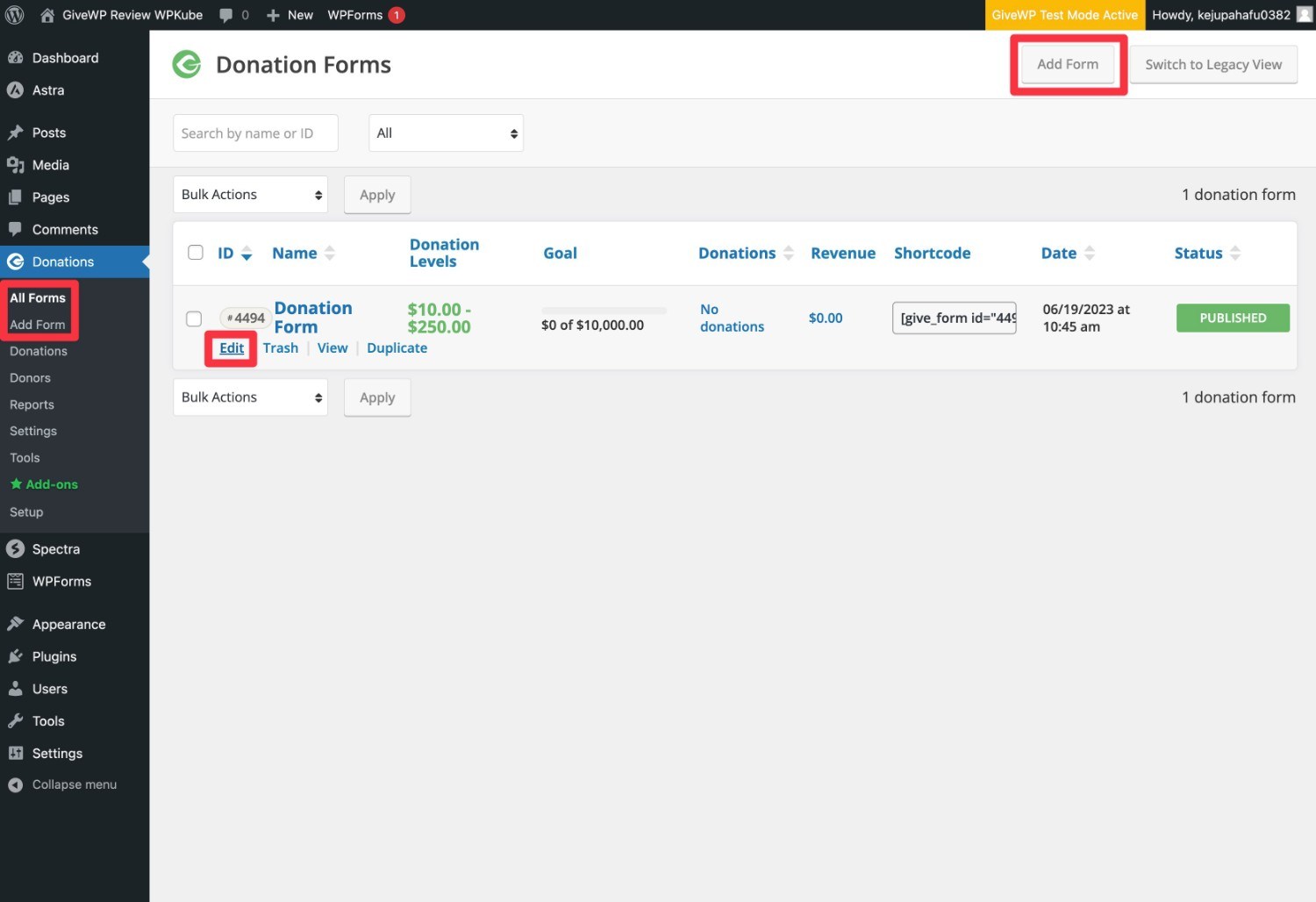
Create or edit a donation form
Once you've connected to at least one payment gateway (and, hopefully, taken care of the other settings), you'll be ready to create or edit your first donation form.
GiveWP creates a basic donation form for you as part of the setup process, so you can edit it to get started. Or you can create a completely new form.
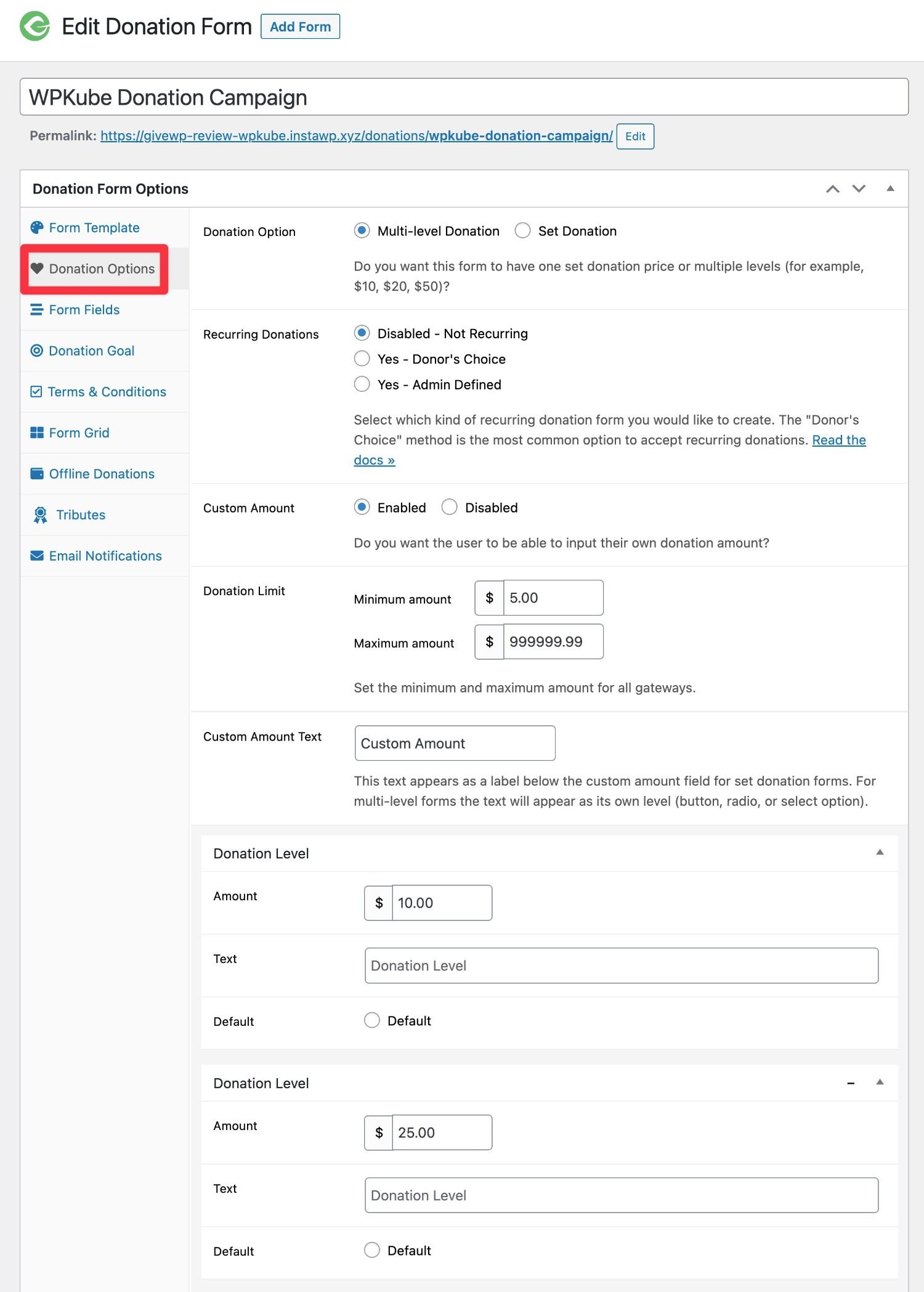
This interface is where the essence of GiveWP's functionality lies. You can...
- Configure the donation options and amounts.
- Customize the fields on the donation form.
- Add donation goals.
- Much, much more.
You'll also see some of the same settings from the main GiveWP settings area. This is because GiveWP allows you to override the default behavior when necessary so you can optimize each individual fundraising campaign.
You can access most of the form settings from the tabs in the sidebar in the Donation Form Options.
For example, in the Donation Options You can configure the donation amounts, whether you want to allow recurring donations, whether you want to allow custom amounts, and so on.
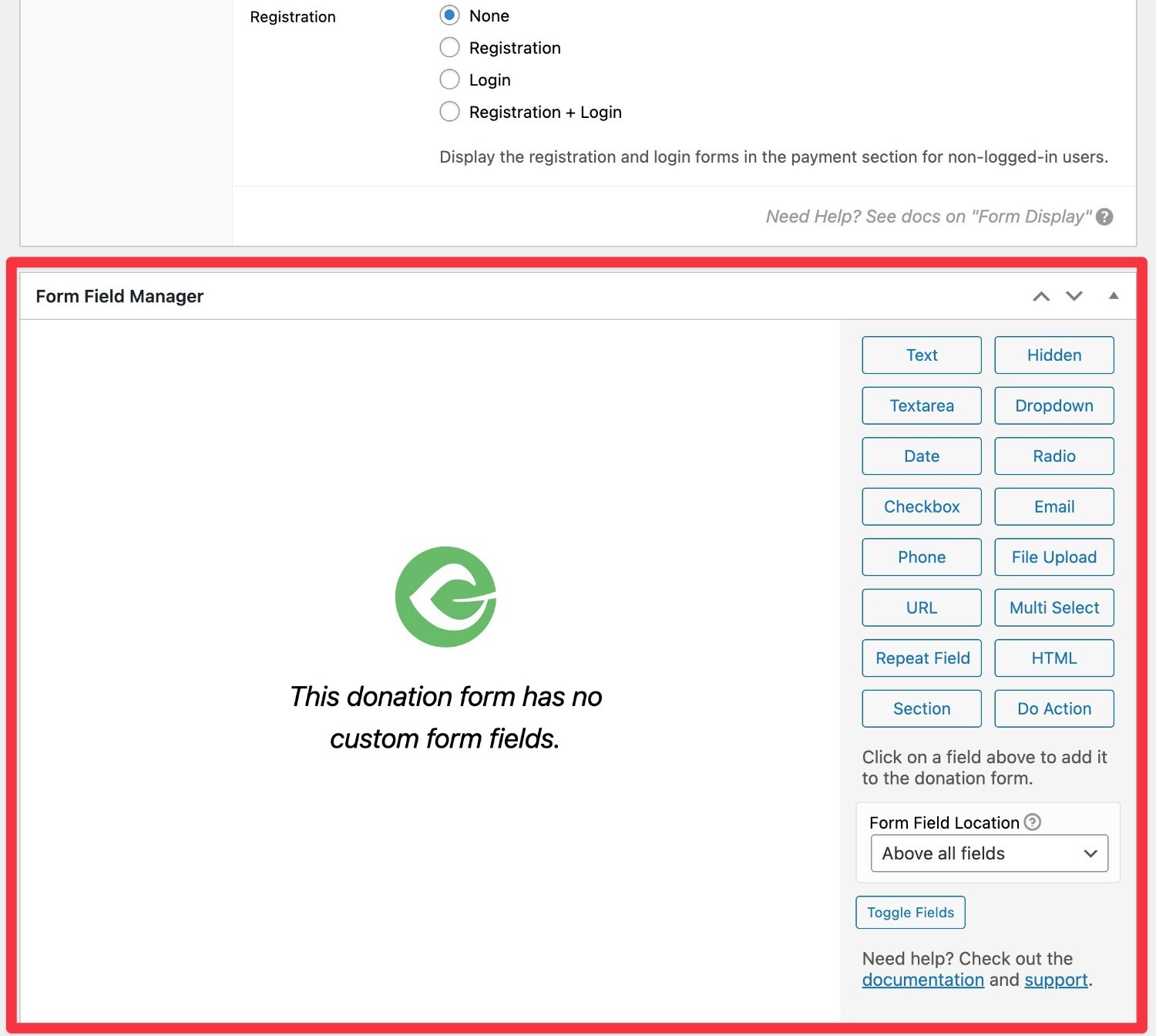
Some plugins have their own dedicated settings areas. For example, if you install the plugin Form Field Manager, you'll see a separate box where you can add custom fields to your donation form.
Once you're satisfied with your donation form, you can Publish/Update as a blog post to be published on your site.
Manage your fundraising efforts
Once you start collecting donations, you'll have several different interface areas available to manage your fundraising efforts:
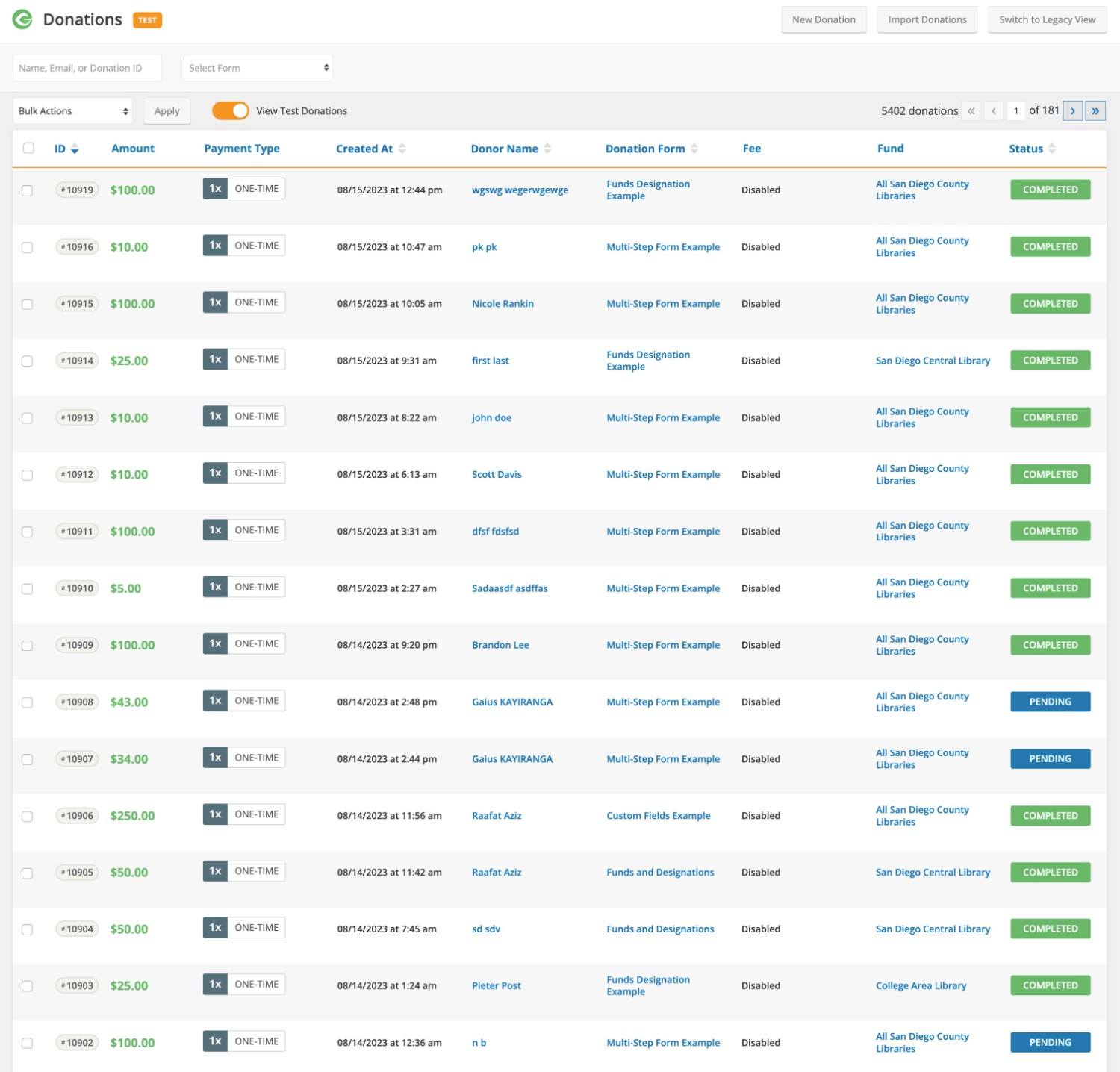
- Donations - View individual donations, along with their associated campaign.
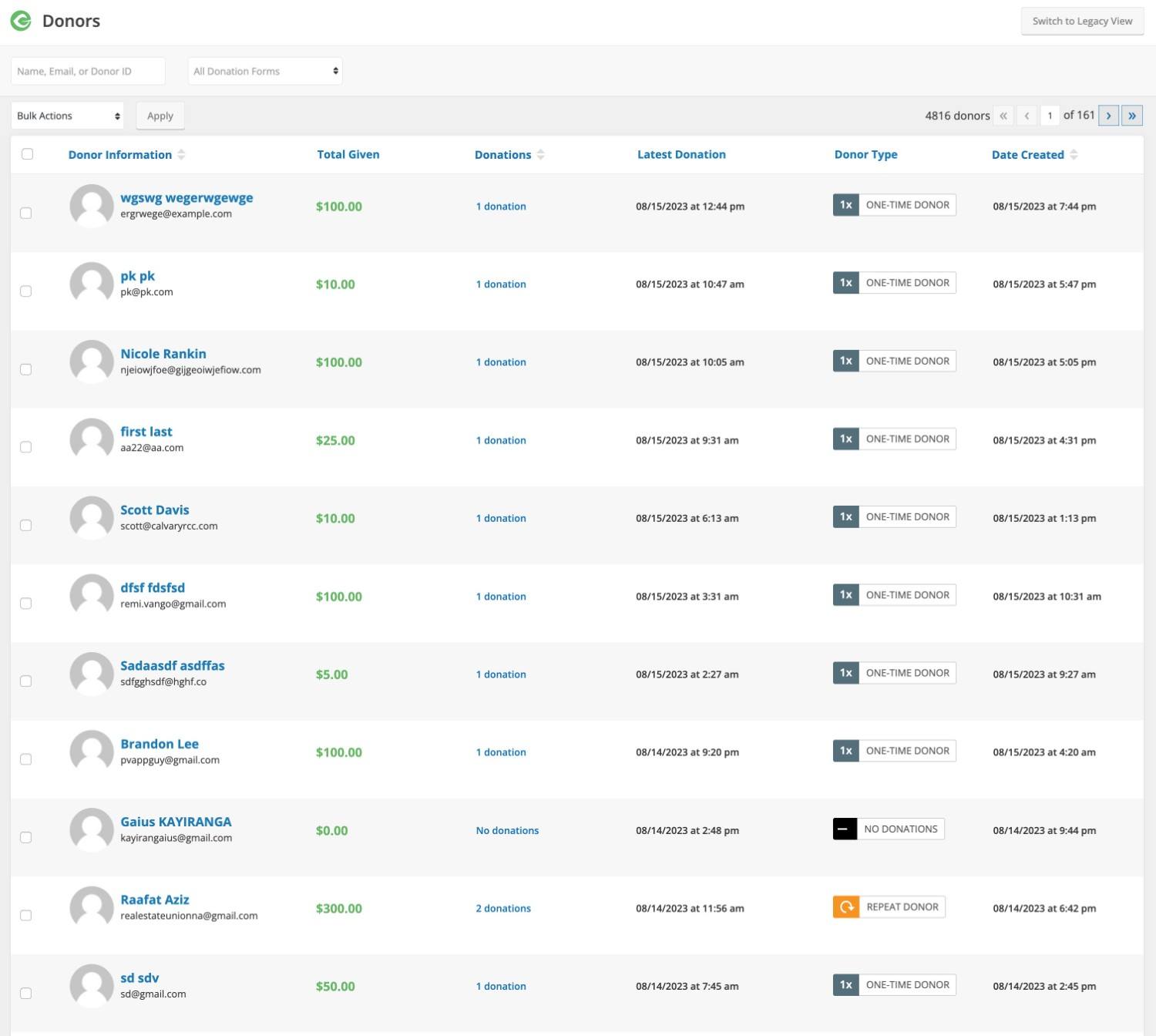
- Donors - View a list of all your donors, along with their donation history.
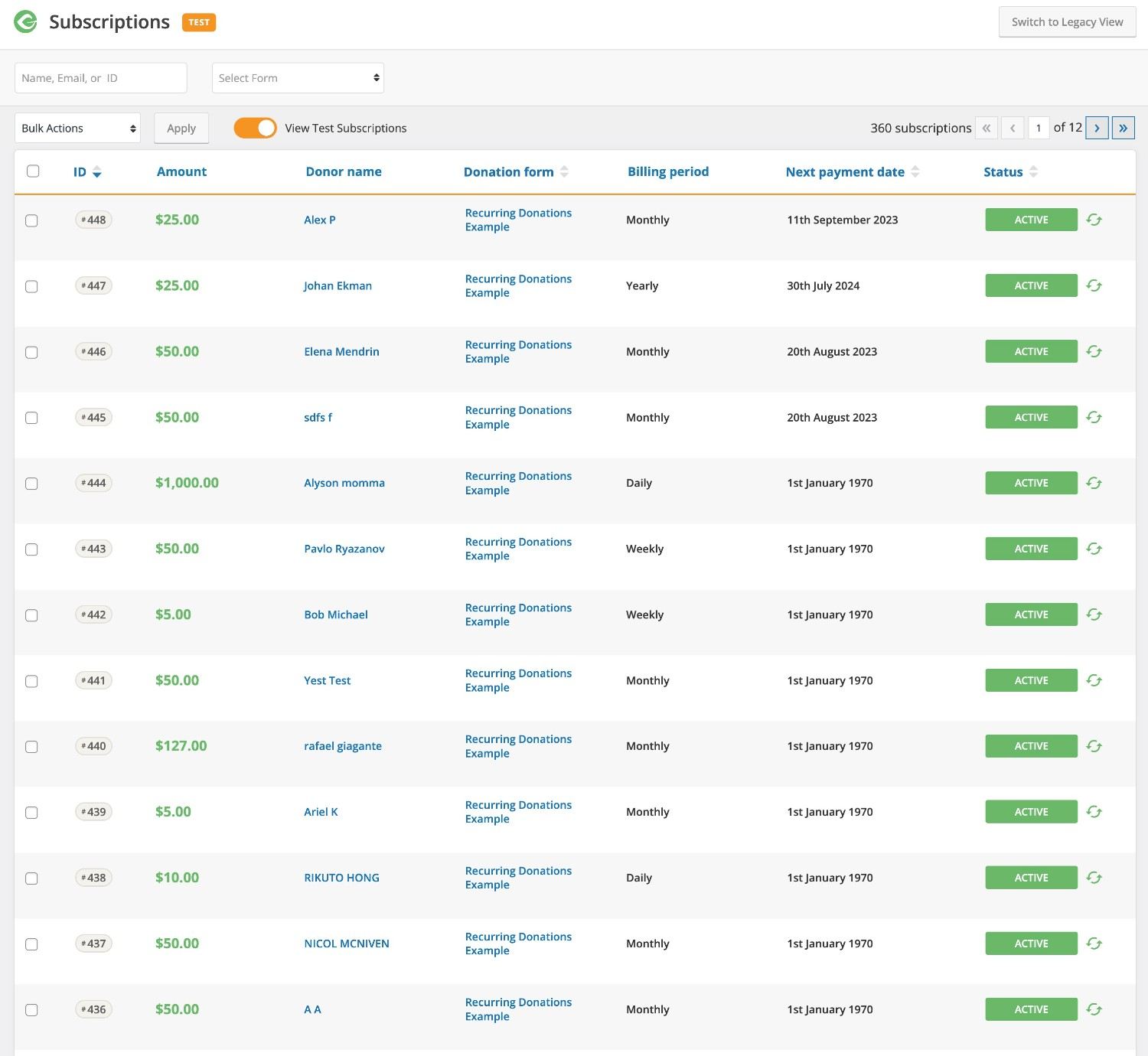
- Subscriptions - If you accept recurring donations, this allows you to view all your recurring subscriptions, along with their next donation date. You can also manually cancel a subscription if a donor asks to stop it. Donors also have access to a dashboard where they can manage their subscriptions without having to ask you for help.
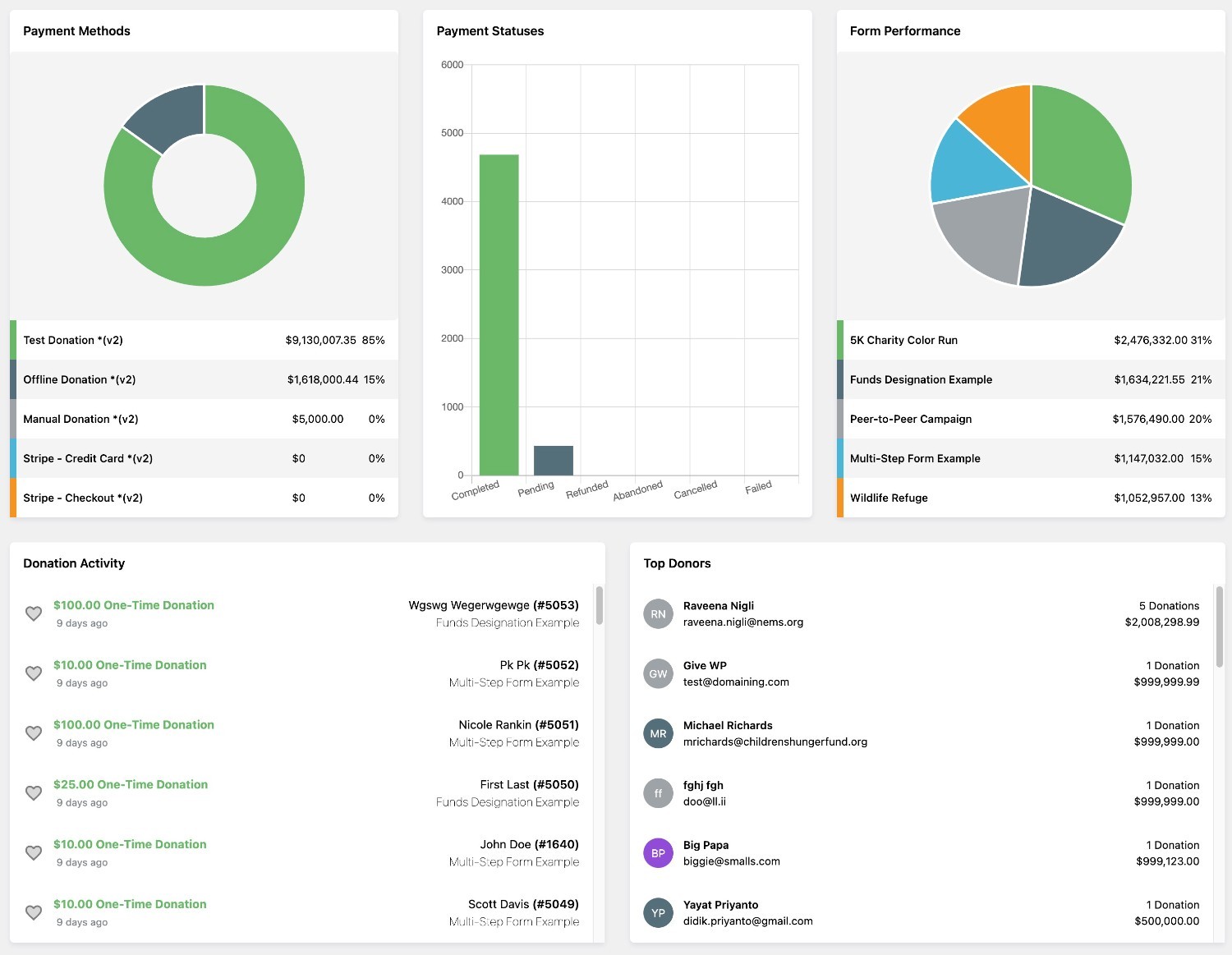
- Reports - They allow you to view a wide variety of useful information, such as total revenue, average donation, total number of donors, total refunds, a breakdown of revenue by day, the performance of individual campaigns, etc.
Management of Individual Donations:
Donor Management List:
Individual Donor Details:
Recurring Donations:
Reports:
💰 GiveWP Price Review
GiveWP uses a freemium pricing model.
The basic version of the plugin is available at WordPress.org. In addition, GiveWP also offers more than 35 premium add-ons that extend the basic free plugins with all kinds of new features.
You can purchase these add-ons individually. There are also three premium packages that give you access to different selections of add-ons.
For most sites, it makes much more sense to purchase one of the packages rather than buying individual add-ons. However, there may be cases where you only need a single Premium feature, in which case it may make sense to purchase an individual add-on.
These are the three packages:
- Basic - $149 per year to access all "Basic" add-ons.
- More - $349 per year to access all "Basic" add-ons more All "Premium" add-ons.
- Pro - $499 per year to access all "Basic" and "Premium" add-ons more the peer-to-peer fundraising add-on.
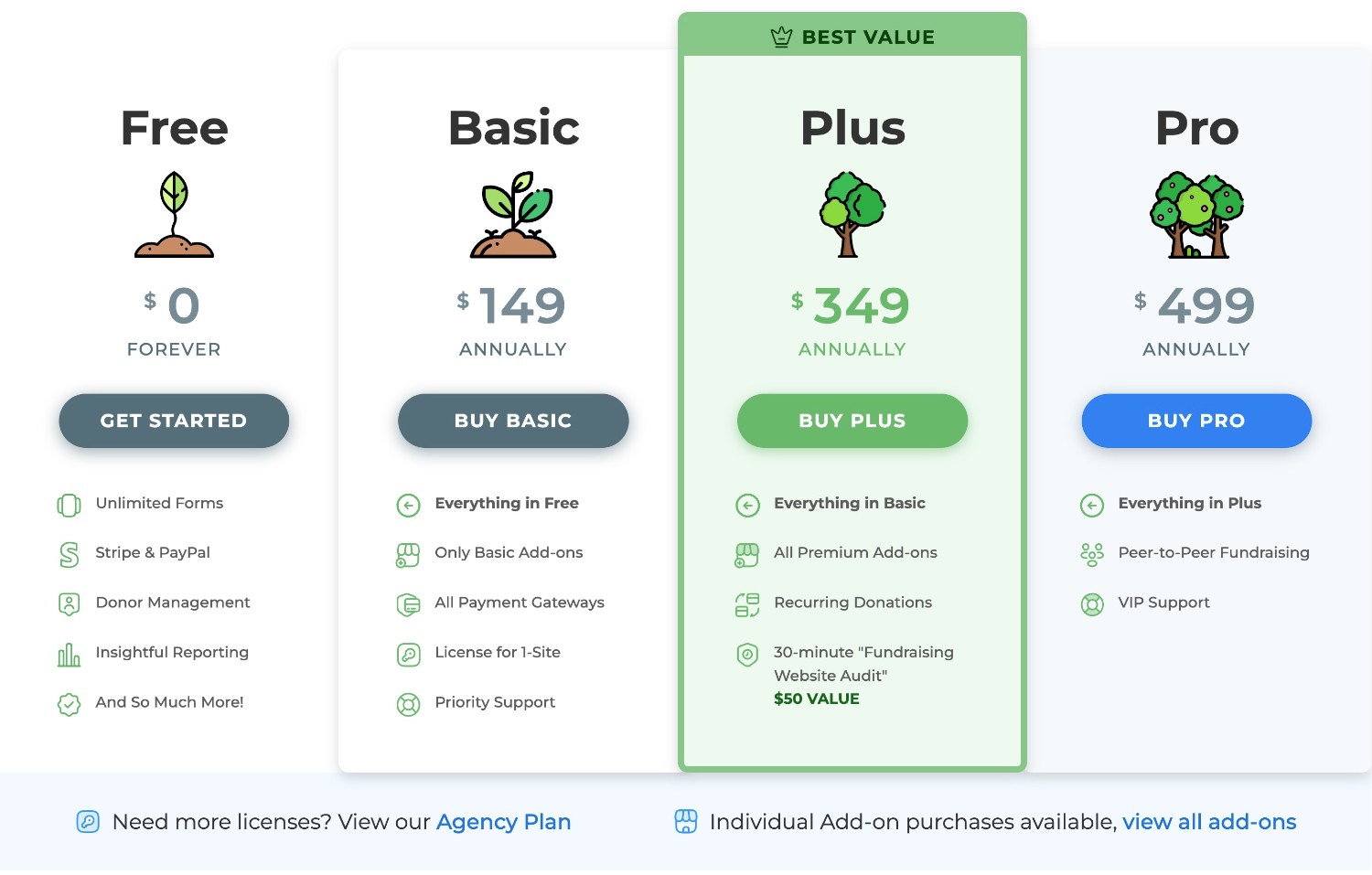
Those prices are for a single site. There's also a plan for agencies that costs $599 for the full Pro package, but allows you to use all those add-ons on up to five websites (compared to just one website with the Pro license).
Great news! 🎉 With Pillbanana, you can save a fortune! On our site, we offer the best accessories from Give for just $4.99 each, taking your donation forms to the next level.
🚀 But that's not all: for just $7.99 a month, you get access to a monthly subscription which includes not only Give add-ons, but also more than 8,000 premium products, including plugins and themes.
🌐 And if you really want to take it to the next level, get our annual subscription! In addition to all the featured plugins and themes, you'll also get exclusive access to Shopify themes and spectacular Elementor Site Kits. Don't miss out on this opportunity—the future is in your hands!
👍👎 GiveWP Pros and Cons
To summarize what we've covered in our GiveWP review, let's go over some pros and cons...
👍 Pros
- Popular and well-supported - GiveWP is the most popular fundraising plugin and has a long track record of support and development. This is a major advantage if you're looking for a long-term solution for your organization.
- Flexible payment options - You can accept one-time and recurring donations, custom amounts, custom recurring schedules, multiple payment gateways, and much more.
- Non-technical - For the most part, you don't need any technical knowledge to use GiveWP. This is a big advantage if your organization doesn't have a technical team to help you set things up.
- Excellent donor management - The tools you get for managing donors and donations are second to none.
- Peer-to-Peer Fundraising - GiveWP is one of the few solutions that support peer-to-peer fundraising, which can be an important source of funding for organizations.
👎 Cons
- Sometimes it may require custom CSS - Although GiveWP's default style is very nice, it doesn't offer many customization options, which means you may need to use custom CSS if you really want to customize things. GiveWP 3.0 will go a long way toward improving this with its new visual form builder, but GiveWP 3.0 had not yet been released at the time of our GiveWP review.
🙋 FAQs for GiveWP
Now that we're nearing the end of our GiveWP review, let's go over some common questions you might have about GiveWP.
Does GiveWP charge a commission based on your donations?
GiveWP does not charge any additional fees If you purchase the premium version of the plugin. However, if you use the free version y If you use the Stripe payment gateway to accept one-time payments, there is an additional 2% fee that goes to GiveWP.
How much does GiveWP charge for PayPal?
GiveWP does not charge any additional fees for PayPal donations, even with the free version of the plugin.
Who is the founder of GiveWP?
GiveWP was originally launched in 2015 by WordImpress, with Matt Cromwell and Devin Walker as co-founders.
However, GiveWP was acquired by the hosting company Liquid Web in 2025. It is hosted under the StellarWP umbrella, which is a subsidiary of Liquid Web that also manages LearnDash, Kadence, Restrict Content Pro, etc.
Matt Cromwell and Devin Walker remain involved with GiveWP, despite the acquisitions.
Does GiveWP work with WooCommerce?
Although you don't need to use WooCommerce to accept donations with GiveWP, GiveWP integrates with WooCommerce through the plugin Donation Upsells for WooCommerce.
This plugin allows you to add donation options to your WooCommerce cart and checkout pages and integrate those donations into your GiveWP donor management and reporting interfaces.
What is GiveWP's refund policy?
GiveWP offers a 30-day money-back guarantee. You can request a refund for any reason within 30 days and get your money back.
🤔 Final Thoughts on GiveWP
Overall, we believe GiveWP is the best WordPress plugin for fundraising.
Therefore, if you need a robust solution to manage all aspects of your fundraising campaigns, GiveWP is the best option for your organization.
Although you can find many more affordable options for creating basic donation forms, GiveWP does much, much more than only create donation forms (although it is obviously a key feature of GiveWP):
- Create unlimited campaigns, each with its own fundraising pages.
- Set a goal for your campaigns and automatically track your progress toward your goals.
- Allow donors to designate their donations or create tributes.
- It provides you with powerful tools for managing your donors, including tax receipts.
- It allows you to view reports and analyses so you can learn how to make your fundraising efforts more effective.
GiveWP is also extremely flexible when it comes to how you accept payments (and how much money you accept). For example:
- Donors can choose between one-time and recurring donations.
- Donors can customize the donation amounts and the frequency of recurring donations.
- You can ask donors to cover the credit card fees.
- In addition to other payment methods, donors can make donations via text message.
GiveWP is one of the few solutions that support peer-to-peer fundraising. So if you want to run this type of crowdfunding campaign, this is probably your best option.
If your organization needs or wants those kinds of features, we definitely recommend GiveWP.
When to Consider an Alternative to GiveWP
On the other hand, if you just want a way to create a simple donation form, a flexible form plugin might work well for you instead of a dedicated fundraising solution.
In that case, I recommend that you consider Gravity Forms. You can create simple or complex donation forms that support one-time and/or recurring payments through various payment gateways.
Gravity Forms also lets you integrate with many other plugins and tools, including the creation of more advanced automation workflows with Gravity Flow.
It can help you implement some key features, such as generating PDF receipts, storing donor information in your CRM, and so on.
However, Gravity Forms does not have the most advanced fundraising features offered by GiveWP, such as campaign goals, peer-to-peer fundraising, etc. So, while it works very well for the donation forms themselves, it’s important to understand that Gravity Forms is by no means a substitute for GiveWP.
🚀 Gravity Forms: 10 reasons why you should have it to create your forms in WordPress
Do you still have any questions about GiveWP or our GiveWP review? Let us know in the comments!
Si quieres conocer otros artículos parecidos a Revisión de GiveWP: Pros y Contras en 2025 puedes visitar la categoría Plugins Wordpress.
 Español Español
  English
  Português do Brasil
Leave a Reply