
Headless WordPress: What It Is and How to Use It
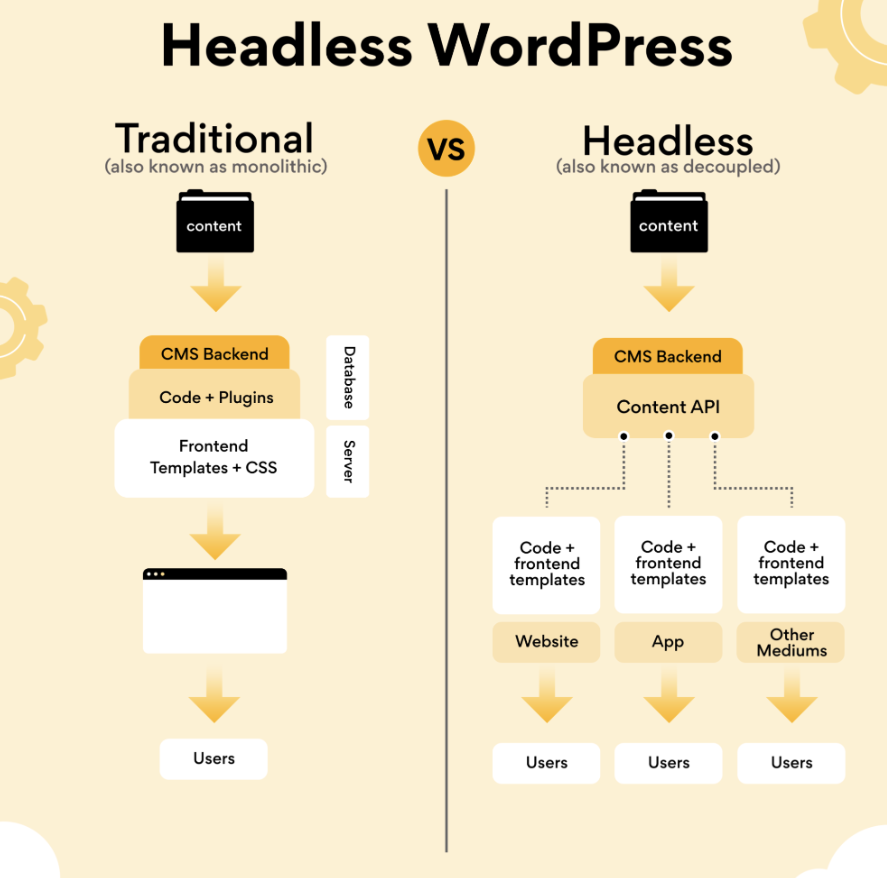
"Headless WordPress" has been a buzzword lately. You've probably heard this term mentioned in online discussions, but you might not be entirely sure what it means.
WordPress is a comprehensive and surprisingly complex platform, but it has its limitations. Although it’s a full-featured tool for bloggers and web developers that offers many possibilities, it doesn’t let you do everything. For example:
- Publish content on multiple platforms
- Coding Your Website in Languages Other Than PHP and JavaScript
- Using WordPress as a publishing tool without an associated website
However, all of that is possible with Headless WordPress. It requires a bit of technical expertise, but by decoupling WordPress from its front end, you can use the back-end content management tools for just about anything you can think of.
Are you ready to dive deeper into this topic and see what Headless WordPress can do for you? Well, let's get started.
What is Headless WordPress?
A content management system (CMS) typically consists of two parts: the front end and the back end.
The back end is where the “management” part comes in. In WordPress, this is where you create and publish blog posts and pages, as well as manage various aspects of your website, such as settings, appearance, and other users.
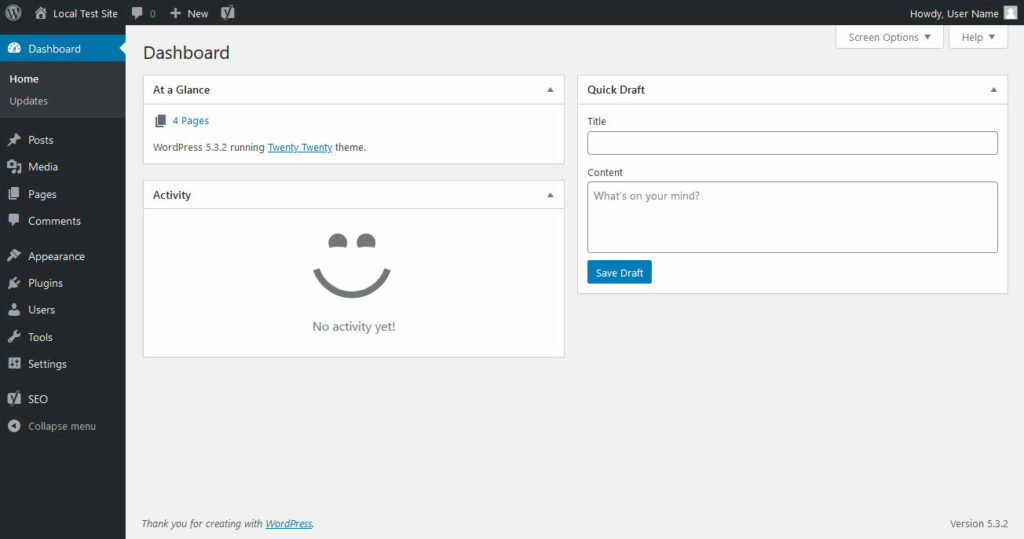
The front end is what people see when they visit your website. In WordPress, it changes the appearance and updates the pages while you work behind the scenes. To do this, among other things, it uses the function REST API to request data from the hidden back end and transmit it to the public website.
For most users, this "integrated" CMS solution works well, as it provides both a way to easily build a website and to manage written content. The downside is that the front end and back end of this type of application are often inseparable, since they are highly dependent on each other.
A headless CMS decouples these two parts, leaving only the back end intact. You have your database, your admin panel, and your content management tools, but no theme or website. However, using the REST API, you can connect anything to it: an application, a custom website, and the list goes on. The implications of this are enormous for developers.
Why would you want to use a headless CMS?
Making WordPress headless disconnects the front end, leaving you free to use the back end for any purpose. Use it to create your own website, application, or content management tool—the possibilities are endless.
WordPress is primarily written in PHP, with some JavaScript. However, as a headless CMS, you can connect your website to third-party applications written in Ruby, Python, or other languages using the API. If you want, you can build your entire website in a different language.
And that's exactly the goal: you get a full WordPress installation with almost all of its features intact, and the ability to experiment with web frameworks that were previously incompatible.
All you have to do is use the built-in REST API to connect your custom website to WordPress, and everything will work seamlessly. That’s how WordPress already works, but with a little code, you can bypass the default connections and replace the front end with your own work. If it can connect to an API, you can use it with WordPress.
Decoupling WordPress can also improve security, especially if your website and the WordPress admin panel are hosted on different servers and domains. Hackers and DDoS attacks will only be able to target one of these endpoints. So if security is a major concern for you, a headless CMS on a hidden server might be the solution.
If you want to use the WordPress interface to connect to a custom website or application, you should use a headless CMS.
What can Headless WordPress do?
Decoupling your CMS frees up developers to try new things and work with languages that previously couldn't be paired with WordPress. You probably have some ideas in the works about what you can use a headless CMS for, but here are some more specific use cases:
- Use WordPress’s robust management tools to create and track content. In Headless WordPress, if configured correctly, permalinks go directly to the edit page. Add other authors and editors, use the user role system, and collaborate on projects. You can even use it as a standalone publishing tool.
- Code your public-facing website in a language you're most comfortable with—anything other than HTML/CSS, PHP, and JavaScript—but continue to take advantage of WordPress's well-designed blogging framework.
- Even if you know all of these languages, WordPress uses its own optimized version of each one. Don't want to deal with learning WordPress's PHP? Decouple it and use your own code.
- Switch frameworks at any time, but keep your content safe. If you decide in the future to rebuild everything from scratch using a more relevant framework, since you're using an API rather than a traditional coded CMS, switching everything over is super easy.
- Create an app that calls WordPress to load content. Headless isn't limited to just websites! You can use WordPress with all kinds of software.
- Use frameworks and libraries that normally don't work with WordPress, such as Ruby on Rails, Django, Vue.js, React, and many, many more.
- Multichannel and multiplatform publishing. Isn't it annoying and time-consuming to publish the same content on your website, app, social media, etc.? By using the REST API, you can automate the entire process, publishing WordPress posts to multiple channels.
When Should You Avoid Using a Headless CMS?
Although Headless WordPress is an innovative solution, there are some things you should keep in mind when deciding whether or not to make the switch.
- If you're not an experienced developer, this method is likely more trouble than it's worth. Tutorials can help you get started, but when it comes to maintenance and bugs, you're on your own. Headless WordPress can be too much of a headache for new developers.
- Non-developers—such as clients, authors/publishers, and designers—will likely have a hard time. Navigating and working in the split environment requires some getting used to. The traditional WordPress setup is easy for both developers and non-developers to understand, and if you're building websites for clients, it's almost certainly the better option.
- Maintenance issues. Choosing to decouple means having a separate front end and back end. In other words, twice the maintenance, twice the number of servers, and twice the confusion if something goes wrong. You also have to manage the REST API that connects the two.
- Decoupling WordPress does not leave 100% completely intact. For example, the WYSIWYG editor and live preview will not work. Other areas may have bugs or require optimization for your specific configuration.
- This approach can be expensive, since it requires coding a custom front end and working in a split environment. As mentioned earlier, maintenance will be more difficult, so you'll need to hire developers who know what they're doing.
We can say, then, that if you aren't creating a multichannel platform, don't have the resources to maintain a complex setup, aren't connecting WordPress to an app or a standalone website, and don't want to build your own site or work with non-standard languages, you should stick with standard WordPress.
What about a hybrid CMS?
Hybrid CMSs are a relatively new development. Headless CMSs were created to address long-standing issues related to the difficulty of deploying content across different platforms and developers’ inability to use new frameworks without abandoning their content management solution.
But they aren't without their problems. They're difficult to set up, require an API to manage everything, and many of the CMS features you're used to—previews and live editors, permalinks for posts, etc.—don't work at all. This is especially evident in Headless WordPress, since you won’t be able to preview posts or pages.
A hybrid CMS is the solution to this. Like WordPress, these platforms offer content management and website-building features, but they let you choose which parts of your site don't have a header and which ones function in the traditional way.
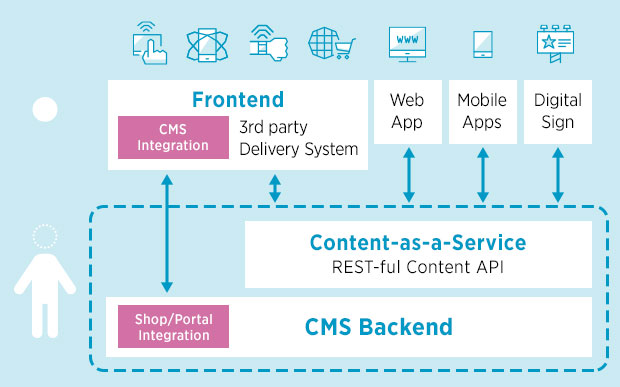
Why is it so important? Basically, you can create a website just as easily as you would with WordPress, taking advantage of features like post previews and live editing, but when you have content you need to publish to multiple platforms or want to integrate your own web framework, it only takes a few clicks.
You can even design most of your website using the built-in tools, and then use an API to connect an application built with another framework. This is also possible in WordPress by default using REST, but hybrid CMSs make the process much easier.
Unfortunately, aside from that detail, there’s no easy way to turn WordPress into a hybrid CMS. You can emulate it to some extent by using plugins that automatically push your content to other platforms and by connecting built-in applications in other frameworks via the REST API. But if you decide to go headless, there’s no way to make the live preview or other features work.
How to Make WordPress Headless
If you want to try separating WordPress from its interface, you have several options. You can use a plugin or plan it yourself. The first option is, of course, much easier, while the second gives you more control over the process.
No matter which method you choose, you should be familiar with the REST API. If you're not, this Online REST Tutorial can help you get started. REST itself also has its own set of tutorials that will teach you everything you need to know.
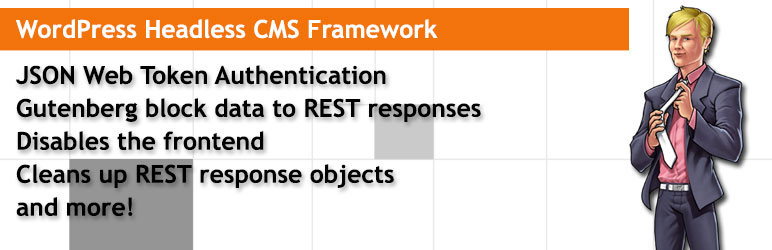
If you want to try a plugin, the most popular one is WP Headless. All it does is block access to the front end and make the post permalinks automatically redirect to the editor screen. This way, you can use it as a tool for organizing your written content. If you want to connect a different website, you can use the API to do so.
Innovate with Headless WordPress
Thanks to all the tutorials out there, separating WordPress from its front end is easier than ever. You can even make WordPress Headless.
A decoupled CMS gives developers the ability to code their own sites in the languages they know best, experiment with libraries and frameworks, use WordPress as an organizational or editorial tool, or publish the same content across multiple platforms—all while continuing to take advantage of WordPress’s robust back end.
If any of these examples sound like your project, you should definitely give Headless WordPress a try. It opens up a world of opportunities for developers to innovate, and it gives you the freedom to use whatever tools you want without losing the robust content management system you're familiar with.
Have you used a headless CMS before, or is this your first time trying it? What made you decide that this was the most effective approach? Tell us about your experience in the comments!
Si quieres conocer otros artículos parecidos a Headless WordPress: Qué es y cómo usarlo puedes visitar la categoría Ayuda y Soporte.
 Español
  English
  Português do Brasil