
10 Essential WordPress Plugins
Don't miss these 10 essential WordPress plugins that cover everything you need to consider when creating your next website. Plus, a BONUS list of 7 more essential plugins to give you even more options—you won't want to miss it!
WordPress is an incredible CMS. Powering nearly 39% of the web, WordPress's success, stability, and versatility are recognized worldwide.
What's even more surprising is the thriving ecosystem that has developed around WordPress.
Thousands of people have created millions of topics and plugins (both paid and free) to extend WordPress and help people create the website of their dreams.
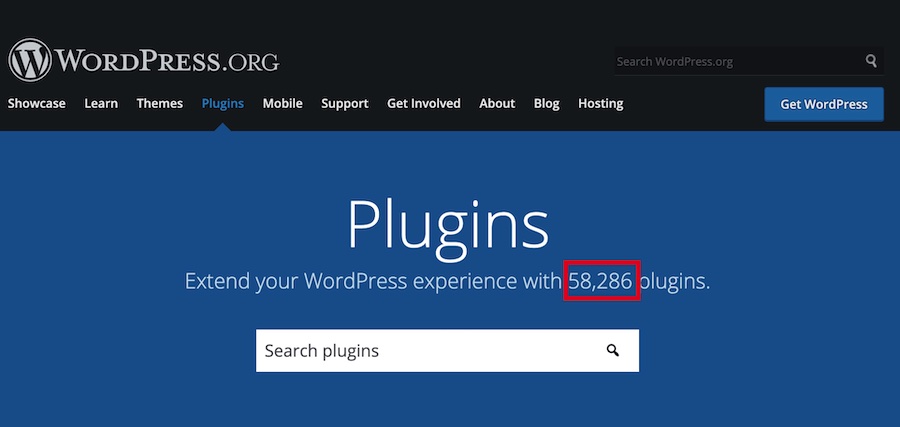
The WordPress ecosystem is great, but the sheer number of options can be overwhelming. To put it in perspective, there are more than 58,000 plugins available in the WordPress repository alone.
If you include plugins sold by third parties and individuals, the estimated number of available plugins would be many times that figure. That's why it's normal for these numbers to be daunting if you're just starting out with your first website.
Don't worry, you only need a few plugins for your website, and you don't need to install all the plugins mentioned.
Below, we've listed the essential WordPress plugins, along with a couple of useful alternatives.
- List of Essential WordPress Plugins (Free or Premium)
- 1- Essential SEO Plugins
- 2- Essential Backup Plugins
- 3- Essential Plugins for WordPress Security
- 4- Caching
- 5. Essential Plugins for Content Design
- 6. Forms
- 7- Email Capture
- 8. Essential Plugins for Image Optimization
- 9. Share on social media
- 10. Blog Comments
- BONUS: Other Notable Mentions of Essential Plugins
- 11. Push Notifications
- 12. Link shortener
- 13. Amazon Affiliates
- 14. Memberships
- 15. Table
- 16. Gallery
- 17. Essential Survey Plugins
- Conclusion on Essential WordPress Plugins
1- Essential SEO Plugins
Search engine traffic can be very lucrative and provide a steady stream of visitors to your website.
Therefore, it makes sense to optimize your website to maximize the traffic coming to your site from various search engines. This process is called Search Engine Optimization, or SEO.
WordPress is an SEO tool ready CMS. This means it provides a decent SEO framework, but you'll need a plugin to bring your website up to speed from an SEO perspective.
Our recommendation for an SEO plugin is Rank Math. It's a fantastic SEO plugin that does the work of multiple SEO plugins for the unbeatable price of FREE.

It can optimize your content by providing specific recommendations for internal links, help you optimize your posts for sharing on social media, improve your meta descriptions, and handle hundreds of small details that have a big impact on your overall traffic.
Rank Math is completely free to use with no limitations, and it already offers more than the premium versions of competing plugins. Here are some of the features Rank Math offers.
- Very intuitive and user-friendly interface
- Support for 14 types of schematic markups
- Google LSI & Keyword Rank Tracking
- Deep integration with Google Search Console
- Advanced Content Analysis and Recommendations
- Built-in SEO audit tool
- XML Sitemaps, SEO Breadcrumbs, 404 Monitor, Redirects
This is by no means a complete list of features, and we encourage you to check it out at the Rank Math website.
One advantage of using Rank Math is that it eliminates the need for many other plugins that you would otherwise have to use.
It's well known that using one plugin that does the work of many is better than using many plugins that each do only a small task, and Rank Math helps you achieve that.
Without Rank Math, you'd have to install separate plugins to check for broken links, rich snippets, redirects, integration with Google Search Console, and sitemap generation—and even use a third-party service to conduct an SEO audit.
It's definitely one of our favorite essential plugins.
You may also be interested in: EVERYTHING You Need to Know About Rank Math to Optimize Your Website's SEO (Updated 2024)
2- Essential Backup Plugins
Even with the best security measures in place, your website can still be hacked. While you should always try to prevent a hack, you should also prepare for the day your website is hacked. The best way to do this is to make regular backups.
Among the essential backup plugins, the best one is Updraft Plus. It's one of the most popular backup plugins, and for good reason.
Here is a list of its features.
- Back up (and restore from) the most popular cloud storage services, such as Dropbox, Google Drive, and others
- Schedule your backups
- It uses fewer resources than most plugins
- Tested on more than one million websites
Alternative
Alternatively, we recommend My WP Backup.
3- Essential Plugins for WordPress Security
WordPress is quite secure on its own, and regular updates ensure that it stays that way. But hackers are clever and are always looking for ways to break into your website.
In addition, each plugin you install—and even your server configuration—can create security vulnerabilities that hackers can exploit.
That's why it's essential to install a security plugin. A good security plugin will proactively protect you from attacks and also help you recover your website if it gets hacked.
Once again, there are hundreds of security plugins, but when it comes to essential plugins, our choice is WordFence.

WordFence is a fantastic WordPress security plugin that adds a layer of security between your server and your users and uses its advanced firewall and other protection technologies to secure your website. Here are some of its key features.
- Web application firewall that blocks malicious traffic
- Built-in malware scanner that monitors changes to WordPress core files
- Protection against brute-force attacks by limiting login attempts
- It proactively scans your website for vulnerabilities and notifies you of any issues
- Block malicious bots and spiders that slow down your site
Alternatives
Another essential security plugin you can use on your website is Sucuri.
If you'd like to learn more about WordFence, we invite you to read our post: Time to Think About the Security of Your WordPress Site
4- Caching
As we continue our overview of essential plugins, we've reached a very important point.
As you know, with every visit, your server has to use some resources to execute code, fetch images, load content from the database, and perform many other operations that make up the process of loading a page. As the number of visitors to your website increases, this process becomes inefficient.
To speed up the process, you can implement caching, which creates a copy of the page's final HTML code (after all operations have been completed) and uses it to serve visitors. This saves server resources and improves performance.
To implement caching, we recommend one of our essential plugins: W3 Total Cache.
It's an excellent plugin that will undoubtedly improve your website's performance significantly. Here are some of the things you can do with W3 Total Cache.
- One of the fastest caching plugins
- Minify and compress your HTML, CSS, and JavaScript
- It works with all types of accommodations
- AMP and Mobile Support
- Supports multiple cache types
Alternative Essential Caching Plugins
Here are some surprising ways to improve performance through caching: WP Rocket y Perfmatters.
You can find much more information here:
- Do you know WP Rocket? and what it can do for your website?
- Perfmatters: WordPress Optimization for Faster Loading Speed
5. Essential Plugins for Content Design
To keep your users' attention, you need to make your posts visually appealing. Otherwise, your readers will get bored and stop reading.
With the new WordPress Block Editor, styling options have expanded, and you can now style your content in ways that weren't possible before.
When it comes to essential plugins, one of the top spots goes to Elementor.
Since its launch, it has taken the WordPress design market by storm. Here's what you can do with Elementor.
- A full-featured drag-and-drop editor
- Live Editing: See Your Changes in Real Time
- Hundreds of free templates you can download for free
- Full-service visual designer with animation skills
If you'd like to learn more, you can read our post Everything you need to know about Elementor, the best visual builder for WordPress
Essential Plugins for Content Design: Alternatives
As an alternative, we offer you WPBakery Page Builder for WordPress, another one of the most popular essential page-building plugins for WordPress right now.
The main features of WPBakery Page Builder include:
- Drag and drop interface
- Front-end and Back-end Developer
- WPML-ready
- Fully responsive
You can check out our comparison of Elementor vs. WPBakery Page Builder
6. Forms
Forms are a great addition to WordPress. Whether you realize it or not, you fill out forms on websites all the time.
A comment box is a form, a contact form is a form, a payment form is a form. Forms are everywhere. But WordPress doesn't have a built-in way to create forms.
If we focus specifically on essential form plugins, our recommendation for creating forms is Ninja Forms.
It's a great plugin that lets you create unlimited forms with complete control. Here are some of its features.
- An intuitive drag-and-drop interface
- Create an unlimited number of forms with an unlimited number of fields
- Export all form entries in multiple ways
- Redirect users to other pages after they fill out a form
In addition, you can purchase a wide variety of add-ons with thousands of features, such as: Ninja Forms Webhooks, Ninja Forms Zapier, Ninja Forms Constant Contact, Ninja Forms Layout and Styles, among others.
Alternative
If you're having trouble with Ninja Forms, then you should try Gravity Forms
You can learn much more here: 10 Reasons Why You Should Use Gravity Forms to Create Your Forms in WordPress

7- Email Capture
It's often said that money is in the list, and unfortunately, WordPress doesn't have any email capture features.
To capture emails, we recommend using Sumo Suite.
It's an all-in-one list-building, sharing, and conversion suite designed for all website owners.
It's a third-party service, and it has a WordPress plugin that you can use to integrate its service with your website. Here's what you can do with Sumo.
- Create high-conversion pop-ups, welcome mats, and pop-up windows
- Create share buttons and embed them in various sections of your website
- Use smart bars to attract email subscribers
Alternatives
WP Subscribe is an excellent option for building your email list.
8. Essential Plugins for Image Optimization
Most bloggers don't realize that the images on their site can be several times larger than everything else. To maintain your website's high performance, it's essential to optimize your images.
Our recommendation for an image compression plugin is ShortPixel.
Here are some of its features.
- Supports lossy and lossless compression
- Supports the most popular image formats
- Supports image conversions
- Use progressive JPG for better rendering
- Full support for WebP.
Alternative
An excellent alternative to the ShortPixel plugin is the WP Smush Plugin.
With this plugin, you can significantly improve your site's loading speed by automatically compressing and optimizing existing images and any new ones you upload to your website. It supports images up to 32MB in size. It even comes with Super-Smush lossy compression, which can reduce file size by half in most cases.
We don't need to tell you about the importance of sharing on social media; you already know that being active on social media can boost your credibility and give you access to an audience you wouldn't otherwise reach.
To integrate social sharing into your website, I recommend using the Ultimate Social Media Icons plugin.
It's a free plugin that offers many features and is very easy to use. Here are some of its features.
- Choose from 16 icon designs to share on social media
- Animate social media icons to encourage sharing
- Create social media share buttons that follow the user throughout the post
- Display the number of shares for the social proof
- Include pop-up windows that ask users to share your content
Essential Plugins for Sharing Content on Social Media
If you want to try out a few plugins before deciding on one, then we suggest you also take a look at Social Snap.
It's another great social media sharing plugin that also offers some additional social features.
We also recommend that you keep in mind Easy Social Share Buttons for WordPress Another essential plugin for sharing content on social media.
This plugin adds unique social media share buttons to your site, an impressive follower counter, the ability to subscribe to mailing lists, and live social chat features. It’s a revolutionary sharing plugin trusted by more than 500,000 sites.
Plus, it offers maximum flexibility and social media exposure by letting you share on more than 50 of the top social media platforms. Not only that, but Easy Social Share Buttons also features the best and most comprehensive package of over 55 beautiful templates, a custom template builder, and much more!
10. Blog Comments
If you receive comments on your blog, that's a great sign that people are engaging with your post and enjoying it.
A few comments are easy to manage, but when your blog becomes popular and you start receiving hundreds of comments, it becomes a real hassle to manage your comments and engage with the people who take the time to comment.
There are several plugins that can help you manage your comments more effectively, and one of the best is Disqus.
It is the world's most popular comment management system, used by millions of websites around the world. Here are some of its features.
- Users create a single profile to manage their comments across the entire website
- Automatic Spam Detection and Prevention
- Easy installation and management of comments from the backend
- Engage your readers with emails and automated notifications
Alternative
Since the free version of Disqus is ad-supported, it's understandable that it might not be the right choice for everyone. If you're one of those website owners, we recommend that you use wpDiscuz.
It offers features similar to those of Disqus and keeps all comments on your website. The price is also reasonable. wpDiscuz is free to use, and you can purchase additional integrations to better manage your workflow and comments.
BONUS: Other Notable Mentions of Essential Plugins
11. Push Notifications
Push notifications are a new way to get people to “subscribe” to your content. They’re similar to email lists, since once a user subscribes, you can send them your content.
The only difference is that instead of an email, they'll receive a notification, similar to the ones you get from apps.
To enable push notifications on your website, we recommend that you use OneSignal.
It's a fantastic free plugin (and product) that lets you send unlimited notifications to an unlimited number of people. Here's what you can do with OneSignal.
- Send push notifications similar to those from a mobile app
- Send desktop notifications in Chrome, Safari, Firefox, and other popular browsers
- Design pop-ups, banners, and other in-app elements
- Create beautiful emails with the drag-and-drop designer
Alternatives
There are many essential plugins for sending push notifications, and PushCrew It's a great freemium product.
12. Link shortener
There are many reasons to shorten your links. It helps you track clicks, manage affiliate links, share links that look better on social media, and simply makes life easier. We strongly recommend using a link-shortening plugin to manage your links.
Our choice for a URL shortening plugin is URL Shortener. It's a powerful URL shortening plugin that offers a lot of flexibility in how you shorten and manage links.
Here are some of the features it offers.
- Organize shortened links into categories
- Select the type of redirect (301/302/307) used
- Automatic "nofollow" and open links in a new tab
- Bulk-replace links in old posts and much more.
Alternative
If for any reason you'd rather not use the URL shortener, you can use Redirects o Pretty Links to shorten URLs and manage them. Both plugins are good, highly rated, and offer features similar to those of URL Shortener.
13. Amazon Affiliates
Most bloggers, when they start making money from their blogs, choose Amazon Affiliates, since it's one of the easiest affiliate programs to get started with. Signing up is easy, and you can get started right away.
The problem is that you have to spend a lot of time setting up and managing the affiliate program. In addition, Amazon's affiliate program prohibits you from mentioning product prices unless you enter them through its API.
An excellent plugin to help you manage this is AAWP – Amazon Affiliate WordPress Plugin. It's an excellent plugin that lets you compare products, create product bundles, and much more for the Amazon Affiliate Program.
This is a very dynamic and effective plugin, since the information updates on its own: products, prices, and discounts will be updated automatically. You don't have to worry about it!
In addition, it offers flexible and easy-to-use configuration. The design is fully customizable—you can choose from various options, add styles, or create new templates to tailor your website's design.
Here are some of the things you can do with it.
- Works with all WordPress themes
- Prices, images, and other information retrieved from the API are updated automatically
- All content created with the plugin is responsive
- Automatically create comparison tables to compare products
Alternatives
Another plugin that works similarly to AAWP, but with different features in Content Egg.
Content Egg is one of our essential plugins, as it’s an all-in-one solution for creating profitable websites, affiliate sites, price comparison tables, featured deals, product reviews, and much more. It’s compatible with many affiliate networks, has a user-friendly interface, and will save you a lot of time and effort when creating affiliate websites.
14. Memberships
You're surrounded by memberships. In the real world, they're called subscriptions, and you probably pay your share. College, the gym, membership clubs, Netflix, Amazon Prime—these are all memberships you pay for.
Many WordPress website owners also monetize their sites by creating membership programs. They do this by placing most of their content behind a paywall, and only people who pay for a subscription can access it.
In our opinion, the best plugin for creating membership sites is Ultimate Membership Pro.

Ultimate Membership Pro is one of the best and most well-known WordPress membership plugins, allowing you to create and manage multiple levels of exclusive access for your members—based on free, basic, or paid plans.
It's available for purchase on CodeCanyon, and it has a number of impressive features, some of which are
- Fully compliant with the GDPR
- Unlimited subscription tiers
- Supports multiple payment options, including recurring payments
- Full support for custom fields with conditional logic
Alternative
A great freemium alternative to Ultimate Membership Pro is Supsystic Membership.
15. Table
Tables are a useful way to organize and present information. Recipes, reviews, and all kinds of content use tables. A good table plugin will allow you to easily create, update, and manage tables.
To create tables on your website, we recommend that you use TablePress.
It's a great free plugin that lets you create great-looking tables and embed them in your posts. Here are some of its key features.
- Create an unlimited number of tables
- Embed text, numbers, images, HTML, or scripts in table cells
- Create tables with formulas
- Enable sorting, pagination, filtering, and scrolling for the table
- Styling Tables with Custom CSS
Alternative
TablePress is one of our essential plugins, but you can also try Ninja Tables as an excellent alternative.
Ninja Tables is a top plugin for creating tables in WordPress, with a user-friendly interface and a very attractive front end. You can build your designs with ease, even without any coding experience. Do whatever you want: create, edit, and customize. Ninja Tables is the ultimate solution for creating tables for any purpose.
16. Gallery
Just as you keep your printed photos in an album to organize them, you should also organize the images you upload to your posts. In WordPress, these are called galleries, and they offer ways to upload and display your images more effectively.
Of the many gallery plugins available, the Envira Gallery WordPress Plugin It's one of our favorite essential plugins.
Envira Gallery is the WordPress gallery plugin with the best responsive design. Envira is not only fully responsive and mobile-friendly, but it’s also optimized for maximum speed, making it the fastest WordPress gallery plugin. Remember that plugins must be installed and purchased separately.
It lets you create many types of galleries, in addition to these features.
- Create an unlimited number of galleries
- Add multiple hover styles, loading effects, and lightboxes
- Add Videos to Galleries (Pro Version)
Alternative
NextGEN Gallery It's another great alternative you can use if you don't like working with Envira.
17. Essential Survey Plugins
Contests are great for driving engagement. We're sure you've seen people sharing some of the other contests on Facebook. That just goes to show how powerful quizzes can be for achieving any blogging goal.
To create quizzes, we recommend using the WordPress Quiz plugin.
Here's what you can do with WP Quiz.
- Create an unlimited number of quizzes
- Choose from 3 types of tests
- Personality Test
- Quiz Contest
- Lucky Cards
- All questionnaires are responsive by default
- Import and Export Competitions
- Social interaction integrated with the questionnaires
Alternatives
If you want more control over the quizzes you create, I recommend using the Pro version of WP Quiz.
Conclusion on Essential WordPress Plugins
With thousands of WordPress plugins available, it's hard to ignore the next big, brilliant plugin that claims it will change your life as a blogger.
In your quest for a website with the perfect features, you might lose sight of your true goal: attracting your ideal audience. So ignore the urge to install that next fancy plugin, and listen to the voice of reason.
Just choose from the essential plugins we've listed above and focus your efforts where they should be: on your audience.
Si quieres conocer otros artículos parecidos a 10 plugins esenciales para WordPress puedes visitar la categoría Plugins Wordpress.
 Español Español
  English
  Português do Brasil
Leave a Reply