
Everything you need to know about Elementor, the best WordPress visual builder.
You've already purchased from Pillbanana, now what's next? We offer you a complete guide with the plugins that are trending so you can maintain your website with the best and most amazing features on the market and at the lowest price.
Save thousands of pesos on the best upgraded products!
Do you want to make your website with WordPress and don't know where to start? Elementor will give you an excellent hand so that you can achieve an outstanding website, without design limits and with advanced capabilities.
What is Elementor?
Elementor is a plugin, which is framed within what is known as WordPress visual builder. It is so called, because it allows you to build your site in real time, using the technique of drag and drop (drag & drop) blocks or widgets through a blank page.
It is installed as a WordPress plugin and must be based on another WordPress theme to work. The main advantage in this regard is that it can be used with any WordPress template.
It includes dozens of useful widgets, a stunningly designed template library, a unique mobile editing toolset and a visual revision history feature, where you can go back to a previous state if you wish.
Thus, that Elementor gives the possibility to users who do not know coding to create any type of page in a short time, as it is very intuitive and friendly. You can dedicate the rest of the time to create quality content which, as you know, is really important.
What are its main characteristics?
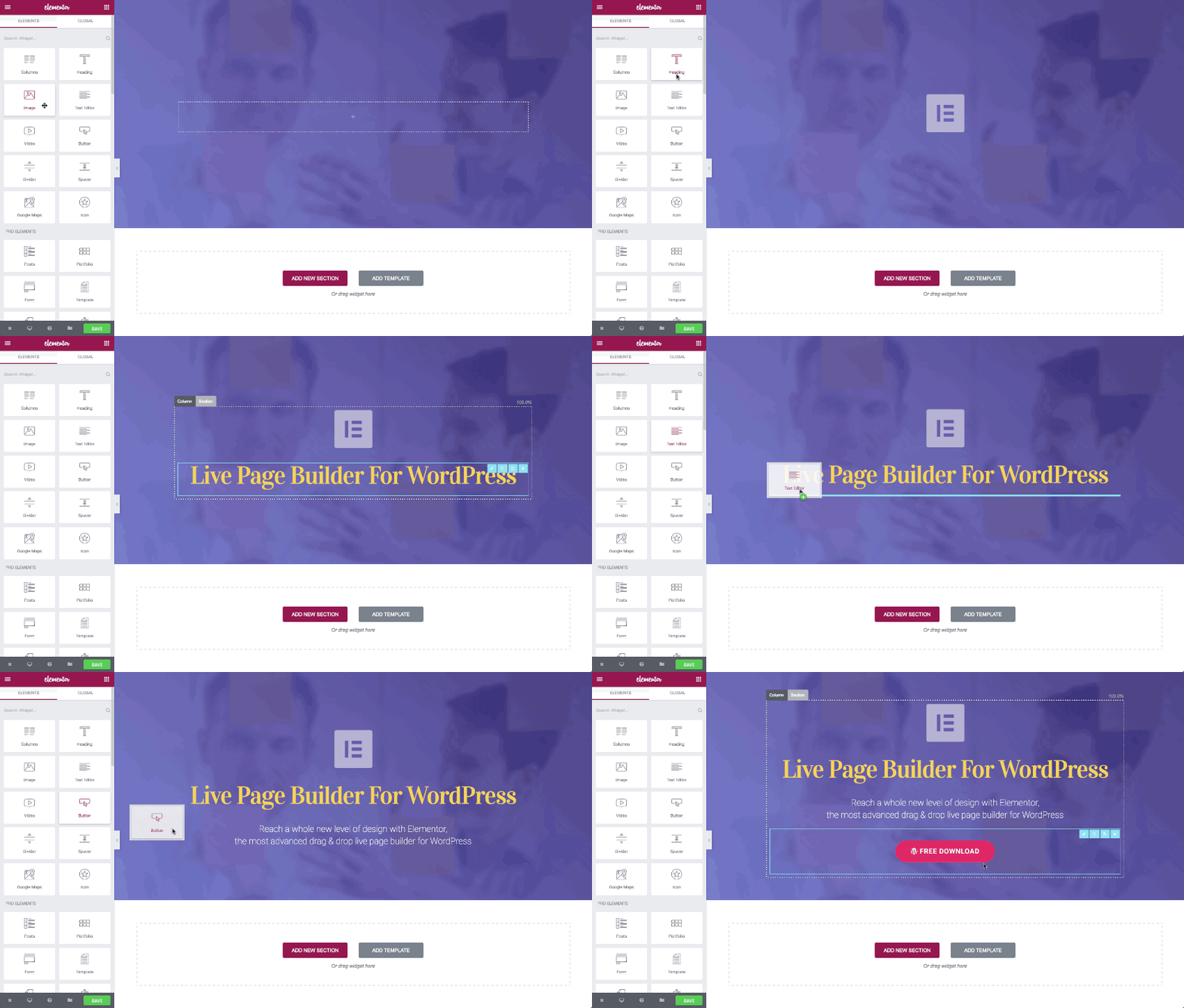
- It works by Drag & Drop. With this drag and drop system, you can place the objects as you wish in your work area. You will be able to add the widgets you want and place them where you prefer in a quick and easy way.
- Results in real time. You don't need to wait to see the results of what you are doing, they appear instantly. That is, you don't have to preview, preload, or refresh several times to see the result every time you modify content.
- It is super fast. Both at the time of working with the plugin, as well as with respect to the performance of the web, as it is almost zero load generated on the page.
- Open source. It is the first visual builder with open source which allows you to modify its source code and adapt it to your needs.
- Compatible with a wide variety of templates. You don't need to buy and install its own templates as is the case with other visual builders, as it is very well integrated with other tools. If you want to use translation plugins such as WPML o Polylang, you should know that Elementor is fully integrated with these and you will be able to create multi-language websites without any problem. As with WooCommerce, for which there are several specific widgets.
- You can create your own templates, save them and reuse them as many times as you want..
- Export / Import templates. You can manage the templates in different projects by exporting and importing them.
- Pre-engineered blocks. In addition to the complete templates of the most common pages in a website, Elementor offers you a wide range of blocks pre-designed by the plugin's team of creators, which you can use to quickly adjust a page with everything you need.
- Fully customizable. It has a great multitude of widgets that you can configure as you wish and distribute throughout your page.
- Continuous updates and improvements. It has constant updates, with new functionalities, effects and advances that make it possible to Elementor stronger every day.
Elementor FREE vs Elementor PRO
There are two versions of Elementor, The free version is free and the paid version is paid. With the free version you can try the plugin and use it as many times as you want, the issue is that it has certain restrictions on the features available for use.
Primarily, the free version offers you 30 basic widgets, while the PRO version, in addition to the free widgets, adds more than 50 powerful addons.
Here is a summary of the differences between Elementor Free and Elementor PRO.
- With the free version you have:
The Elementor visual layout tool
30 basic widgets
Page and section layout
A series of templates - With the PRO version, in addition to what the FREE version offers, you will have:
More than 50 PRO widgets
More than 300 templates
Full theme layout (Pages, Sections, Header, Footer, Archive)
FRE and PRO Templates
WooCommerce Layout Designer
Popup Creator
Use of dynamic content: Custom Post Types and Custom Fields
Motion effects: Parallax and mouse effects
Management of usage roles
Shortcodes for widget insertion in any location
As you can see, the difference is quite significant, that's why we recommend you to download right now Elementor Pro for a fraction of the price on our website.
What are the best Elementor Themes?
There are many Themes to integrate Elementor to your site. However, there are four that are the most named in terms of compatibility and testing. Let's see them!
There are many Themes to integrate Elementor to your site. However, there are four that are the most named in terms of compatibility and testing. Let's see them!
OceanWP
OceanWP It is a theme with many configuration variations and is fully integrated with Elementor, in fact it has specific options in its customization screen to insert sections designed with the visual layout tool.
GeneratePress
GeneratePress is a very light theme, easy to customize and very versatile. If you want to make a powerful website without getting too complicated, GeneratePress is a great option.
Astra Theme
Astra is another theme that is very well integrated with visual layout tools, such as Elementor. It is also a very light and customizable theme.
Hello Theme
This theme is free and owned by Elementor, the visual layout tests are done with the theme itself. Hello Theme, so the compatibility is absolute. It is simple and clean, the loading speed is one of its strengths. It is important to clarify that if you have Elementor PRO you can customize it without any problem, otherwise its functions are quite limited.
What are the featured addons for Elementor?
Crocoblock
Crocoblock It is the most extensive plugin pack on the market. It has more than 100 addons distributed in 15 different plugins. Here are the main ones so you can learn more about each one of them:
– Jet Style Manager For Elementor
– JetProductGallery
– JetCompareWishlist For Elementor
– JetBlocks For Elementor
– JetSmartFilters
– JetSearch For Elementor
– JetTricks for Elementor
– JetPopup for Elementor
Essential Addons
With Essential Addons You will be able to improve your experience in building pages of Elementor, It adds more than 60 very attractive addons to your page builder.
Premium Addons for Elementor
Premium Addons for Elementor offers widgets and add-ons for Elementor that are not included in any other widget collection on the market.
Elementor Extras
Elementor Extras is a great complement to the Elementor Pro, The new software, as it expands its functionality by adding new and useful widgets and extensions, making the Elementor is a much more powerful page generator plugin.
Some widgets included in Extras are: image comparison, circle progress, additional publications, timeline, navigation paths, dropdown, interactive zones and much more!
With all of the above, Elementor is presented as the great solution for all users who are starting in WordPress and have no programming skills.
Basically, it is a plugin designed so that you can drag and drop blocks of content and create a website in a short time and in an agile way, without many complications and with numerous professional alternatives.
Finally, we would like to tell you that at our website you can find Elementor for UDS only 3.99, saving you a great deal of money and enjoying all of its functions PRO.
You will have all its updates for one year. Also, you can evaluate the possibility of our subscriptions -monthly and annual reports - to download the Themes, Plugins and Addons that complement this web page builder in an incredible way.
You will be saving over $10,000 on Premium Plugins and Themes. Currently, we have more than 4200 products and with your subscription you will have unrestricted access to all of them.
Finally, remember that when you buy from Pillbanana you receive unmodified, clean and virus-free 100% files with all their updates absolutely free for one year.
Give yourself the opportunity and invest in your project, build the best pages with competitive tools.
Install Elementor right now, for only UDS 4.99 and start seeing incredible results!
Si quieres conocer otros artículos parecidos a Todo lo que tienes que saber sobre Elementor, el mejor constructor visual de WordPress puedes visitar la categoría Plugins Wordpress.
 Español Español
  English
  Português do Brasil
Leave a Reply