
Divi vs. TheGem | Comparing Premium Themes [2025]

Here's a new comparison between Divi and TheGem, two highly professional premium themes with very functional features. Don't miss this post, where we cover everything you need to know about Divi and TheGem.
TheGem vs. Divi: Everything You Need to Know About TheGem
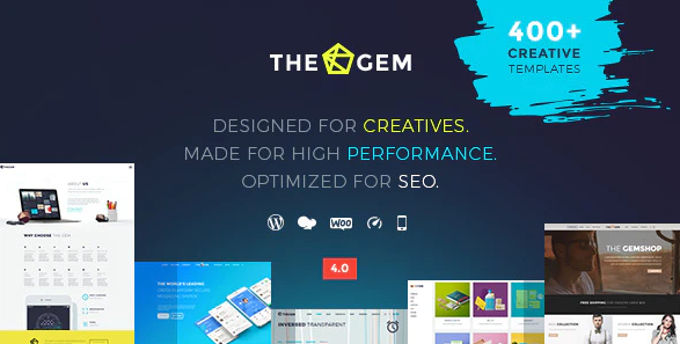
It's definitely worth checking out and writing a review about TheGem. The first thing you notice are the incredible demos included in the theme, which are separate and beautifully designed.
In total, the theme currently offers about 70 one-click demo versions (which they call "creative concepts").
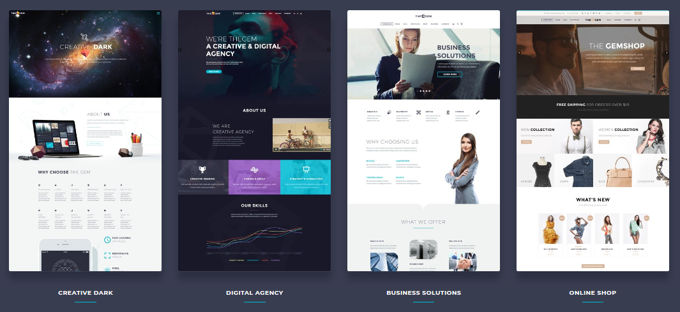
With a good, versatile theme, you should literally be able to create any kind of website to get the highest score on your reviews. And after testing TheGem, we can safely say that it delivers on all its promises.
TheGem is the latest creation from CodexThemes, a well-known theme in the theme world. It’s a truly versatile theme. CodexThemes has put together some demos for niches ranging from creative agencies to gyms, restaurants, and much more. It’s definitely a beautiful and functional theme.
Main Features
- More than 70 design concepts for different niches
- Templates for more than 400 pages
- Focused on Performance
- Types of Useful Custom Messages
- Beautiful designs
- Includes Bakery Page Builder y Revolution Slider
- Fix the code formatting for page speed
- Designed for multiple pages or just one.
- More than 2,600 font icons
If you like any of the more than 70 homepage designs, you can easily import all of them or a specific selection through TheGem's control panel. All you have to do is go to TheGem Import in your admin panel, and the wizard will guide you through the process. As for the import process, it couldn’t be easier.
Installing the Theme
After installing TheGem, you should install all the necessary and recommended plugins. Once you've done that, your admin dashboard will look much more complete. In addition to all the new plugins, TheGem also offers many types of custom post types.
As we mentioned earlier in this review, you can always import one or more of the over 70 design concepts by going to TheGem's import option. But if you don't want to use any of those design concepts, you'll need to go to the theme's customization menu.
Customize the theme
TheGem uses its own theme customization manager, not the WordPress customizer. The admin panel is divided into ten categories. Generally, you configure basic information such as your blog’s layout and branding. There isn’t much to change beyond your logo and some information about functionality:
Review Headers
Under "Header," you can configure all the details of your site's header. This includes the layout, alignment, and design:
You have a wide range of header options thanks to the drop-down menus with multiple styles. Under "Fonts," you can set which fonts your site uses and their sizes.
In addition, you can also visit any class to customize every aspect of your fonts. TheGem offers many Google Fonts, so you have a variety of styling options. And if you want even more choices, you can always import new fonts using the built-in Font Manager:
In the "Colors" section, you can set the colors for literally every element on your site. It would take some time to review and adjust everything, but all the options are there if you want them:
Review Funds
As the name suggests, "Backgrounds" lets you customize the backgrounds of different parts of your site. You can choose solid colors or upload images.
Under "Footer," you can enable or disable the footer and set custom text. Again, there isn't much to this section. There may be other useful options here, such as enabling or disabling social media icons or links:
TheGem Review: Contact & Social Media
With "Contacts & Social," you can add address and contact information, as well as links to social media icons. These social media icons can appear in both the header and the footer.
Reviewing Backups
In this review of TheGem, it's worth mentioning that the "Backup" feature is a wonderful tool that you should definitely have.
It allows you to export a backup of all your theme settings. That way, if you ever lose any theme settings, you can easily restore them using the backup feature.
Basically, experimenting with theme settings is a low-risk activity, since you can always fall back on your backup if you need to:
Types of Custom Entries
TheGem includes seven custom post types by default. These are:
- News
- Portfolios
- Quick Searches
- Customers
- Galleries
- Teams
- Comments
Custom fields for posts and pages
TheGem It contains a large number of custom fields for creating posts or pages. When you add a new post or page, you'll see a lot of options at the bottom of the screen:
You can configure everything from video sequences to custom clips and custom layouts. For example, if you want to move the sidebar on a post, you can do so using the custom fields. If you want to add custom widgets to a post, you can do that, too. These custom fields are very versatile. With TheGem, you have plenty of new ways to customize your individual posts and pages.
Includes Bakery Pagebuilder
As we mentioned in the list of features, you also have access to Bakery Page Builder to create pages.
Bakery Pagebuilder is undoubtedly a solid choice and includes both front-end and back-end editing. Every time you create a new page or post, you have the option to switch to the Bakery Pagebuilder editor view you've chosen to create drag-and-drop layouts:
TheGem Elementor Review
The theme is now available in two different versions for one price. That means you can choose between the page builders included: WP Bakery PageBuilder or Elementor.
TheGem Load Time - Good Google PageSpeed
We conducted tests on TheGem's demo site using Google PageSpeed Insights. The score was 84 on the desktop version without any cache or optimized images. We assume that after fixing those issues, the site would score a 90 on PageSpeed Insights, which is a very good score.
Discover TheGem – Creative Multi-Purpose High-Performance WordPress Theme for just $3.99!
Divi vs. TheGem: A Review of Divi for WordPress

This review of Divi We'll show you the latest improvements and the theme's most eye-catching features. We're not going to give you boring bullet points and lists of options that you can find in Elegant Themes. Let's get started right now!
ADVANCED GRADIENTS
Let's start with the two newest features that prove Divi has the best tools by far. Anyone who has worked with Photoshop, Corel, or similar photo-editing programs knows how to create gradients in all the colors of the rainbow. The same is now possible in Divi under the name of Advanced Gradient Builder.
This feature offers unlimited possibilities for gradients. Of course, no theme has this yet, though they'll surely copy it. They do that with everything Divi comes up with.
LAYOUT CLOUD
And let's move right on to the next feature, which no other theme has. The feature is called Divi Design Cloud. It lets you instantly use sections, columns, entire pages, images, videos, audio files, and anything else you upload to the Cloud while working on any website you have.
The time savings this feature offers are unprecedented. It's an absolute must-have for every professional web designer—and, of course, for design agencies.
ONLINE STORES
1-Click Divi Demo Templates
A standout theme should offer fantastic options for creating an online store, and Divi certainly fits the bill. The theme provides an incredible number of options for customizing product and category pages using WooBuilder and WooModules.
Divi has 229 different demos (1,685 templates). That's an incredible number!
The Divi demo library contains many beautiful store layouts that you can install in your project with just one click. Styling your entire store can be really easy with WooBuilder.
Everything can be configured very quickly in the front end. All of the available demos have, of course, been created using the Divibuilder which we'll discuss below, along with Elementor Pro considered the best page builder available.
DIVIBUILDER (Page Builder)
DiviBuilder It’s the perfect page builder for WordPress, and it’s an absolute pleasure to work with this tool. The page builder works very precisely, which means that what you see on the website itself looks exactly the same as what you’re working on. Everything you want to use—such as elements and effects—is easy to find, and you can build pages very quickly.
TEMPO OF THE PIECE
Meanwhile, no website wants to fall behind in terms of load times or speed, since Google is placing increasing importance on these factors.
Divi recently received a speed update and has become one of the fastest-loading themes available for WordPress. It's amazing that a single theme can outperform all the others on every front.
EFFECTS
With Divi Effect, images can be adjusted in the blink of an eye. Change the exposure, adjust the colors, invert the image, apply sepia tones, or make it transparent (you can set specific percentages).
Changing images directly in Divi rather than in a desktop program ensures that your image remains intact and can be quickly modified at any time. We give this tool a score of 10 in this review of the Divi theme.
TRANSFORMATIONS
With Divi Transformations, you can do just about anything with text and images—rotate, flip, and skew objects just like with Photoshop's "CTRL+T." It's a fantastic tool that, as far as we know, no other theme offers.
SHAPE DIVIDERS
This feature really makes your website stand out—your competitors will be envious of your site. It used to be quite a challenge, even for professional web designers, to create those shapes in the blocks. That’s no longer the case with the DiviBuilder, since anyone without technical knowledge can do it with the greatest of ease—including you!
BULK ORDER
Colleagues who have been building websites for years also remember how we used to repeat the same actions over and over again. If you had 6 blocks whose styles you wanted to change, you had to do the work 6 times. That’s no longer necessary with Divi’s Bulk Editor—you can make adjustments to all 6 blocks at once. This feature saves you an incredible amount of time.
SHADOWS
You no longer need Photoshop to create shadows for your images. Not only is Photoshop a very expensive program, but it also takes much longer than Divi's Drop Shadows.
Another advantage is that the original image remains intact, and you can add additional styles later or adjust the shadow if necessary.
DIVI DIVISION TESTS
All businesses want as many potential customers and conversions as possible, so they regularly try to improve their web pages to get the most out of them.
However, Divi Leads It makes things much easier for you. You can create as many different versions of a design or text as you want. These are displayed to your visitors on a rotating basis.
Divi tracks statistics so you know which versions perform best.
Divi and the Divi Builder have so many features and options that we could make this Divi Theme Review page three times as long, but the best thing is Take a look here on the Divi website to learn more.
REVIEW OF THE DIVI TOPIC: SUMMARY
In conclusion, we can say that this theme is a well-oiled machine for building websites from the ground up. Divi has no weaknesses or shortcomings. Whether you’re creating an online store, a corporate website, or a personal site, you’ll always be glad you bought it.
Try the Divi WordPress Theme right now for just $4.99!
Conclusion: TheGem vs. Divi
First of all, thank you for reading this comparison of The-Gem vs. Divi all the way through. Of course, both are great themes, but it's immediately clear that Divi offers better quality.
Divi has the edge in every way. Whether it's the much better page builder, the more attractive designs, the many extras it offers, the loading time, or the customer service, Divi is better in every way.
However, as we always tell you, it's a good idea to try both of them so you can draw your own conclusions.
You can subscribe to our monthly membership and get access to these two topics and over 7,800 products!
Si quieres conocer otros artículos parecidos a Divi vs TheGem | Comparando Temas Premium [2025] puedes visitar la categoría Temas Wordpress.
 Español Español
  English
  Português do Brasil
Leave a Reply