
Gravity Forms: 10 Reasons Why You Should Use It to Create Your Forms in WordPress

We continue to bring you the most comprehensive guides to the plugins you need to keep your website equipped with the best and most amazing features on the market—and, of course, at the lowest price.
Save thousands of pesos on the best upgraded products!
Today: 10 Reasons Why You Should Use Gravity Forms
These days, forms are an essential part of your website. They’re a fundamental element that you can’t do without—ranging from a simple contact form to more complex ones designed to collect all kinds of information.
There are a multitude of plugins in WordPress that make it easy for you to create forms—some are free, and others require payment. You're probably familiar with Contact Form 7, a fairly comprehensive free plugin for adding a basic contact form.
However, there are times when you need to do something more complex and Contact Form 7 It may not meet your expectations.
For situations like this, the premium plugin is an excellent choice Gravity Forms, which offers a wide variety of elements you can add to your forms. For example: text fields, checkboxes, date and time pickers, file upload fields, fields for purchasing products, and many more.
Keep reading this post to discover 10 reasons why Gravity Forms is your best and most comprehensive option for creating forms.
1. Simple, code-free, and powerful
The simple and user-friendly editor drag & drop You'll be hooked from the very first second. It offers a very simple interface, and with just a couple of clicks, you'll have a fully functional form.
It's also very easy to embed forms in posts or pages. You don't need to know any code—just select the icon for Gravity Forms and insert the form.
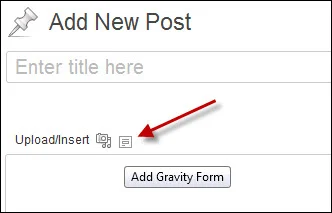
2. Many predefined field options
Gravity Forms has a sidebar which has a large number of predefined fields. Thanks to this, you can dynamically and effectively create your forms, allowing you to spend more time designing and configuring them properly.
3. Styled Forms
The forms for Gravity They look much better on the pages. On top of that, the design of the email notifications is very user-friendly. Likewise, the user interface is much more intuitive than any other contact form plugin.
We dare say that creating forms with Gravity Forms is a seamless experience.
4. Forms with Conditional Logic
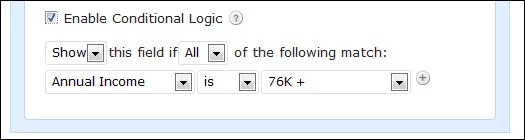
With Gravity Forms, you can create forms with conditional logic. This allows you to adapt the form based on the user's responses as they fill it out. In the advanced settings for any field, you'll find the option “Enable conditional logic.”.
We'll give you an example so you can better understand how this works. For example, if a respondent selects "76K+" in the "Annual Income" field, it will show or hide the next question.
This way, you can combine different types of responses and create the form you need, making it highly dynamic. In these situations, the user feels that the form is uniquely and specifically tailored to them, and that, of course, is very important.
5. Payment gateways
Gravity Forms It includes a comprehensive set of pricing fields and the ability to integrate with PayPal. It also allows you to offer a variety of products with multiple options. Additionally, you have the option to calculate shipping costs.
There are many different payment gateway options available with Gravity Forms, among the main ones is Gravity Forms Stripe.
6. Notification Routing
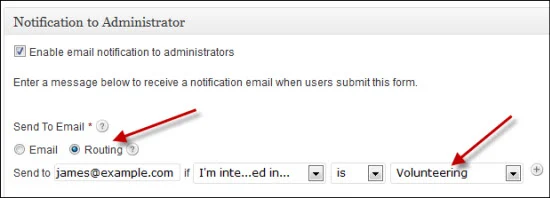
When you design a form for a more complex organization, it is sometimes necessary to send email notifications to different recipients based on the responses provided in the form.
With this plugin, routing notification emails to different recipients is very simple and quick. For example, if the respondent selects "Volunteering" in the countryside "I'm interested", notifications are sent to a specific person.
Mailpoet: A plugin to increase your mailings and optimize your subscriber lists
7. Create user-generated content
This is, without a doubt, one of the plugin's most impressive features. Gravity Forms You can create a form that is filled out within a WordPress post.
The respondent can enter the body of the post, select the post category, and even upload an image using the form Gravity.
8. Multi-page forms
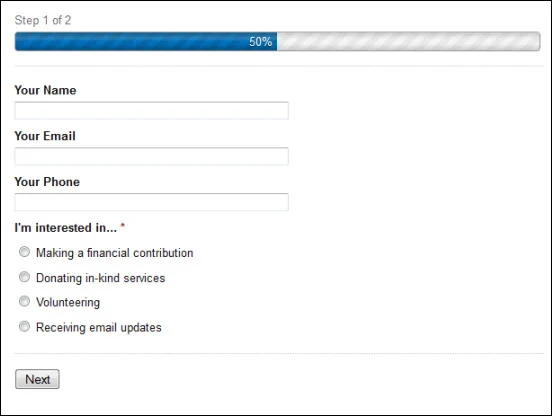
Gravity Forms It allows you to easily insert page breaks into forms, each with its own headers and more. This is ideal for ensuring that respondents don't feel overwhelmed by the amount of information they need to fill out. You can divide the questions into blocks, making it much easier to complete the form.
9. Ability to upload files
When you need a form that can easily upload files and you want to be able to control the file type, Gravity Forms That's the answer. It's also worth noting that the email notification includes a link to the uploaded file for quick access.
10. Add-ons that enhance its power
There are tons of really interesting add-ons to help you fine-tune your forms. Below is a complete list; click on the links to learn more about what each one does.
- Gravity Forms MailChimp
- LearnDash LMS and Gravity Forms Integration
- Gravity Forms Dropbox
- Gravity Forms Styles Pro Add-on
- Gravity Forms Constant Contact
- WPML Gravity Forms Multilingual Add-on
- WooCommerce Gravity Forms Product Add-ons
- Gravity Forms Postmark
- Gravity Forms Highrise
- Gravity Forms CleverReach
- And many more!
As you can see, Gravity Forms It's a very powerful feature to add to your website. You'll be able to create all kinds of forms on your site WordPress, and it also offers a wide variety of addons to improve its functionality.
This is one of the best options for collecting data, both for users and for those who need it. You can include thousands of options in your forms and make them both attractive and functional.
We invite you to visit our platform, where you can access Gravity Forms for just $4.99 and achieve incredible results with minimal effort. Just install it and enjoy an original product at the lowest price. You'll receive unmodified files—clean, virus-free 100% files with all their updates—completely free of charge.
And finally, don't forget that you can subscribe to our club for one year to get a great discount and access all the downloads from Premium WordPress Plugins, WooCommerce Plugins, and Premium Themes.
Si quieres conocer otros artículos parecidos a Gravity Forms: 10 razones por las que debes tenerlo para crear tus formularios en WordPress puedes visitar la categoría Plugins Wordpress.
Leave a Reply
 Español Español
  English
  Português do Brasil
Do you know if this can be used for the contact form on blog posts?