
WordFence: Time to Think About Your WordPress Security

Protect all your websites right now with the best WordPress security available—with minimal effort and at the best price. At Pillbanana, we offer everything you need….
Here's a comprehensive guide to the trending plugins so you can equip your website with the best and most amazing features on the market at the lowest cost. Save a lot of money on the Top Updated Products!
Today we're introducing you to Wordfence Security, a plugin that provides superior protection for your website, with the ultimate goal of Improve the security of your WordPress site.
It's important for you to know that Wordfence Security It includes a firewall and a malware scanner that were built from the ground up to protect WordPress. It features a threat defense feed, which ensures it has the latest firewall rules, malware signatures, and malicious IP addresses needed to keep your website secure. Plus, it has thousands of additional features. For this and much more, Wordfence is the most comprehensive security option available—let’s learn a little more about it!
- WordPress Security: Key Features of WordFence
- Malware Analysis with WordFence Security
- Secure Your WordPress Site with Live Traffic from WordFence Security
- Blocking IP Addresses with WordFence Security
- Login Protection with WordFence Security to Protect Your WordPress Site
- Complete Security for Your Site with WordFence Security Premium
WordPress Security: Key Features of WordFence
Among the main functions that has WordFence Security To monitor the security of your WordPress site, we can mention:
- A malware and virus scanner that allows you to scan your WordPress installation for malware using the WordFence Security database.
- A firewall or WAF that protects the WordPress installation from external attacks.
- Real-time traffic and visitor analyzer, including bots and crawlers, which makes it easy to block all attacks effectively.
- An IP blocking system that integrates seamlessly with WordFence's traffic analyzer and WAF.
- Login protection.
Let's learn a little more about what each of these features is all about
Malware Analysis with WordFence Security
To start, we'll discuss one of WordFence's most interesting features: its malware and virus scanning system.
The malware scanner is located in the WordPress admin panel, within Wordfence; the first option is called “Scan,” and it’s very easy to set up. You can also configure the scanning engine from the “Options” interface by going to the “Scans to include” section:
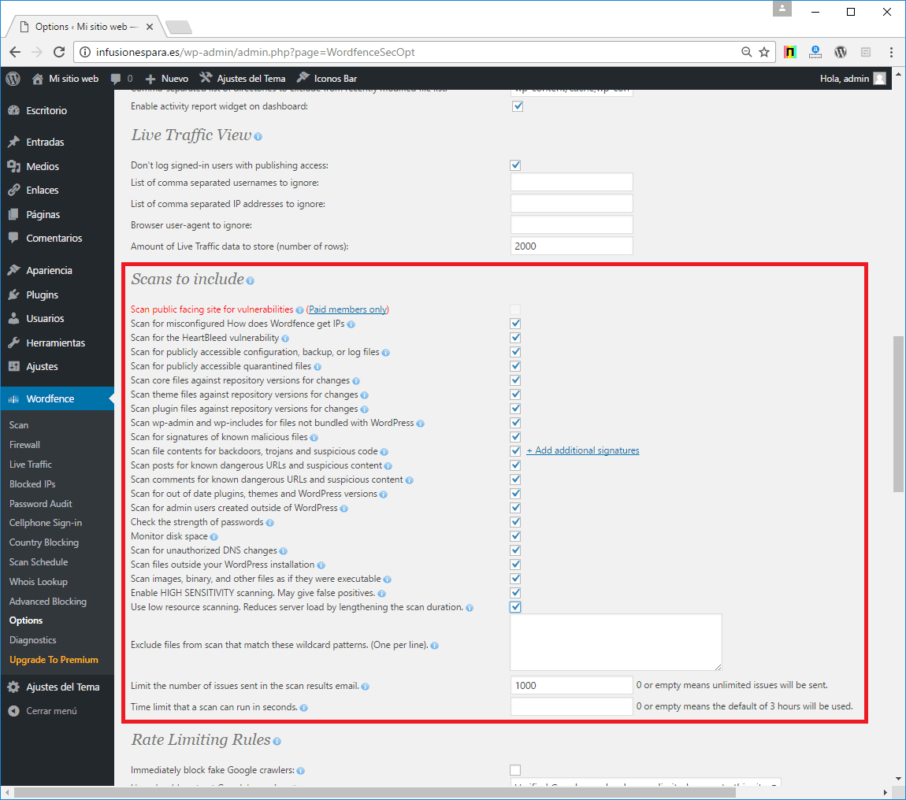
There's no need to go through everything step by step, but you should keep in mind that if you select all the checkboxes, no device will be skipped, and your system will be fully protected and secure.
WordFence Security's Firewall or WAF
WAFs, or Web Application Firewalls, are essential security systems that were first introduced in 2016. Their settings can be found in the “Firewall” section of WordFence:
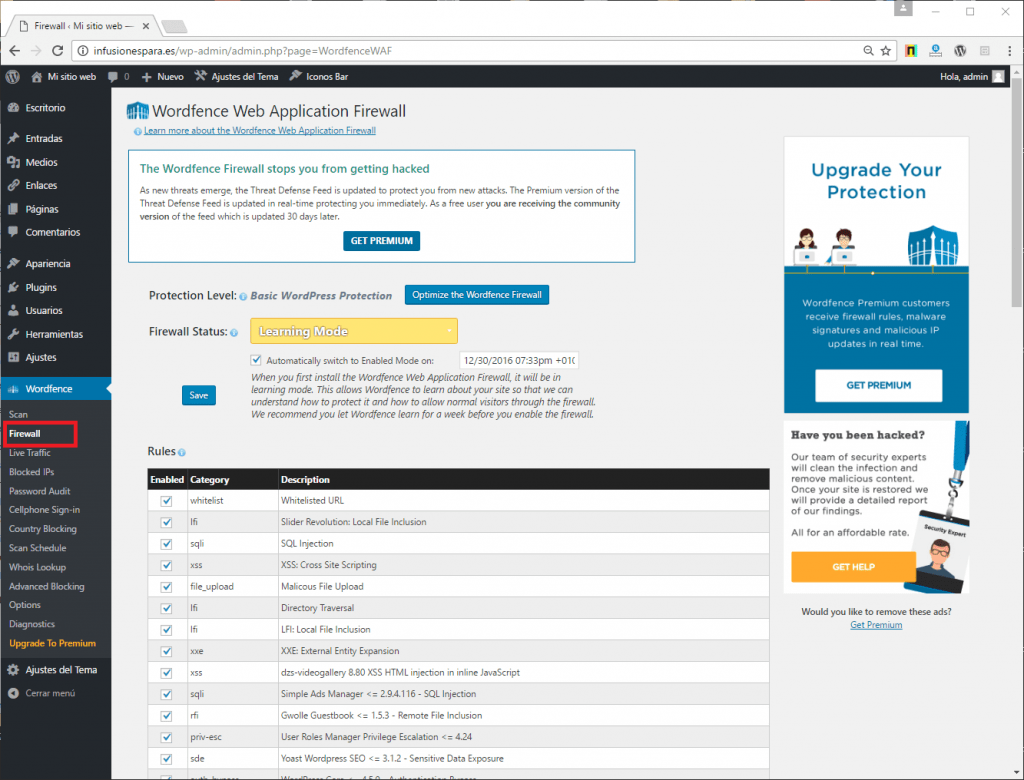
It is important to note that WordFence Security It has two operating modes:
- Basic WordPress Protection: which comes “preconfigured” and doesn't require you to make any major changes.
- Extended protection: where you need to go through a setup wizard that adapts the WAF's behavior to the configuration of the hosting environment, the web server, and the PHP interpreter.
It's always best to keep the second mode enabled, since it provides a much higher level of security and efficiency.
It's also important to know that once you enable the WAF (web application firewall), there are three modes of operation:
-EEmpowering and Protecting: In this case, the firewall will be up and running and protecting the website.
-Learning Mode: Here, the WAF is active and is tracking which requests are being made to add them to the exclusion list. This mode should remain active for at least a couple of weeks so that the WAF doesn't detect as many false positives.
-Disabled: This completely disables the WAF.
Secure Your WordPress Site with Live Traffic from WordFence Security
It is one of the main characteristics of WordFence Security, although it's important to note that it can use up quite a few resources at times when it's active. You can find it in the WordPress admin panel.
It's fair to say that the interface provides real-time updates on the resources being used by the traffic analysis system, and using the “Block this IP” or “Block this network” buttons, you can block traffic or visits coming from a specific IP address or network.
Blocking IP Addresses with WordFence Security
If there's one thing this plugin stands out for, it's its ability to block IP addresses or entire ranges. As we mentioned earlier, you can also use this feature in WordFence's Live Traffic. The feature “Advanced Blocking” It allows you to block everything from IP addresses to hostnames, referrals, or even user agents.
Login Protection with WordFence Security to Protect Your WordPress Site
Another of the most interesting aspects of Wordfence Security It's the login protection feature, since it allows you to safeguard WordPress authentication forms from potential brute-force attacks.
The setup is very simple:
1- Go to the “Options” section and select “Login Security Options.”.
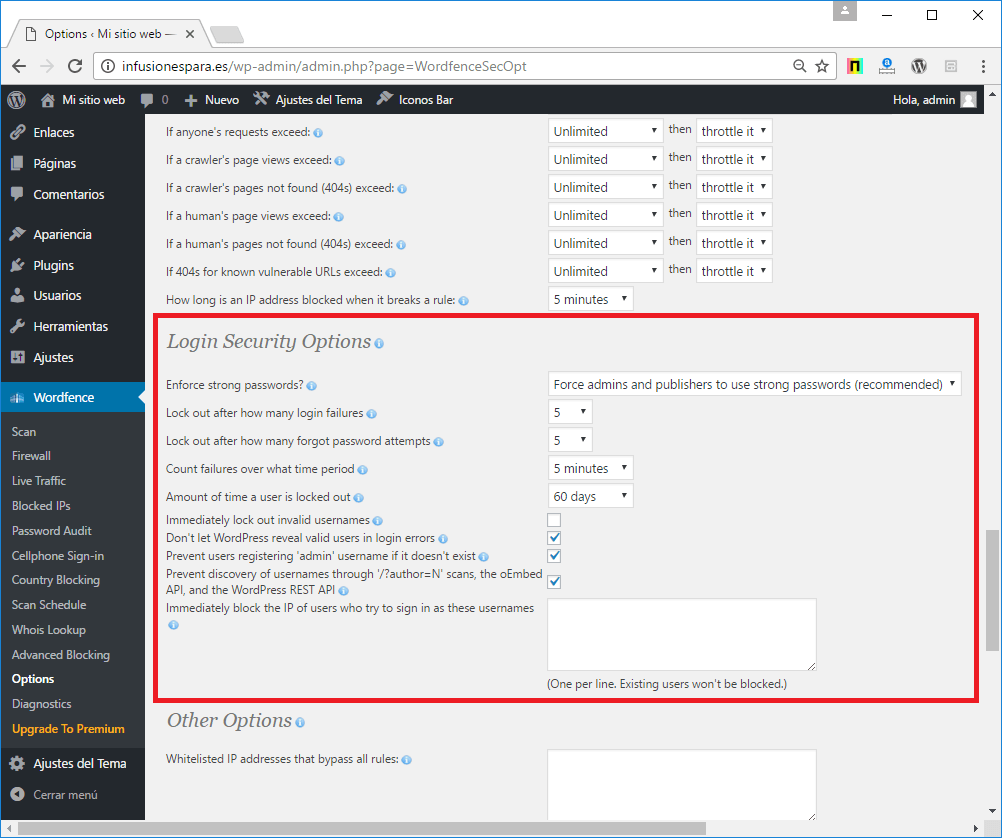
2- If you use this configuration, your WP-ADMIN and WP-LOGIN.PHP will be fully protected against potential brute-force attacks.
Remember that to effectively mitigate the impact of attacks, you must block them using an efficient WAF, such as mod_security, or by blocking them at the server firewall. The reason for this is that if you have to check the IP addresses causing the attacks using PHP, it can consume resources, and in cases where those resources are significant, you may still experience issues that harm your website’s performance.
Imagine all these excellent and incredible features, plus thousands more that are even more powerful. Yes! There is a version WordFence Security Premium And if you purchase it on our website, you'll get many more features for just USD $4.99
Among its key features, the following stand out:
- Country Blocking: Allows you to block access from IP addresses in different geographic regions around the world by filtering directly by country.
- Password Audit: You can perform automatic audits of user passwords.
- Cellphone Sign-in: Improves the security of your WordPress installation by enabling two-step authentication via text message.
- Scan Schedule: a schedule of scans that run automatically.
- Advanced Comment Spam Filter: Configure advanced spam filtering for comments and forms on the website.
- Advanced scanning on remote servers: For Premium users, WordFence Security leverages the power of the WordFence developers' remote servers to enhance security and scanning efficiency.
Get it right now for just USD 3.99 and achieve incredible results with minimal effort. Just install it and enjoy an original product at the lowest price.
Finally, remember that when you shop at Pillbanana you receive unmodified, clean and virus-free 100% files with all their updates absolutely free for one year.
You can also subscribe to our club on a monthly or annual basis, and you can save more than $10,000 on Premium Plugins and Themes. We currently offer more than 4,200 products, and with your subscription, you'll have unrestricted access to all of them.
Si quieres conocer otros artículos parecidos a WordFence: Tiempo de pensar en la seguridad de tu Wordpress puedes visitar la categoría Plugins Wordpress.
 Español Español
  English
  Português do Brasil
Leave a Reply