
Blocksy review: A versatile and very fast Theme.
Thinking about using the Blocksy theme to build your WordPress site? In our hands-on analysis of the Blocksy theme, we'll help you decide if this multipurpose theme is right for your site.
Blocksy is a lightweight multipurpose theme that you can use to create literally any type of website, from blogs to business websites, portfolios, e-commerce stores and much more.
Overall, it deserves a place on the list of the best options using this lightweight, all-purpose approach.
It is packed with well-designed Customizer options to help you easily customize your theme. For more advanced users, it also offers powerful tools for custom layouts, conditional content and more. And for WooCommerce stores, you get tons of advanced features.
It has some drawbacks. For example, although all of its demo sites look amazing, the quantity is quite limited compared to similar themes.
But overall, Blocksy is a great theme and I'm sure you won't be disappointed using it for your site(s).
- ⚙️ Exploring six key features of Blocksy: and how to use it
- 🏎️ Performance testing of Blocksy theme against other popular options
- 💰 Block prices
- 👍👎 Blocksy theme pros and cons
- 👊 The best alternatives to Blocksy Theme
- 🙋 Review of Blocksy Frequently asked questions
- 🤔 Final thoughts: should you use the Blocksy theme?
⚙️ Exploring six key features of Blocksy: and how to use it
To begin our review of Blocksy, let's look at some of the most notable features and how to use it.
1. More than 25 importable demo sites
To get started with Blocksy, you can design your site from scratch or import one of Blocksy's 25+ pre-built demo sites.
Although having 25+ demo sites is a bit limited compared to other themes that offer 100+ sites, all of the demo sites look amazing.
Basically, although the quantity can lag behind other issues, the quality Is top notch and equal or superior to all other topics I have looked at. You can consult the complete collection here:
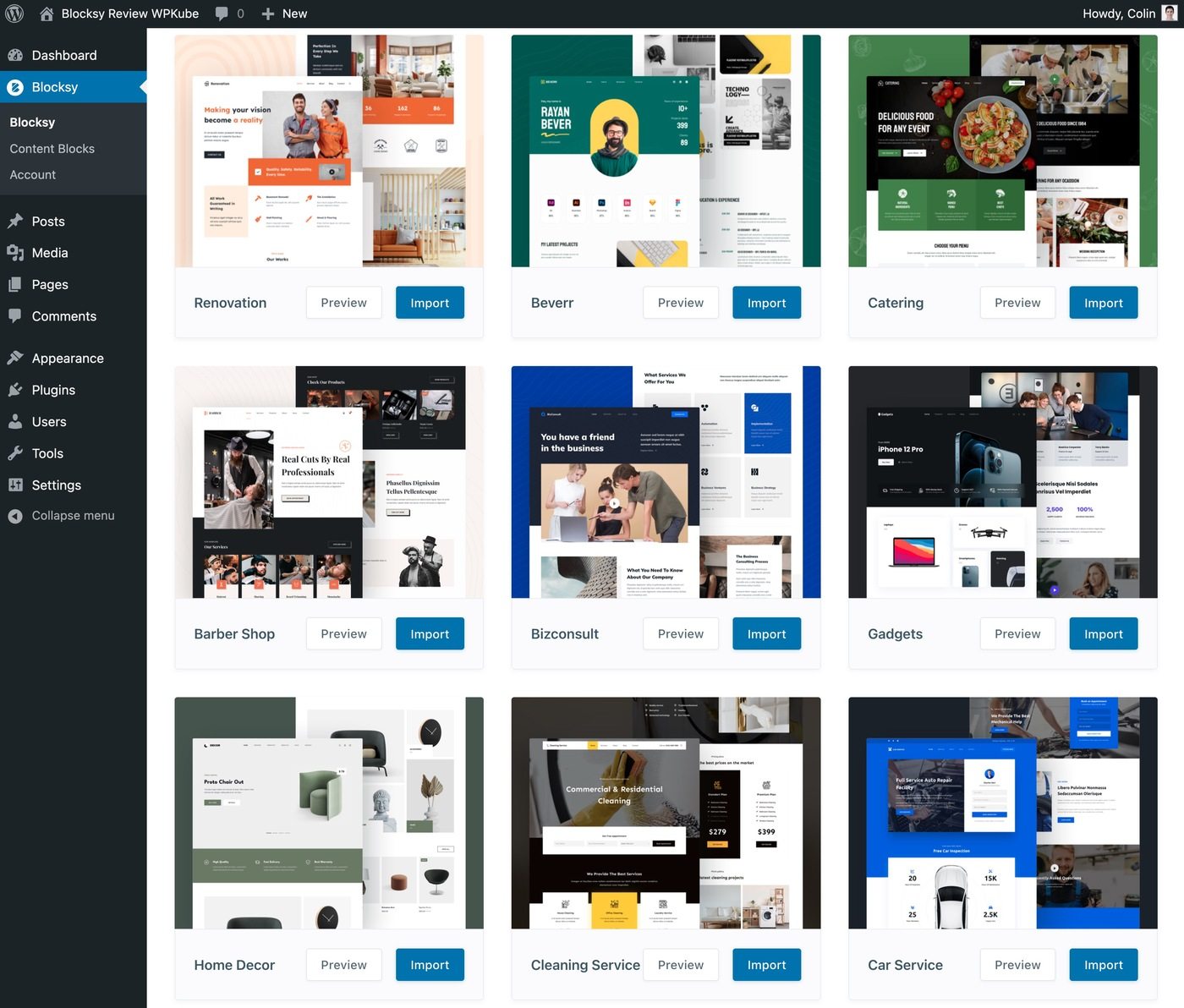
Some demonstration sites are built with both Elementor and Gutenberg (and some support Brizy), while others only support Gutenberg.
When you import a demo site, you can choose to import only the Customizer settings or also the demo content. If multiple builders are supported, you can also choose the one you prefer.
Overall, the demo import process has a very nice wizard, which includes setting up a child theme for you:
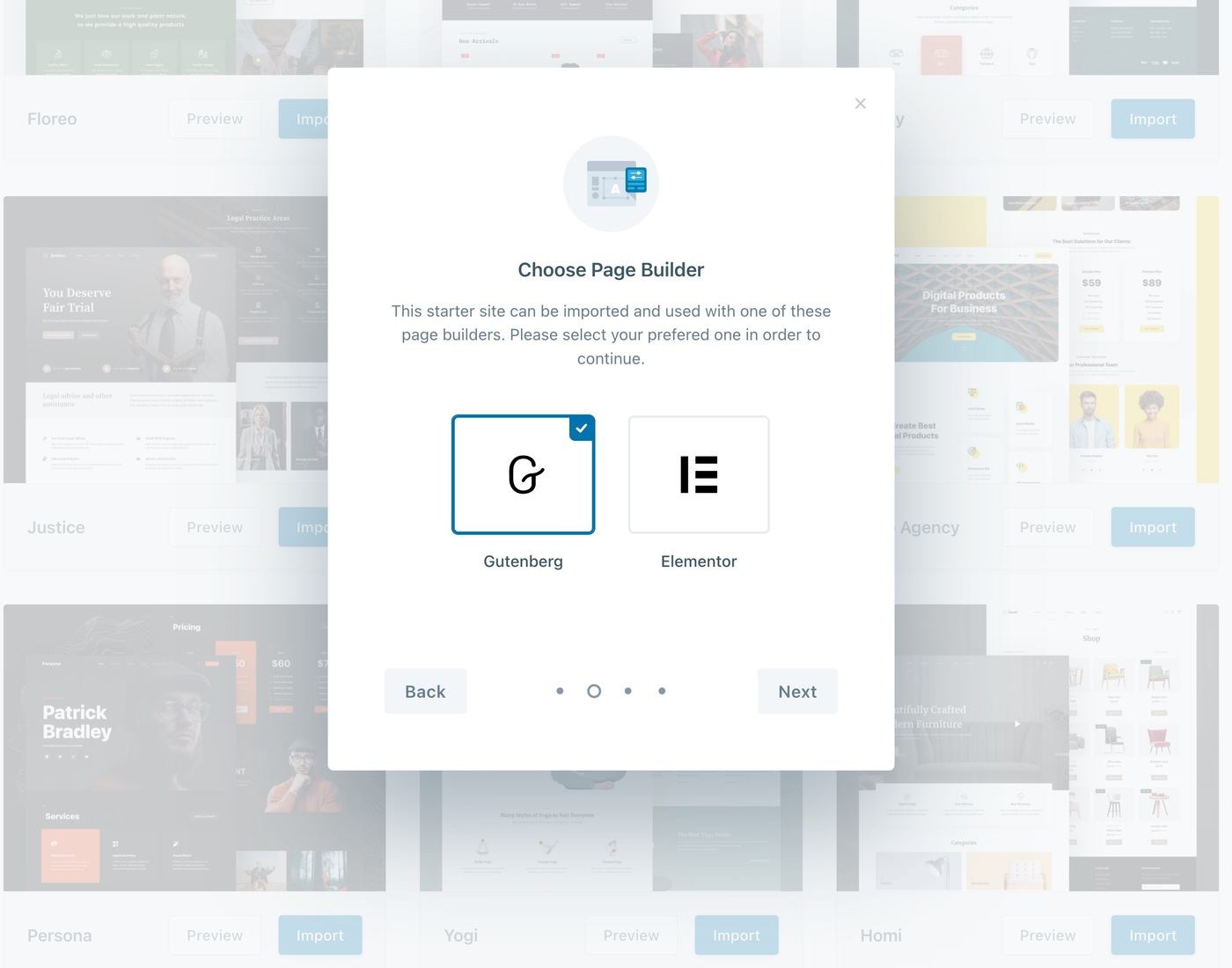
And just like that, you can have your site looking like the demo in less than a minute.
2. Very detailed customizer options
To control the overall design of your site, you'll use the real-time native Customizer, along with tons of built-in options.
You can use these options to control the layout of your blog, colors, typography, headers, footers, etc.
In general, you get a variety of options, which is why we can't show you all of them. But let's take a look at some of the most prominent areas.
Header and footer creator
To control your header and footer, Blocksy offers a drag-and-drop builder within the Customizer.
You can use a lot of different elements to add content to the header grid. You can also use the options at the bottom to customize your header for different user devices:
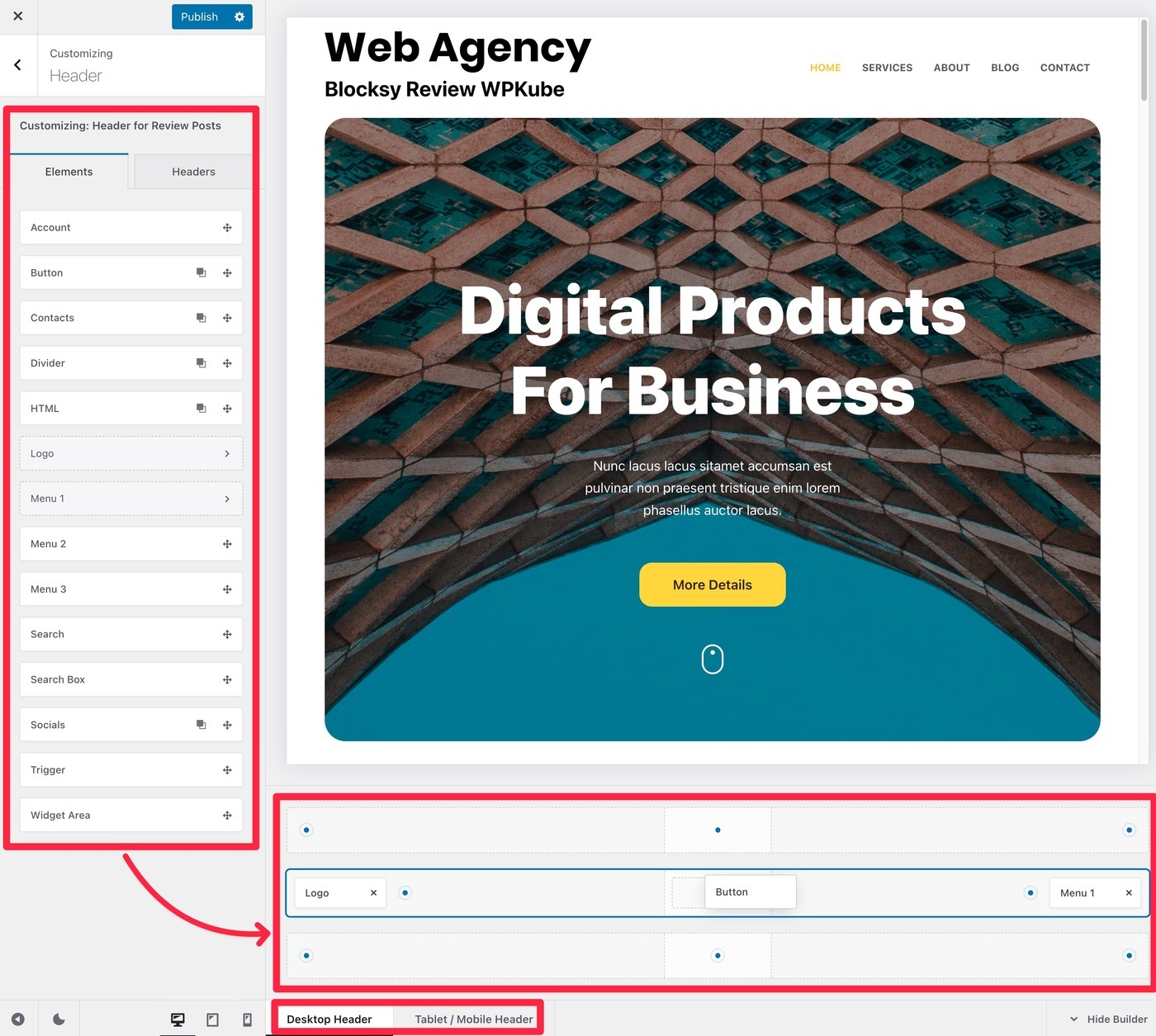
In addition, you will have additional options to customize the overall header, as well as individual header rows and elements.
Blog designs
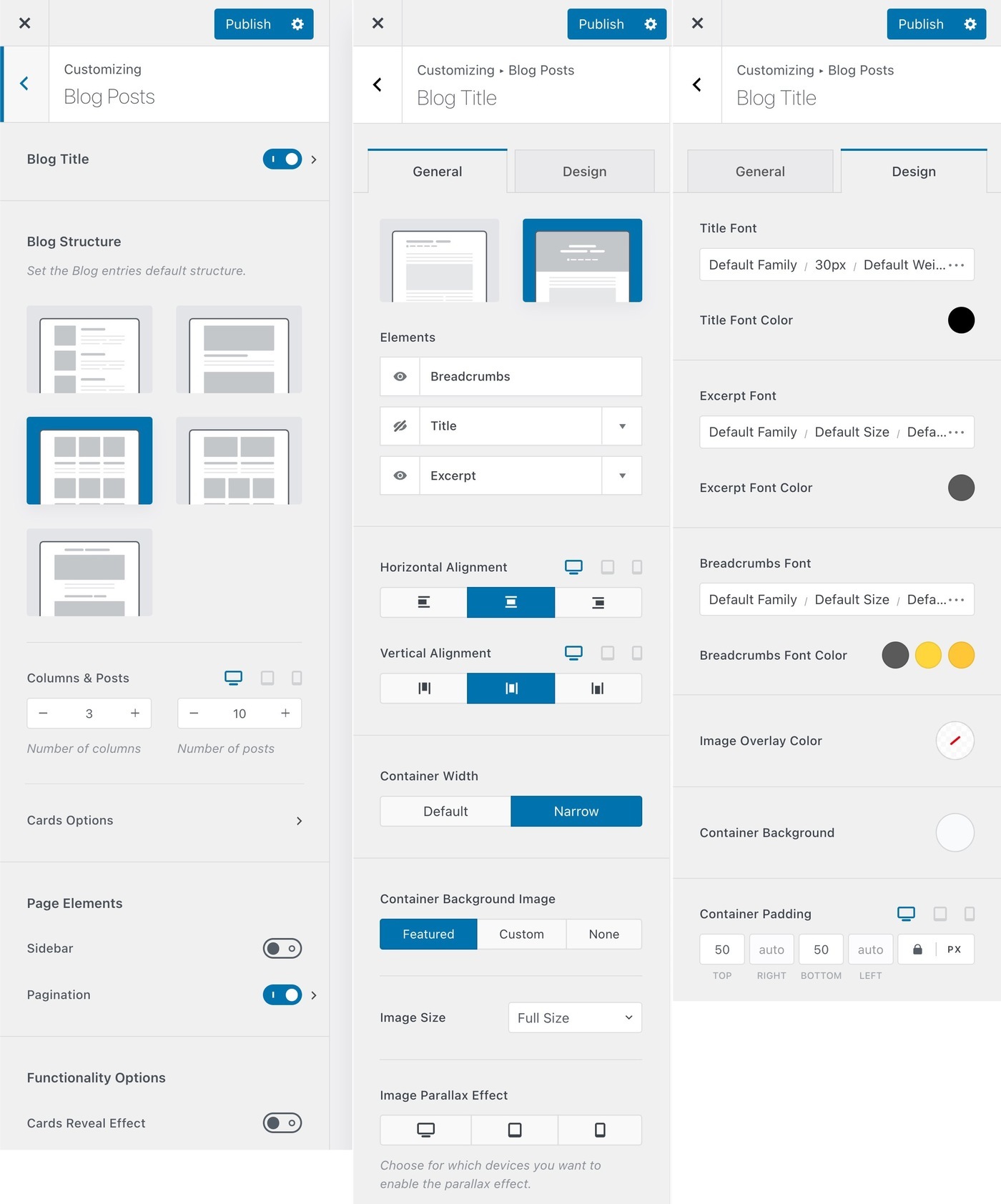
You have a lot of options to control the layouts of both individual blog posts and pages in your blog archive.
Blog archive options:
Individual blog options:
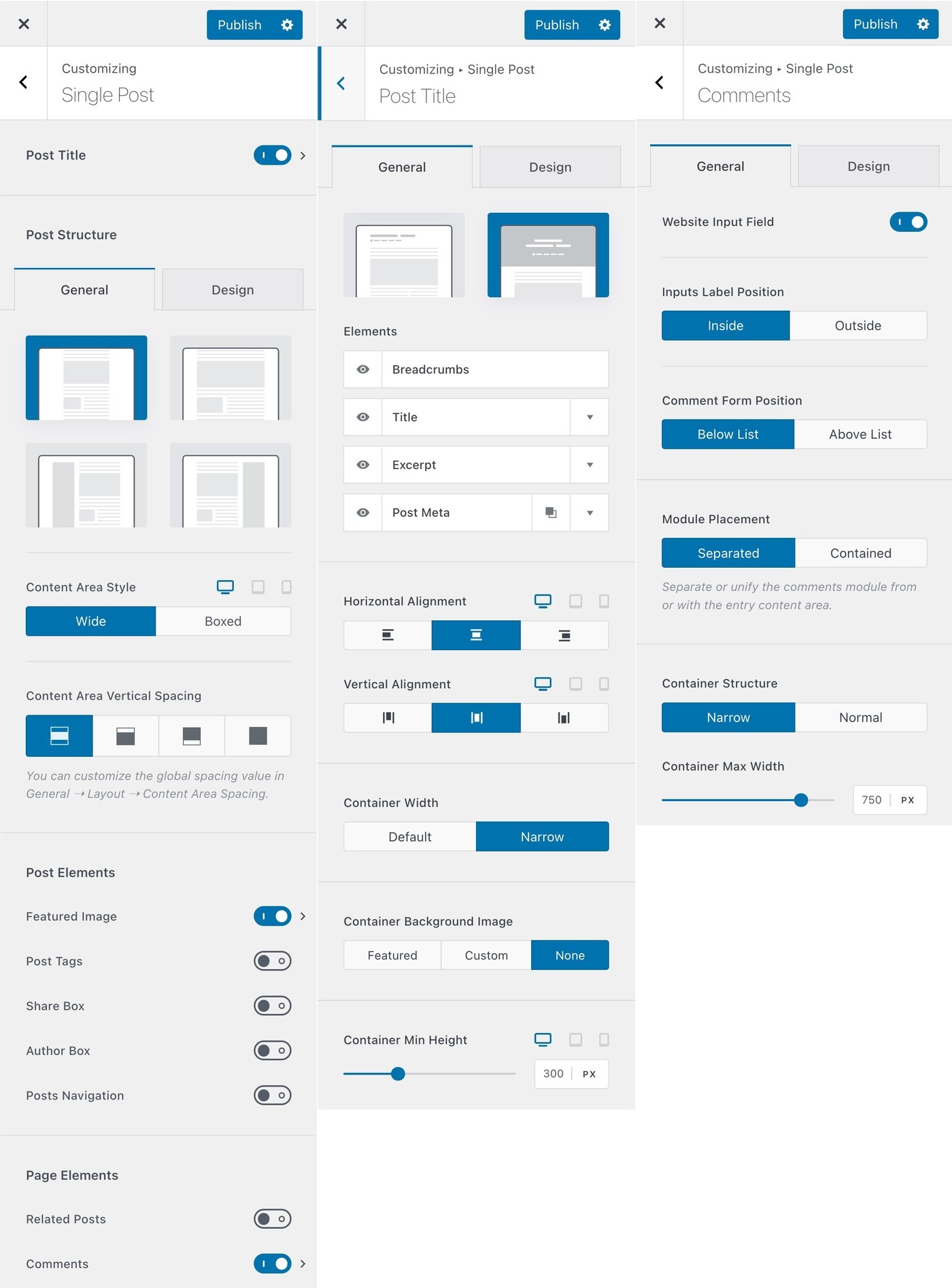
Blocksy also has some nice touches, such as offering you dedicated options to customize comment sections, author pages and category pages.
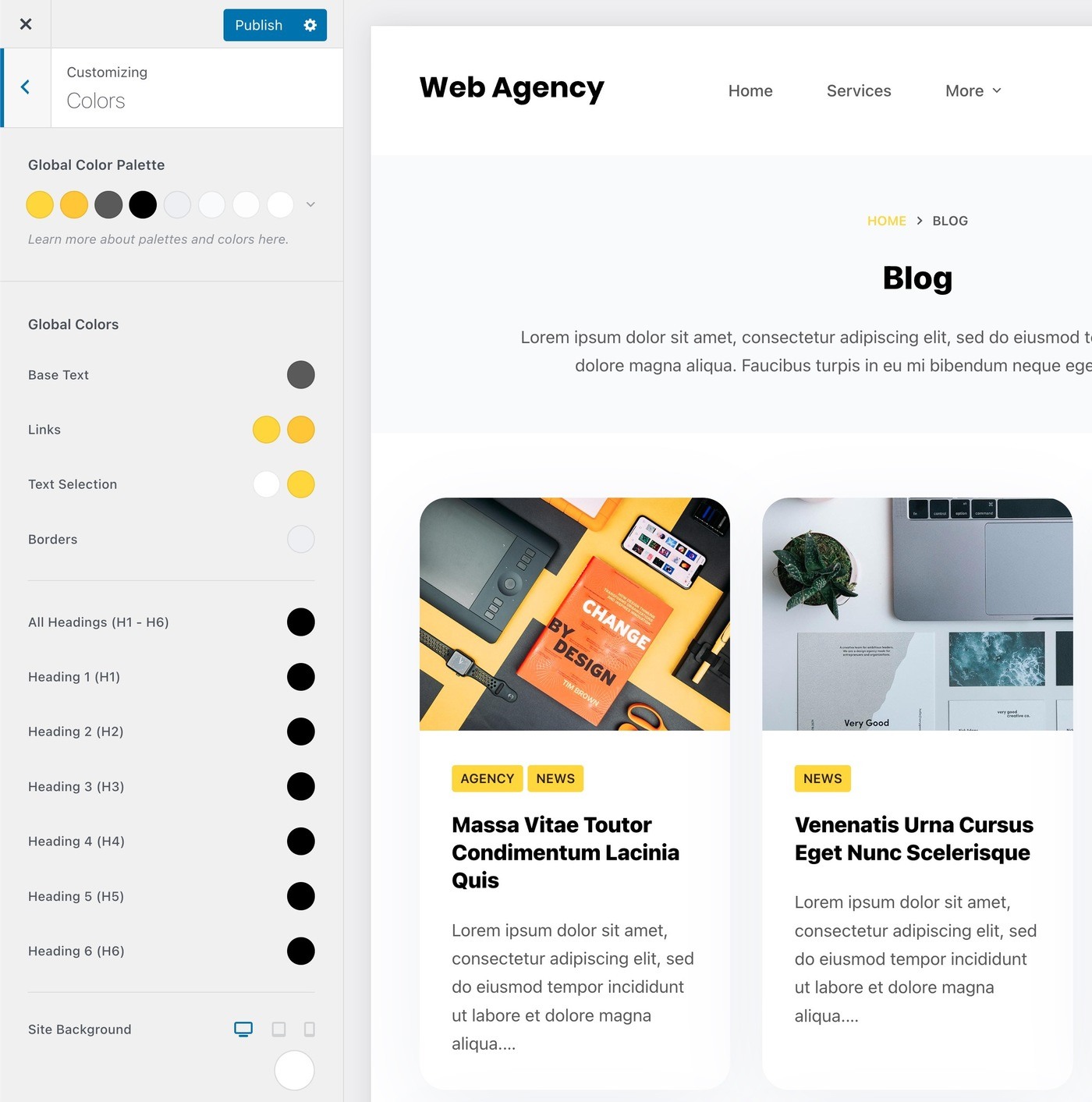
Colors
You can set a unified global color palette to maintain consistency. If necessary, you can adjust individual colors when working on specific parts of your site.
Typography
To control the typography, Blocksy has a nice system that allows you to set the typography for different types of text:
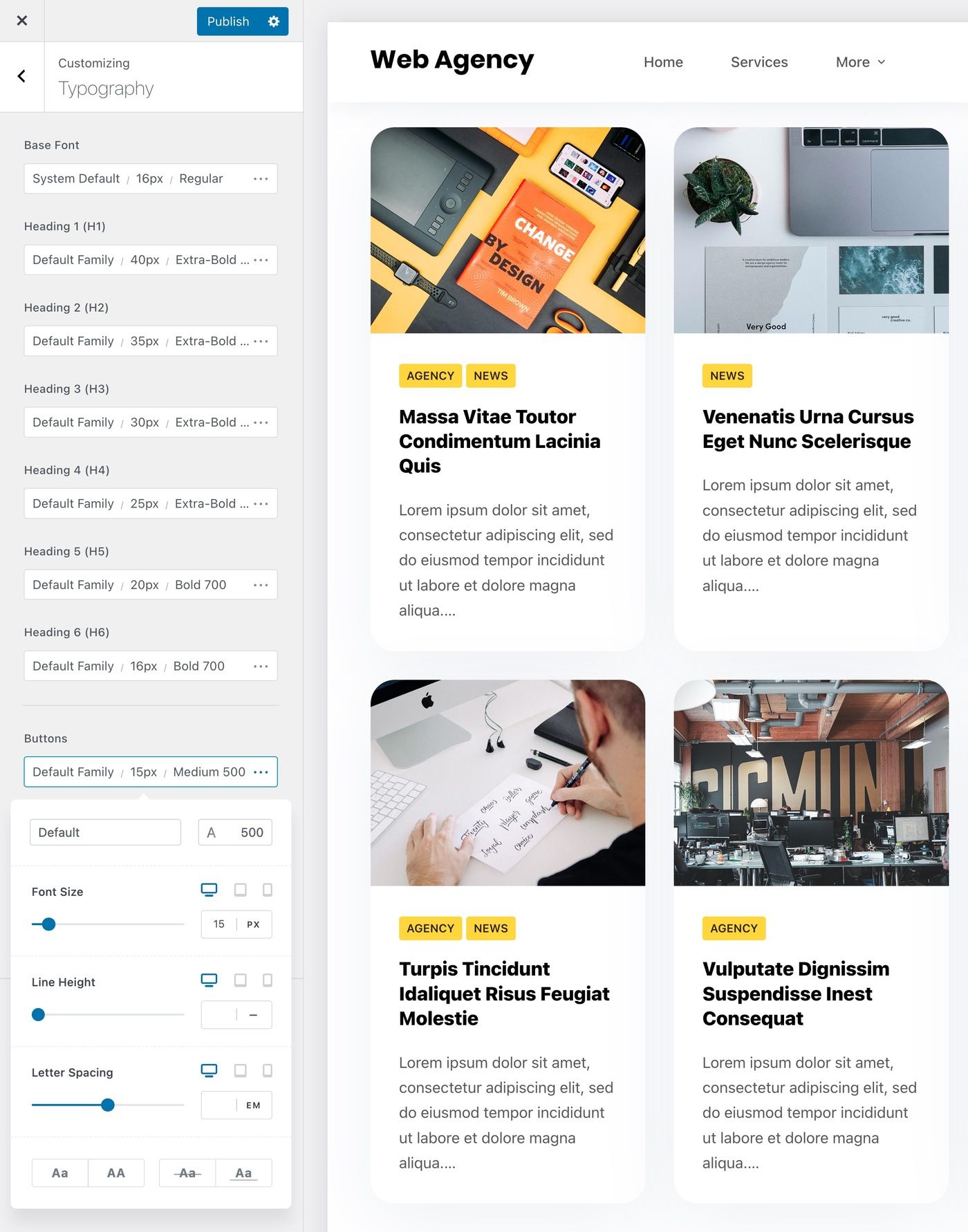
In turn, you will have typography options in other areas, such as specific options for the post title, excerpt and other details. You've already seen some of these in the screenshots in the blog archive.
3. Page level controls
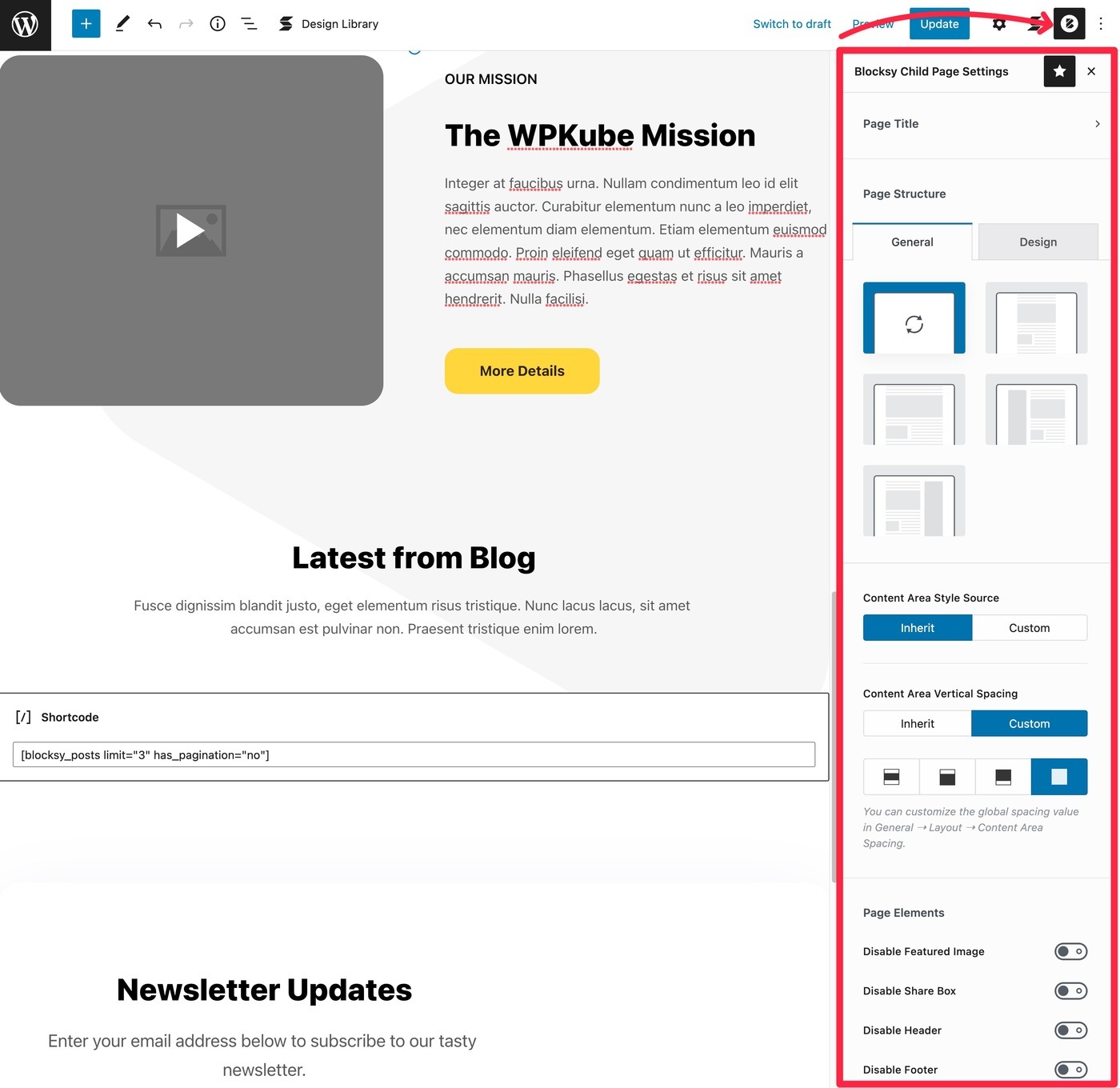
In addition to the Customizer options, Blocksy offers detailed page-level controls that allow you to control the layout of your entries/pages on an individual level.
This gives you full control over the canvas, which is great for both using the block editor and integrating it with page builder plugins.
Here's what you can do
- Hide the page title.
- Choose different page layouts.
- Adjusts the background color.
- Adjusts the spacing.
- Hide other page elements (featured image, share box, header or footer).
Here you can see all the page-level controls of Blocksy:
4. Conditional headers, footers and sidebars (Pro)
With the free version of Blocksy, you can fully customize your header, footer and sidebar... but you can only have one version of each element for your site.
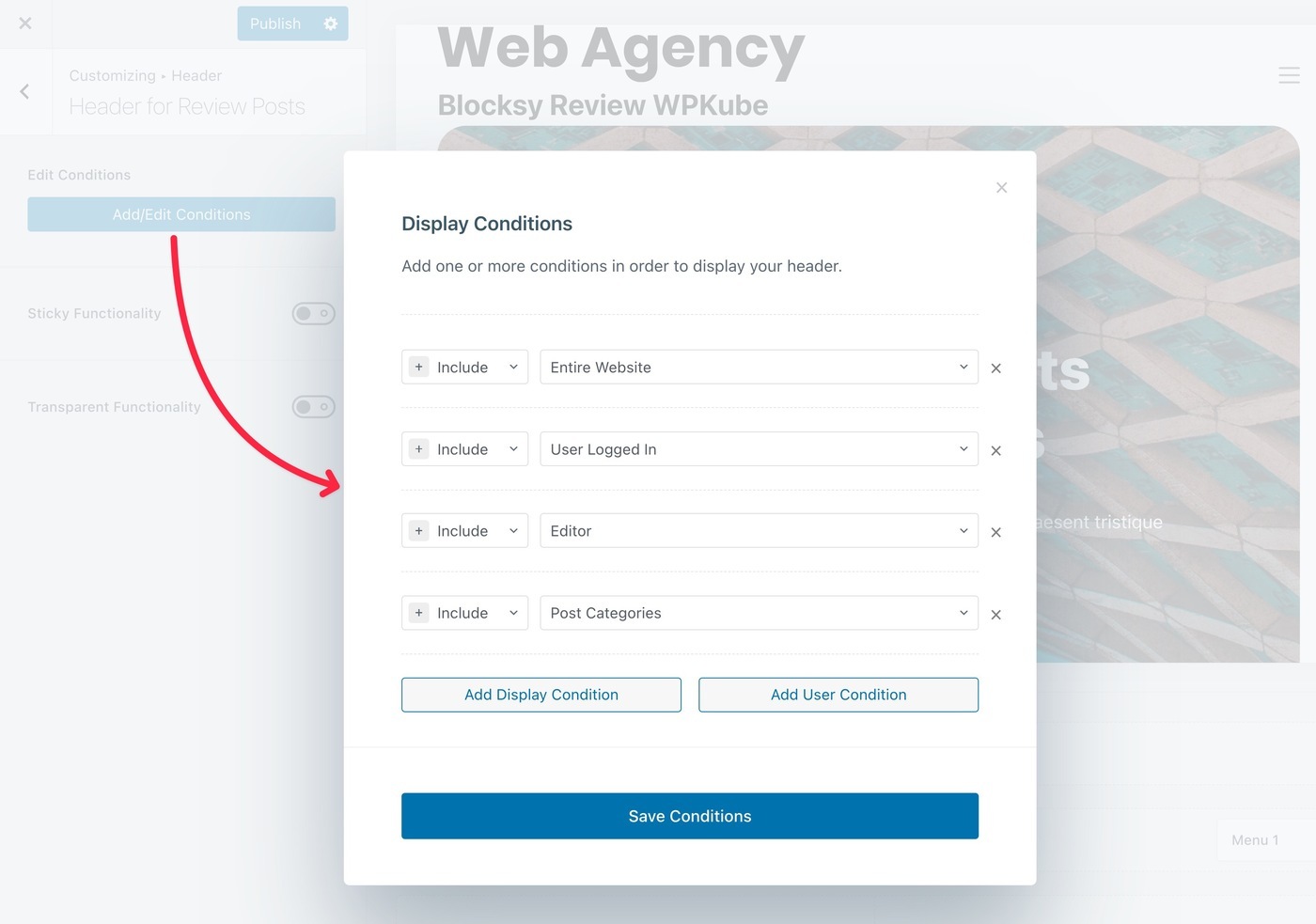
However, with Blocksy Pro you can create multiple layouts and use conditional rules to display each of them. This allows you to optimize those elements for different parts of your site.
For example, you could create a custom header for a certain type of post or for blog posts of a certain category. Or you can create different headers for anonymous users and registered users, or even for users with different roles, which is especially useful for membership sites, online stores and online courses.
For example, with headers, you will have an option to add a new header within the header builder:
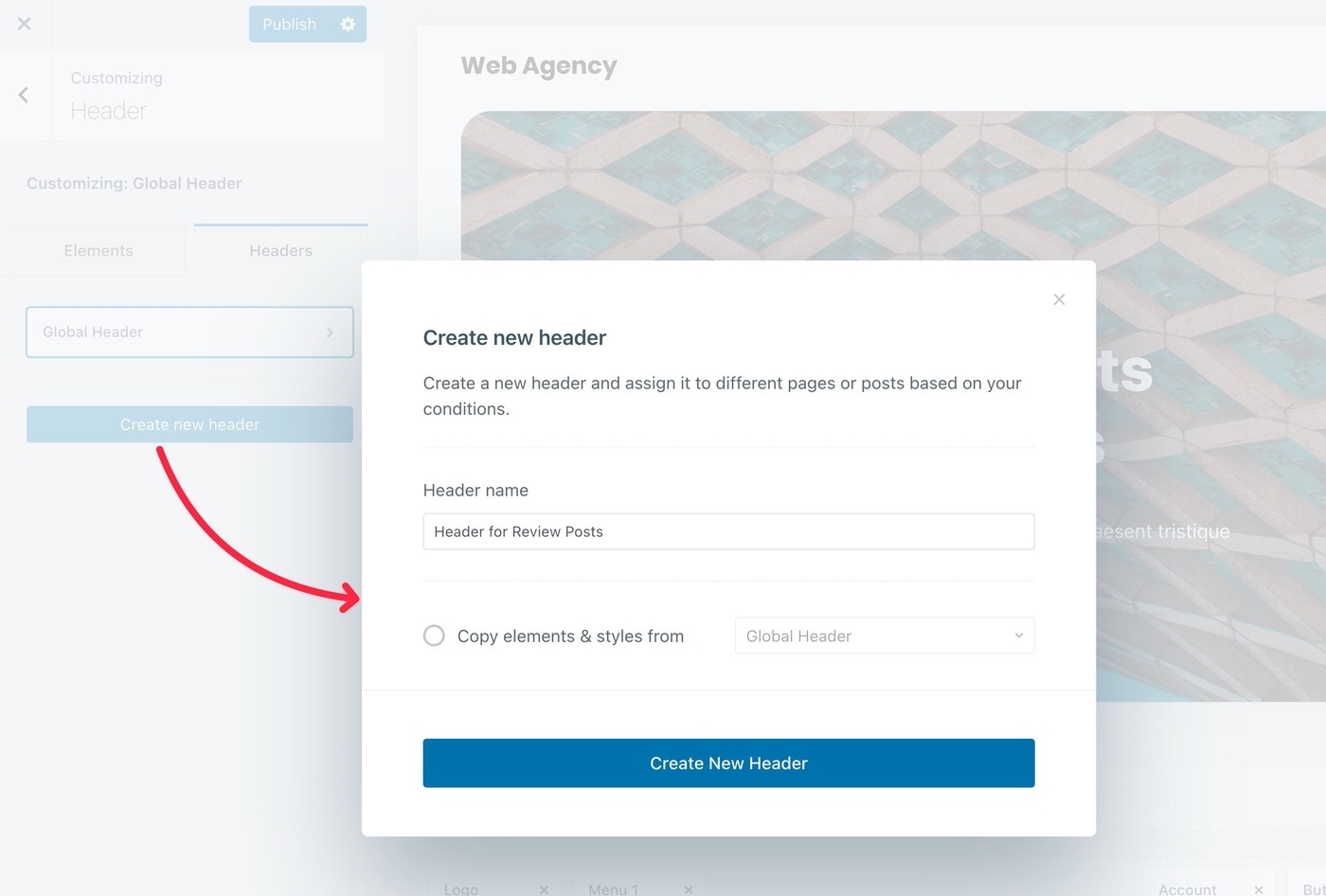
You can then design that header just like you created your global header. The only addition is that you can set conditional rules for that header to control when to use it:
Quite useful!
5. Customized layouts/hooks, also known as content blocks (Pro)
Blocksy Content Blocks are a more advanced feature that helps you customize your site.
With Content Blocks, you can create three types of customized layouts:
- Customized content that you inject at different points in your theme using hooks.
- Popups that you can display on your site.
- Custom theme templateshow to design a custom template for an entry.
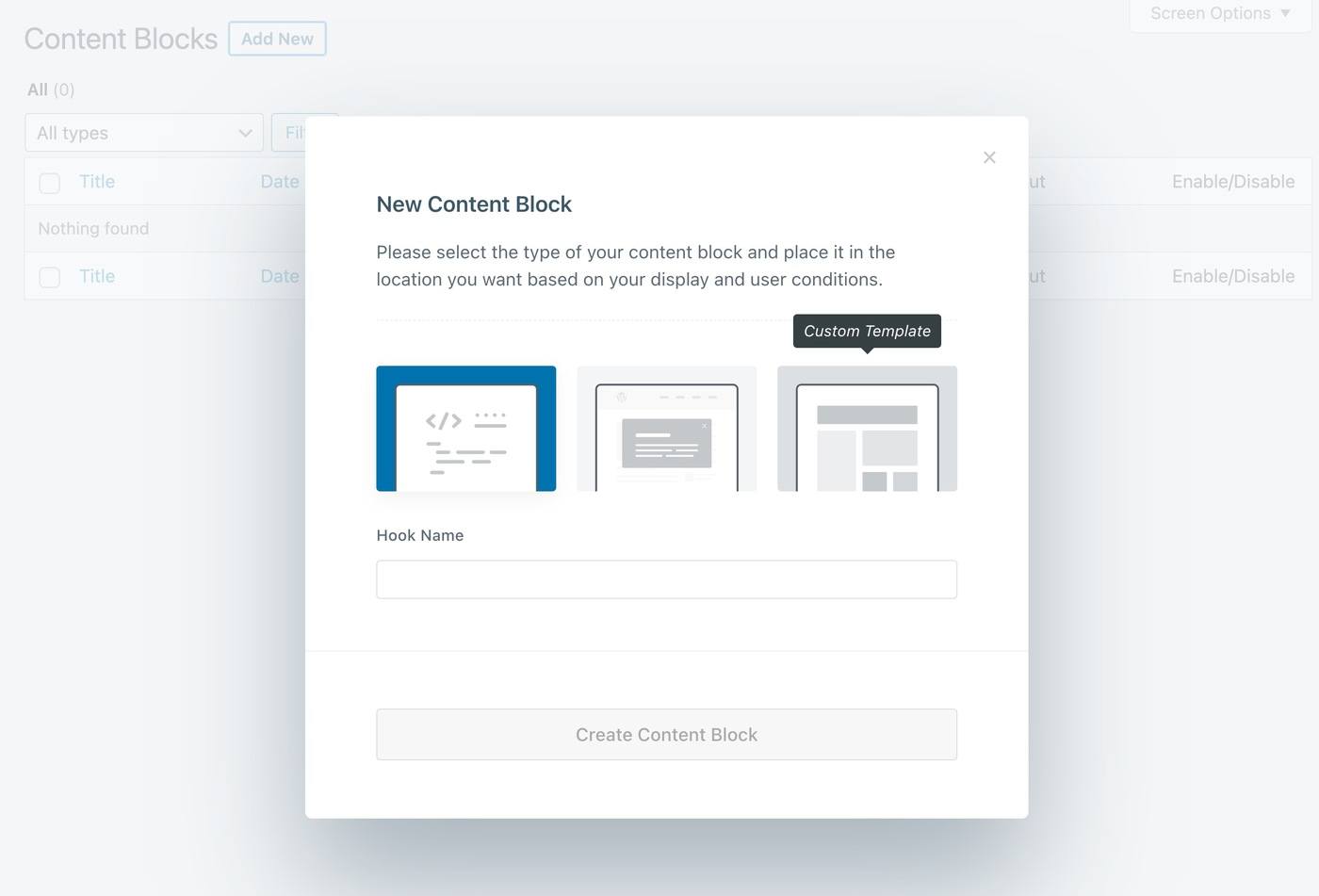
If you're a casual user, you may not touch them. But for more advanced users, they will help you go beyond the Customizer options without resorting to custom code or third-party plugins.
Here are some examples:
Customized content
First, let's say you want to add an email subscription form at the end of your blog posts. You could do this by creating a custom content block and using the numerous hook locations to insert the design anywhere on your site.
To control the actual content, you can use the block editor or a code editor:
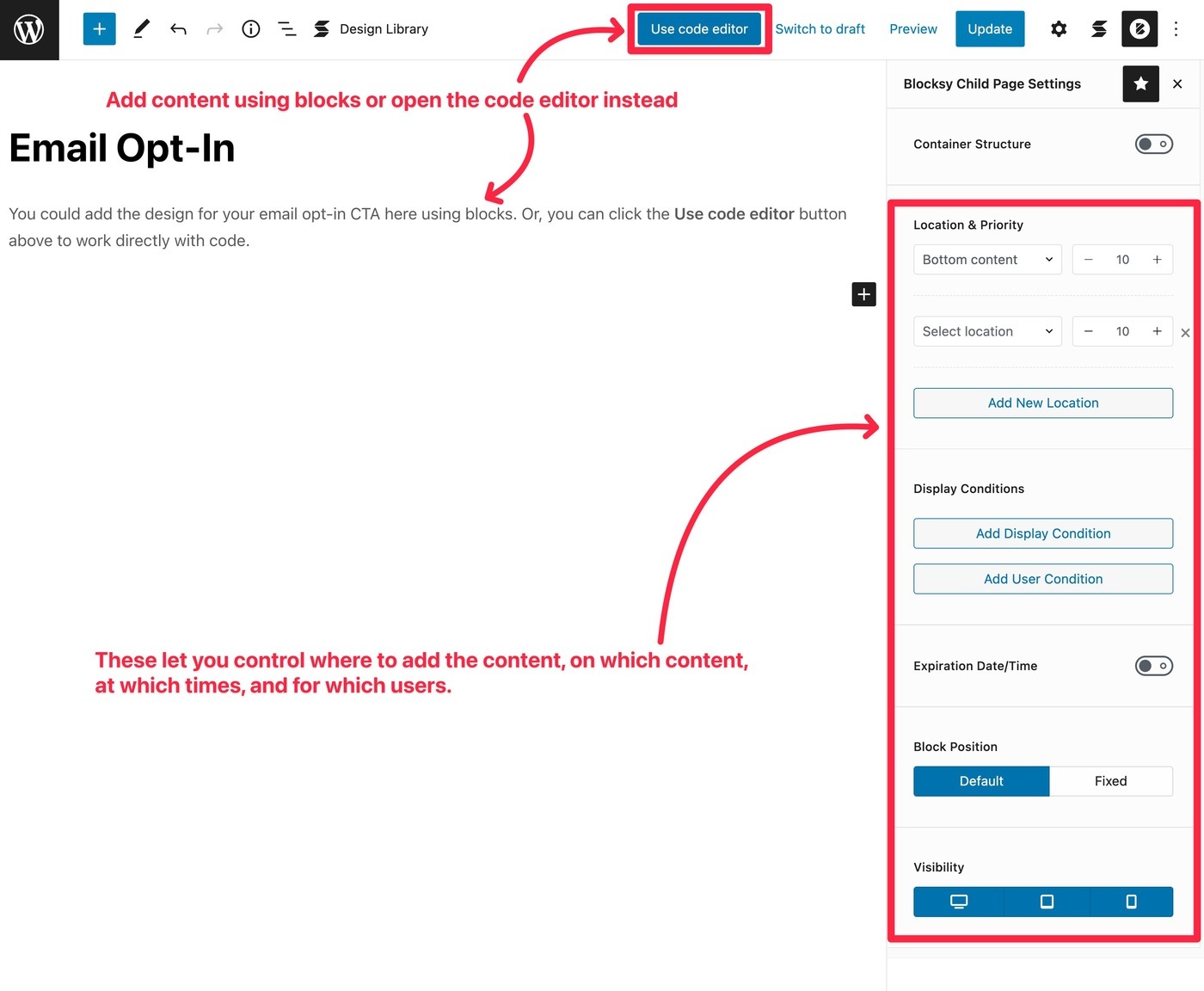
At the same time, you can use display conditions to control who sees the block:
- Display only on certain content. For example, blog entries of a certain category.
- Show only to certain users. For example, you could hide the email subscription form for registered users.
- Schedule it to run at certain times.
- Hide it on certain devices.
Pop-up windows
With the pop-up content block, you have virtually the same options.
The key difference is that you are displaying the content in a pop-up window rather than injecting it into your site using hook locations.
You also have options to choose different locations, sizes and triggers for pop-up windows.
The activation options are exactly what you would expect from a dedicated pop-up plugin, including time on page, scroll depth and even exit intent:
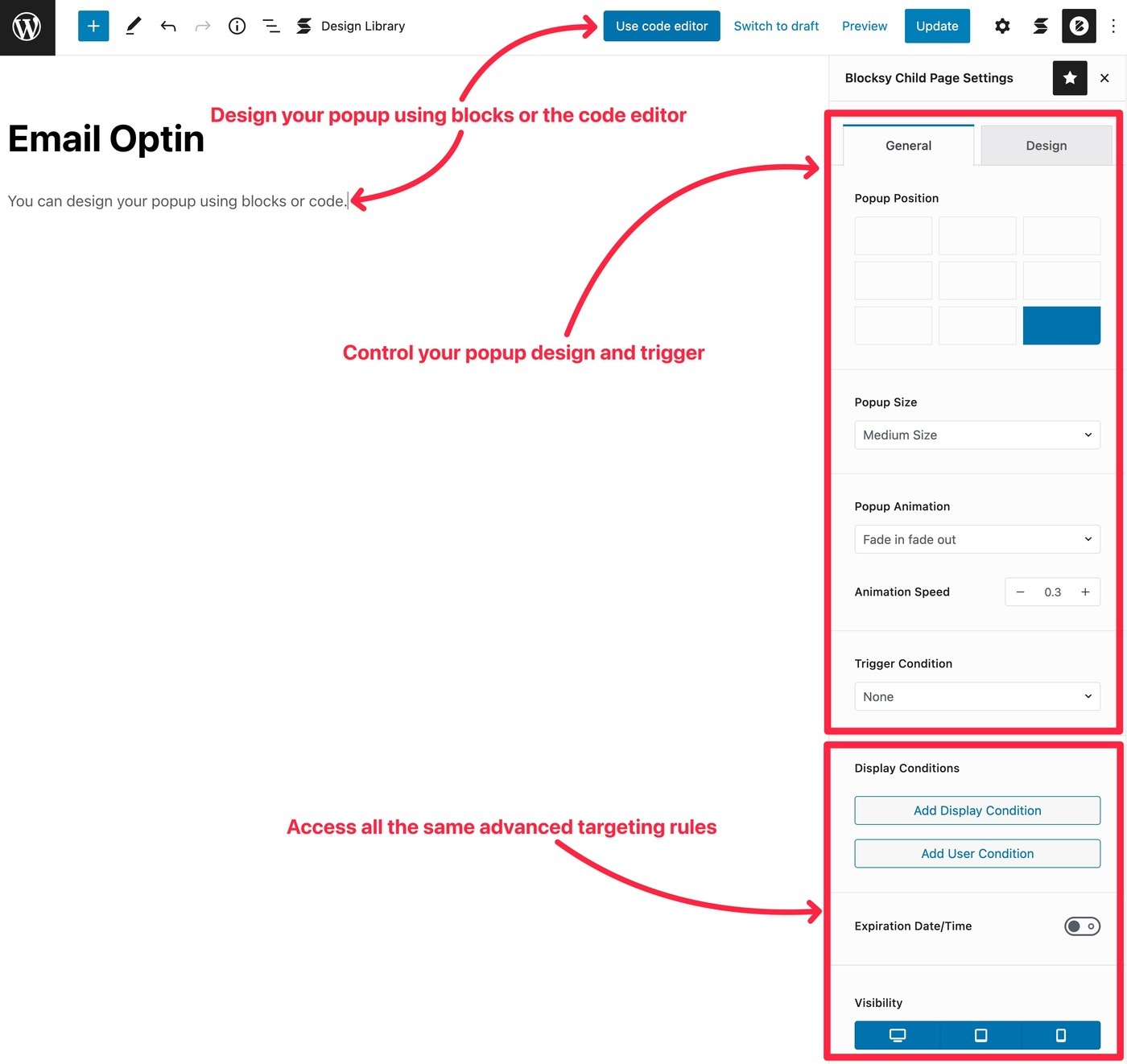
This is a very unique feature, as most themes do not offer pop-ups as custom design options. For most use cases, this can eliminate the need for a separate pop-up plugin.
Templates
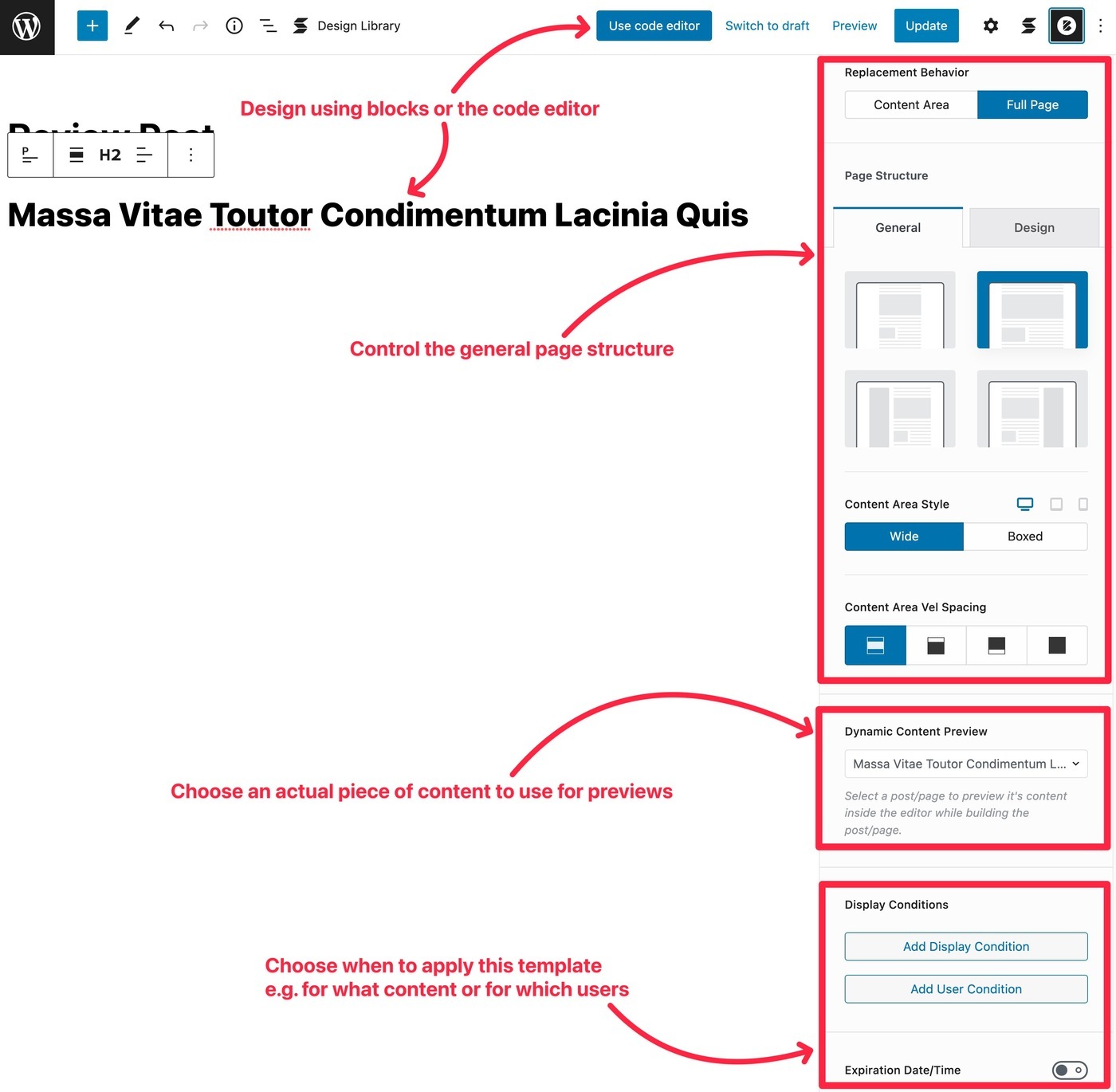
Finally, you can use Content Blocks to design custom templates for the following areas of your theme:
- Header
- Footer
- Only
- Archive
- Page 404
For example, you may want to use a different post template for blog posts in a certain category.
With this feature (and the native theme blocks), you can easily configure it:
6. Many other useful extensions
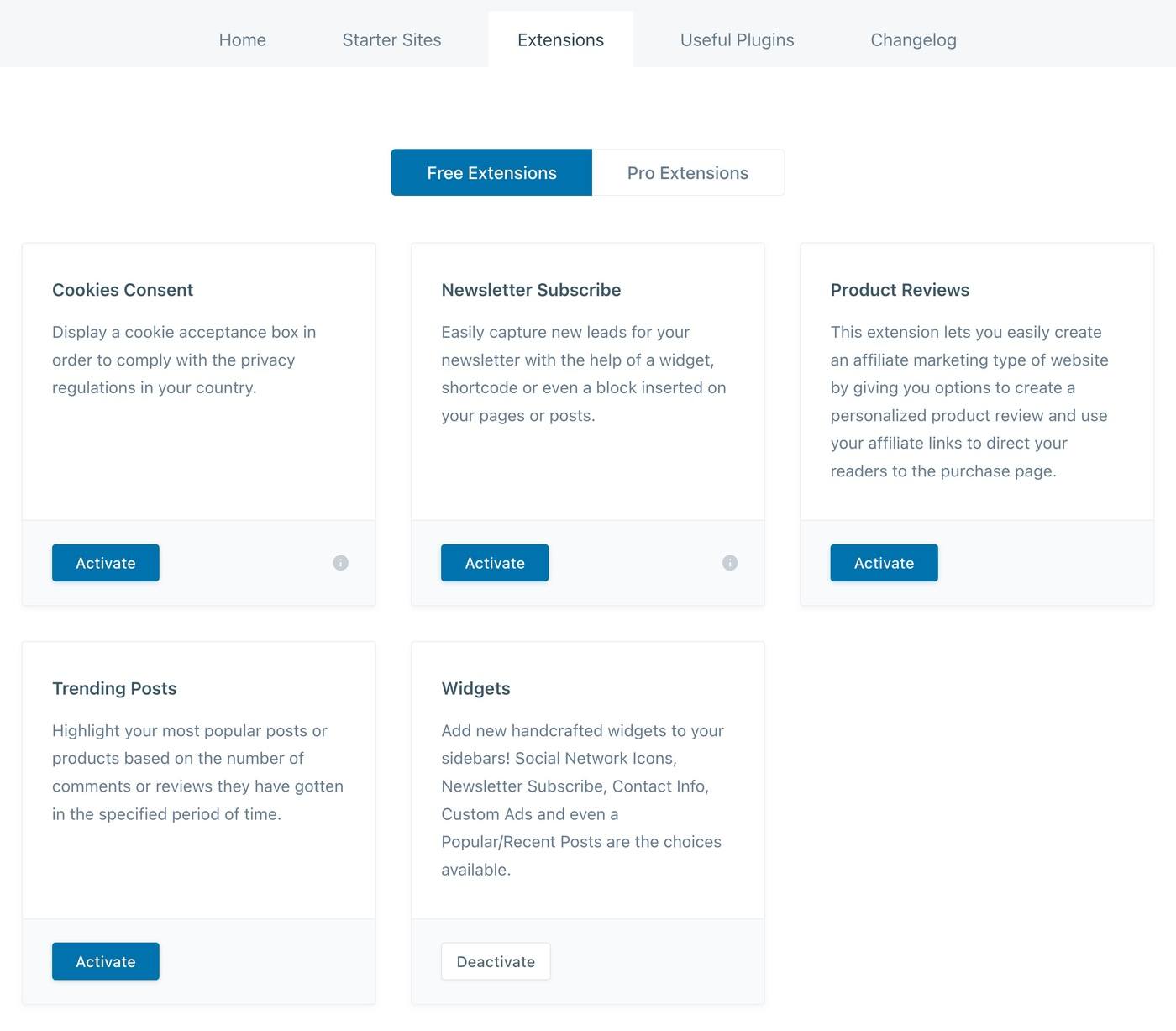
In addition to the Content Blocks, you have other unique extensions that you won't find in other similar themes.
For example, you get free extensions for cookie consent notices, newsletter subscription and product reviews:
With the Pro option, You get some advanced extensions for custom code, menus and more advanced compatibility with WooCommerce:
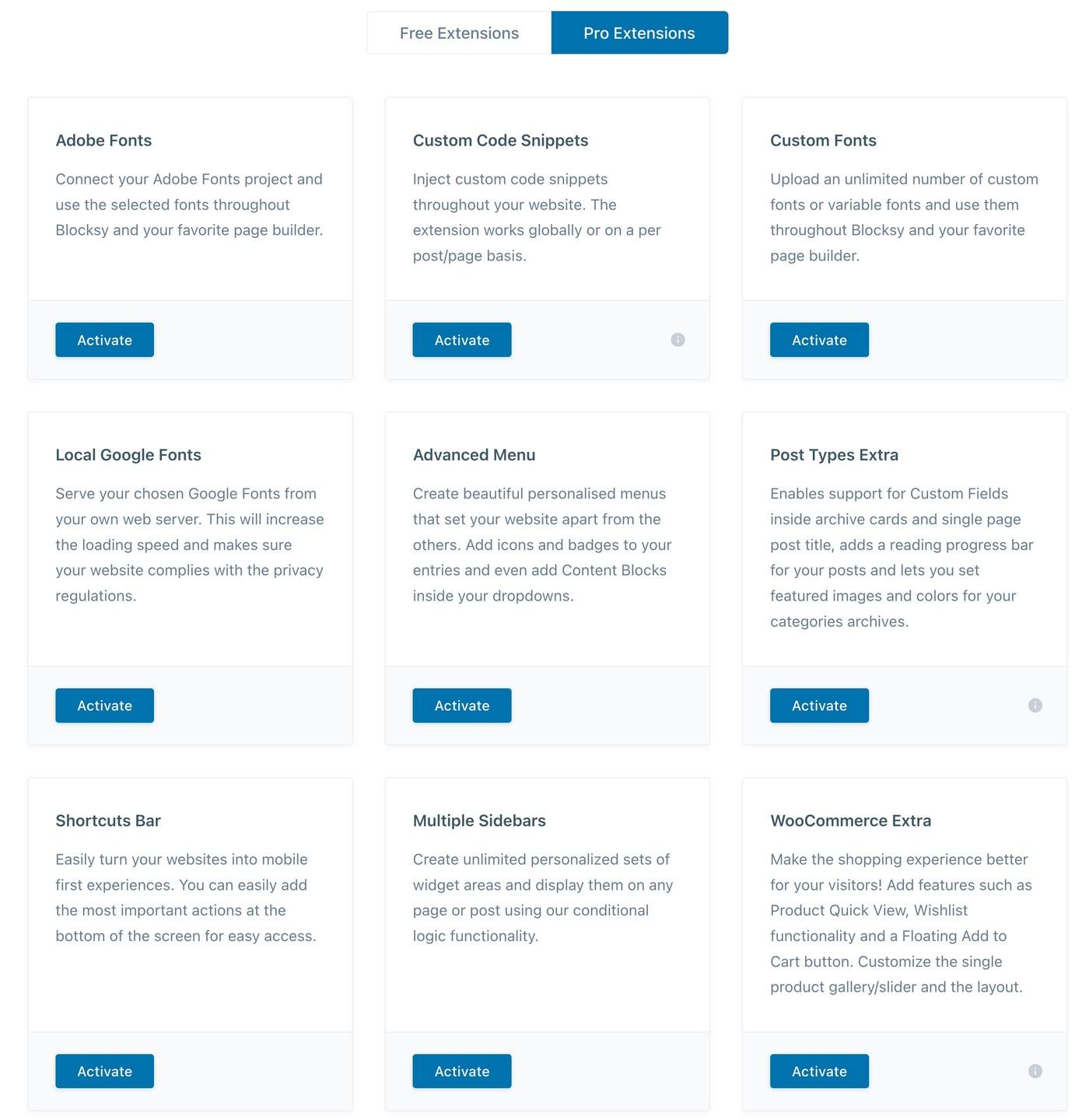
One of our favorites is Extra message types which is very useful if you are creating custom content sites that include custom fields. In addition to other useful features (such as a reading progress bar), it allows you to include custom field content in your file cards or in the title section of the post/page.
🔺Virtue vs Blocksy | comparing free/professional WordPress themes
🏎️ Performance testing of Blocksy theme against other popular options
If you want your WordPress site to load quickly, choosing a fast loading theme is one of the best things you can do.
Blocksy is a fast loading theme. It is lightweight and has a very optimized technology, such as loading code only on the exact pages where it is needed, instead of loading everything on the entire site.
However, to see how fast it is, I ran some performance tests with Blocksy and some of its main competitors.
All of these tests are for just the bare theme on a fresh installation. While not a very realistic scenario, we feel it is the fairest way to compare different themes and give a good idea of the basic "weight" of a theme.
Here are the weights of several popular topics:
| Subject | Page size | HTTP requests |
| Blocksy | 48 KB | 6 |
| Astra | 44 KB | 6 |
| GeneratePress Premium | 31 KB | 6 |
| Kadence | 48 KB | 9 |
| Neve | 35 KB | 6 |
| Divi | 213 KB | 14 |
| Avada | 467 KB | 15 |
Overall, you can see that Blocksy is as fast as other popular lightweight themes. And when compared to heavier themes like Divi or Avada is much faster.
💰 Block prices
The main Blocksy theme is available free of charge from WordPress.org.
Even with just the free theme, you already have access to a lot of customization options and several importable demo sites.
If you want to add more functions, you can buy Blocksy Pro which is an add-on that you install together with the Blocksy theme.
You can see all the differences between Blocksy Free and Pro on the prices but here are some of the most notable additions:
- Content blocks (hooks) and customized designs
- Multiple conditional headers, footers and sidebars (instead of using the same one for your entire site)
- Mega menu support
- More advanced WooCommerce features, such as off-canvas filters, floating cart, etc.
You can purchase Blocksy Pro as an annual or lifetime subscription.
There are three different pricing plans - the only difference is the number of sites on which you can use the Blocksy theme:
- Staff - 1 site - 49 $ per year or 149 $ for lifetime support and upgrades.
- Professional - 5 sites - 69 $ per year or 199 $ for lifetime support and upgrades.
- Agency - unlimited sites - 99 $ per year or 299 $ for lifetime support and upgrades.

At Pillbanana you can purchase Blocksy Pro for as many sites as you want, at an incredibly low price of only $4.99! Take advantage of this exceptional opportunity to get a versatile and powerful theme at a very affordable cost.
👍👎 Blocksy theme pros and cons
Now that you know all about the Blocksy theme let's go over some of the pros and cons of using Blocksy...
👍 Pros
- Fast throughput - Blocksy's lightweight design and intelligent asset loading help you create a site that loads quickly.
- Beautiful demonstration sites - All of Blocksy's demo sites look amazing, with clean and modern designs.
- Support for mega menus - Blocksy Pro offers an integrated mega menu, something that other similar themes lack.
- Customized layouts (including pop-ups)) - Blocksy has a powerful custom layouts feature for advanced users. The popup option is also unique and something you won't find in most similar themes.
- Great WooCommerce features - If you're creating an eCommerce store, Blocksy Pro includes tons of advanced WooCommerce features, such as wish lists, floating cart, quick view, off-canvas filters and much more.
- Unique extensions - Blocksy extensions are quite unique for the space and offer really useful features, such as cookie consent notices and product review boxes.
- Conditional headers, footers and sidebars - you can use them to create a better and more personalized experience for your users.
👎 Cons
- Limited number of importable demo sites - Compared to other themes in this space, Blocksy has a limited number of demo sites that you can import. Blocksy only has 25, while a theme like Astra has over 200 and other similar themes usually have at least 60+.
- No advanced LMS integrations - If you are creating an online course, Blocksy does not offer advanced LMS plugin integrations such as themes like Astra or Kadence Theme.
👊 The best alternatives to Blocksy Theme
Although we believe that Blocksy is a great theme, there are also many quality alternatives to Blocksy that use the same lightweight, multi-purpose approach.
We have already mentioned several of these issues, but let's put it all together....
If you like this approach but also want to consider other options, I recommend you take a look at these topics:
- Astra - the most popular non-default theme of all time. It has a huge selection of starter sites and tons of customization. Learn more in our Astra review.
- GeneratePress - get to be even more lightweight than Blocksy. It also has some advanced features for custom layouts/hooks and even a full-featured block-based theme builder. Read more in our GeneratePress review.
- Kadence Theme: a newer option with a lot of customization options, a powerful custom layouts tool and great looking demo sites. Learn more in our review of Kadence Theme.
- Neve - another very lightweight option. It has a solid collection of over 80 demo sites and flexible Customizer options.
Honestly, any of these themes will be a great choice for your site, Blocksy included.
It really just depends on your budget, which starter sites you like best, and the specific customization options you may need (for example, a certain type of off-canvas header that you must use).
🙋 Review of Blocksy Frequently asked questions
To conclude our review of the Blocksy theme, let's review some frequently asked questions.
Is the Blocksy theme fast?
Blocksy is one of the fastest WordPress themes out there, with lightweight code and Webpack-optimized asset loading.
Is Blocksy free?
The main Blocksy theme is available 100% for free on WordPress.org. If you want to add more features to the theme, you can purchase the Blocksy Pro plugin.
Is Blocksy a page builder?
No - Blocksy is a lightweight WordPress theme, it does not have its own integrated page builder. However, it works well with the most popular page builder plugins, as well as the native WordPress editor.
Does the Blocksy theme work with Elementor?
The Blocksy theme works great with Elementor and many of Blocky's importable demo sites offer Elementor versions for easy customization.
Can you use Blocksy on WordPress.com?
Yes, you can use Blocksy on WordPress.com, but only if you pay for WordPress.com's Business or eCommerce plans. You need one of those plans to be able to install custom themes and plugins like Blocksy and the Blocksy Pro plugin.
🤔 Final thoughts: should you use the Blocksy theme?
In general, Blocksy is an excellent WordPress theme if you like the lightweight and multipurpose approach, which is what many themes are using right now.
For us, one of the main disadvantages is its limited selection of pre-built home sites.
On the other hand, there's a lot to love about Blocksy.
First of all, although the number of demo sites is limited, the quality is excellent and all the demo sites look great.
Second, the performance is incredible. In addition to lightweight, clean code, Blocksy uses technologies like Webpack to load only the code for the exact functions you need, rather than overloading your site with code for functions you don't use.
Finally, you have a lot of options in the native WordPress customizer, including nice touches like drag-and-drop header and footer builders.
For more advanced users, you can also customize your site with personalized layouts using the block feature, and even design your own theme templates with the block editor.
Blocksy also offers very powerful conditional rules for all these custom designs, allowing you to target specific content, users, times and much more.
Overall, Blocksy certainly deserves a place at the top of the "lightweight and multipurpose" WordPress theme space.
Si quieres conocer otros artículos parecidos a Reseña de Blocksy: Un Theme versátil y muy veloz puedes visitar la categoría Temas Wordpress.
 Español Español
  English
  Português do Brasil
Leave a Reply