
Bryzy Analysis: Pros and Cons + Performance Tests.
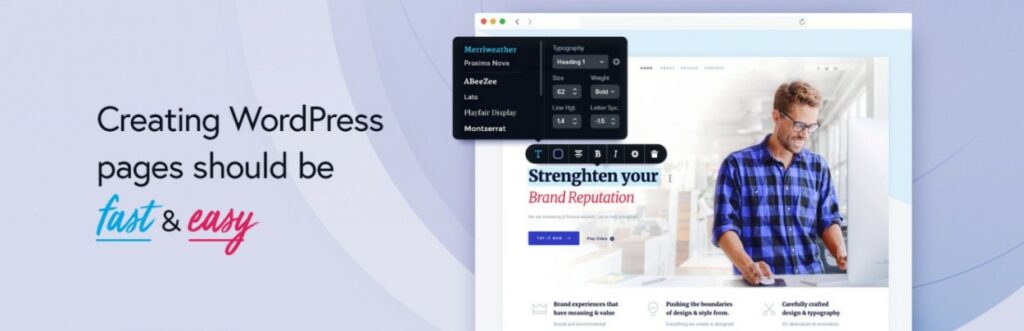
Thinking about using Brizy as a WordPress page builder?
Brizy allows you to create amazing layouts and websites using a drag-and-drop visual interface, with no coding knowledge required. It fits in the same class as other popular page builder plugins like Elementor, Beaver Builder y Divi.
However, while the basic function is the same as those tools, Brizy does some things better than the competition... and also some things worse.
To know the pros and cons of Brizy as a builder and decide if it's right for you, you'll want to read our full review of Brizy.
This is all we will cover in our review of Brizy:
- Brizy Review: A quick look at features
- Nine outstanding Brizy features (also known as the good things)
- Two areas in which Brizy could improve (aka the bad).
- Brizy Performance vs Elementor & Others - About what you'd expect
- Brizy's prices - Quite competitive
- Brizy vs. other popular page builder plugins
- Brizy Review Frequently Asked Questions
- Brizy review: final thoughts
Brizy Review: A quick look at features
To start our Brizy review, let's briefly go over the key features Brizy offers. We don't want to go too long because you can find all of this in the Brizy's website, We believe it is useful to cover this topic before going into the practical sections.
The core of Brizy is its builder:
- Visual drag-and-drop design - Design everything using a visual editor, no coding knowledge required.
- Online editing approach - you can control most of your design by using inline options instead of sidebars and pop-ups. This is one of Brizy's best things.
- Responsive design - all your designs are responsive by default and you have options to further control the appearance of your designs on different devices.
- Builder's flexible elements - the free version includes 24 elements, while the Pro version doubles them to 48.
- Predesigned templates - access to lots of page and section templates.
- Form creator - create your own customized forms, even with the free version.
- Marketing integrations - connects with other marketing tools such as Mailchimp and HubSpot.
- Conditional display - Show/hide blocks based on different conditions, such as a user's device or connection status.
Here's a basic look at the Brizy builder:

You can open more options using the sidebar on the left. There are also a couple of other useful interface details that we will show below:

At the same time, Brizy Pro includes functions to go beyond the design of individual pages and entries:
- Theme Builder - including support for WooCommerce.
- Dynamic content support - Add custom field data to your designs and theme templates.
- Pop-up window builder - Design pop-up windows with the visual builder and display them anywhere on your site.
Nine outstanding Brizy features (also known as the good things)
Now that you have a basic idea of what Brizy has to offer, let's dive into some of its key features and strengths.
1. The online editing experience is impressive
We mentioned earlier that Brizy's "inline editing experience" is something that sets it apart from other page builder plugins. Well, what does that mean?
By online editing experience, we mean the ability to customize your design without resorting to sidebars or pop-up configuration areas.
Most page builders now allow you to edit text by simply clicking and typing in the live preview, but you will still need to use separate interfaces to manage the actual configuration of your content elements.
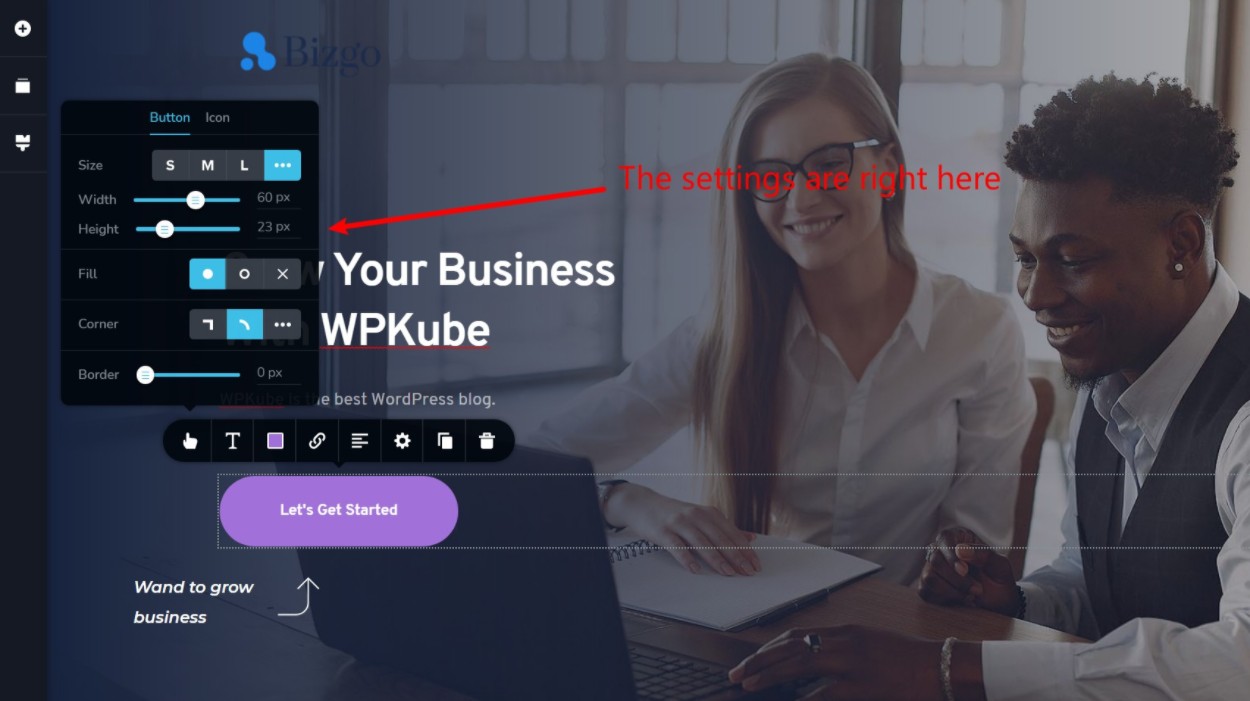
With Brizy, it's different. You can access many key settings directly from the design interface, which we believe leads to a faster and more intuitive design experience.
For example, when you customize a button in Brizy, right there you have options to configure the size, border, icon, etc:
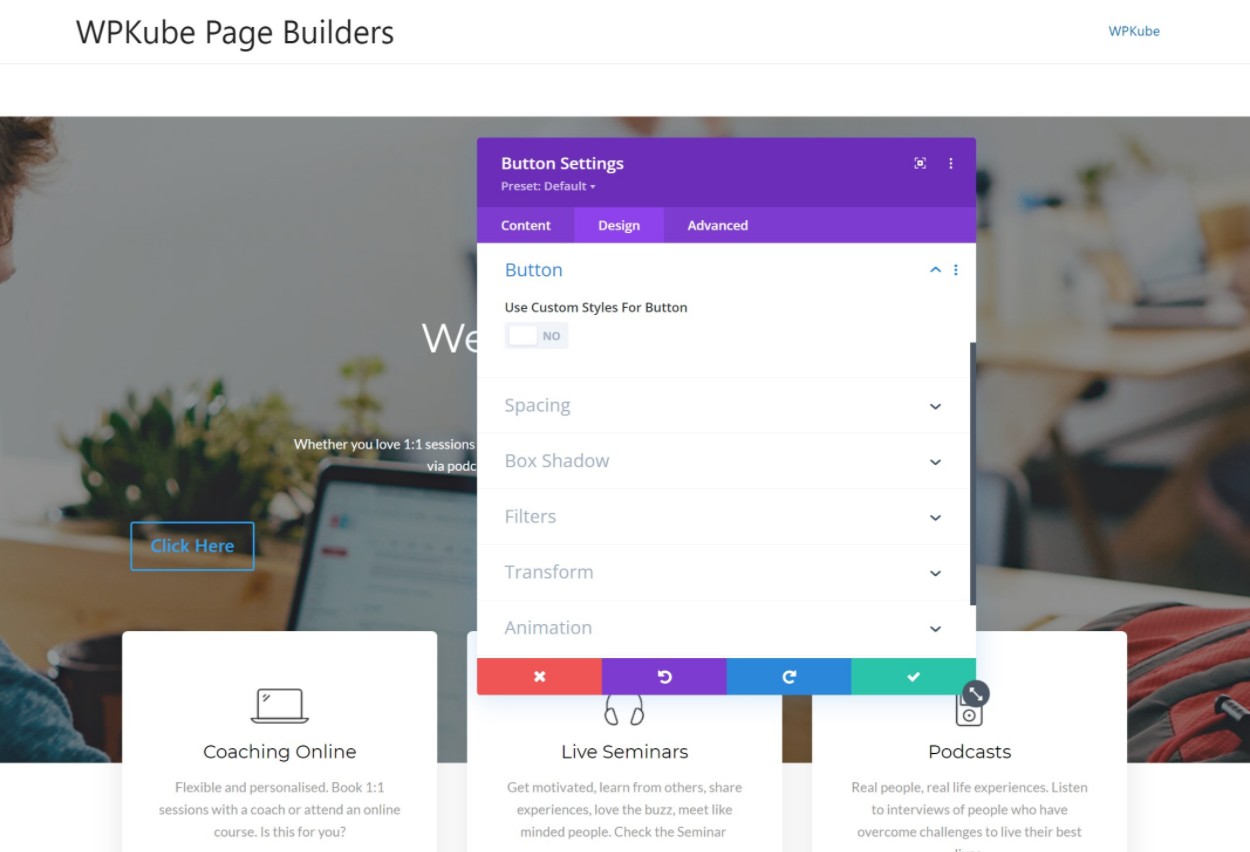
On the other hand, if you were working in Divi (or most popular page builders), you have to use a popup/sidebar to customize the settings of a button, which takes a bit more time:
We truly believe that this is one of the best characteristics of Brizy, It makes it very easy to style your content elements.
If you're only going to create a few designs, that extra efficiency may not matter. But if you're going to be using your page builder a lot, these "small" differences can make you more productive and efficient.
2. You get useful content elements (including a form builder).
To help you create your designs, Brizy includes 24 elements with the free version or 48 elements with Brizy Pro.
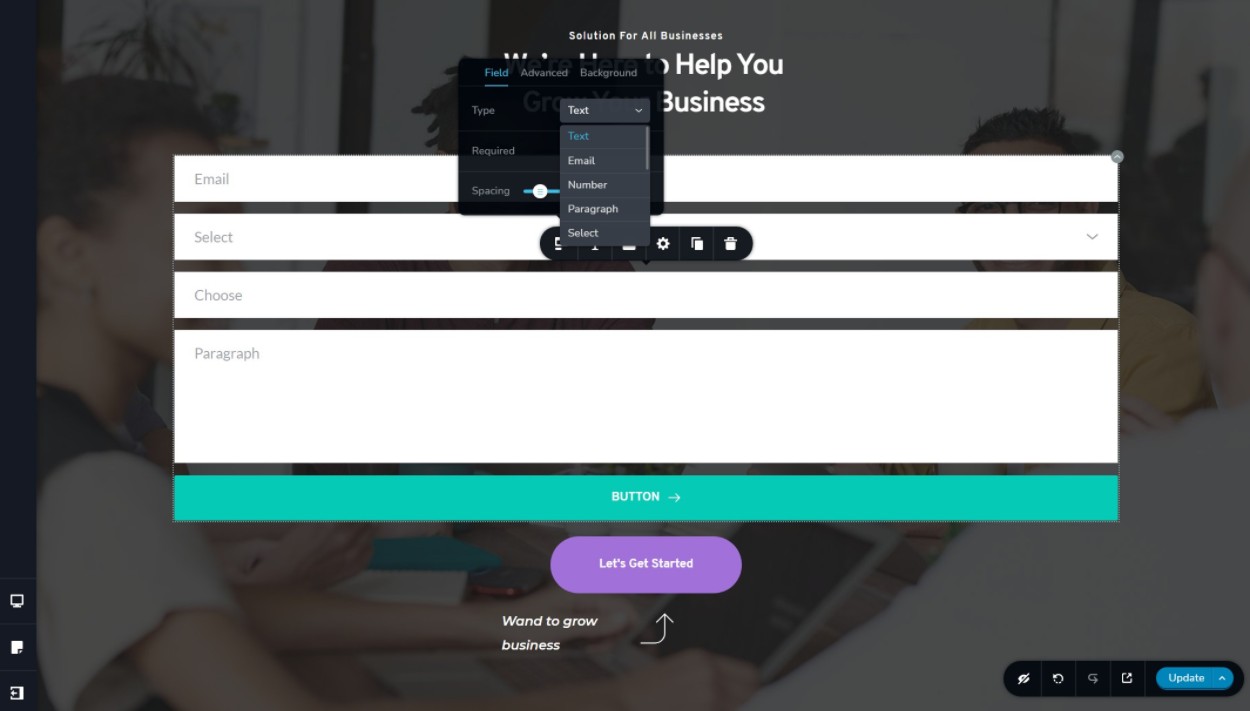
One of our favorite elements is the form builder, which can replace the need for a separate WordPress form plugin.
The most remarkable thing about this feature is that you get the form builder even with the free version of Brizy, while most other page builders charge for form builders:
3. Brizy integrates with other marketing tools
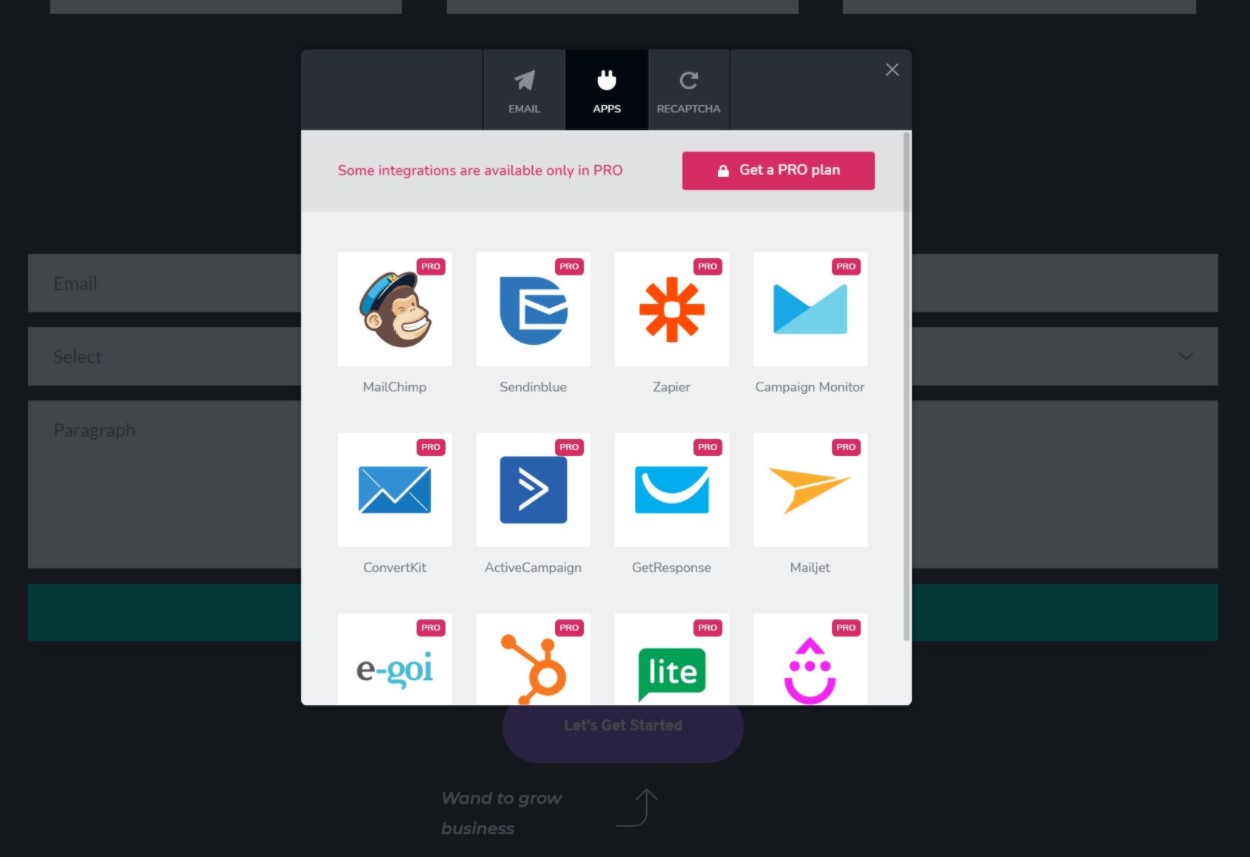
Brizy integrates with many popular marketing tools. If your tool is not on the list, there is also a general Zapier integration. Here's the full list:
- Zapier
- Mailchimp
- HubSpot
- Salesforce
- Asap
- AWeber
- MailerLite
- SendGrid
- Autopilot
You can easily connect the form to any of these services:
4. Templates are great
Although Brizy offers you the ability to create your designs from scratch, you may not need to because Brizy also includes a bunch of pre-built templates. These templates come in two forms:
- Blocks - templates for specific sections of a page.
- Designs - full page templates.
Currently, you have more than 120 designs and more than 251 blocks (available in light and dark colors).
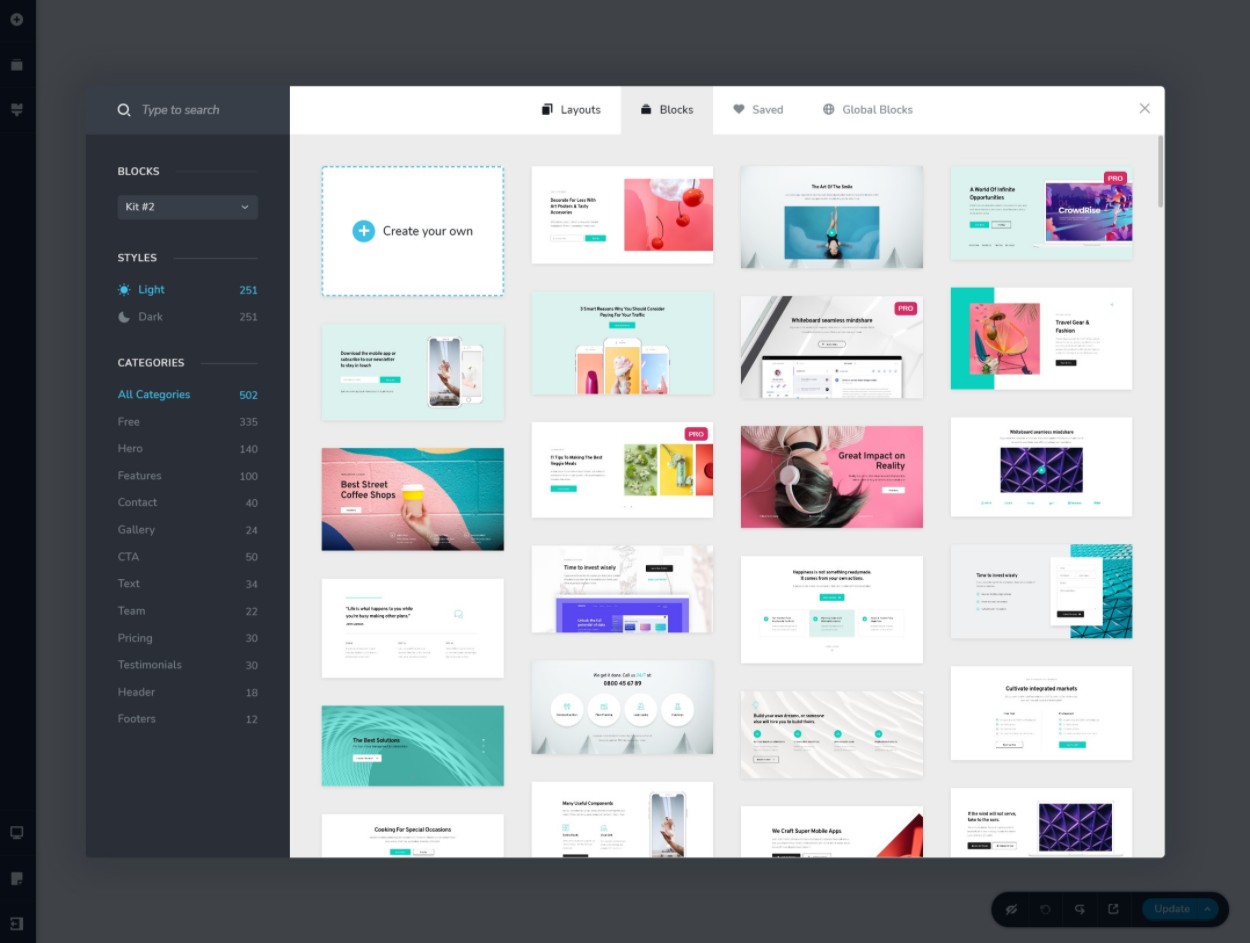
While the templates look great, one drawback is that the quantity doesn't match what you get with Elementor or Divi Builder.
5. Brizy Sync allows you to access your customized Brizy templates anywhere.
A really cool template-centric feature of Brizy is Brizy Sync. Basically, it allows you to save your own custom block templates and layouts in the Brizy cloud. Then, you can access all of these templates on any WordPress site where you use Brizy.
So you can create a template in "Site A", save it in your Brizy account and use it in "Site B", without the need to import/export anything manually.
We are not aware of any other page builder that offers this as a basic feature, so it is a definite advantage of Brizy.
That said, there are third-party tools that can add a cloud template library to other builders, such as. Pro Assistant (supports multiple constructors) or WunderWP (Elementor).
🚀ACF Pro: A complete guide to customizing WordPress
6. You get a theme builder (includes support for WooCommerce).
If you want to go beyond designing individual posts and pages, Brizy Pro also supports full theme creation. This means you can use Brizy's visual editor to design your site's theme:
- Header
- Footer
- Individual templates (the template that some/all of your blog posts or custom post types automatically use)
- File templates (pages that list your blog entries or other types of entries)
When you create these templates, you get conditions to control where you want to use them, such as using only one template for a specific category of blog posts:
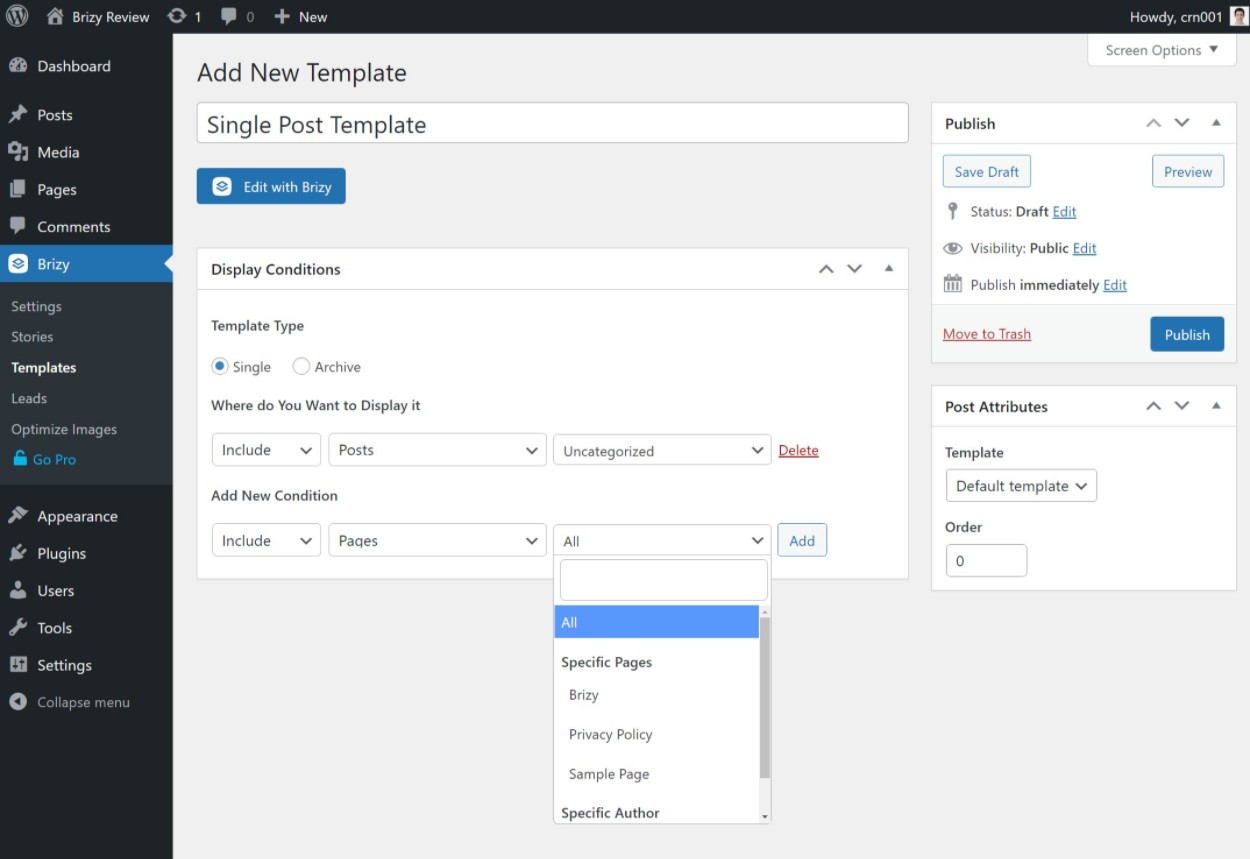
In the editor, you will have special thematic blocks to insert content dynamically.
Brizy also supports dynamic content from custom fields that you have added with plugins such as Advanced Custom Fields (ACF), Toolset, Pods and Meta Box.
The way Brizy's theme builder handles header and footer templates is a bit different from other page builders, but it's easy to use once you get the hang of it.
Instead of creating your headers and footers as separate templates, you will design them while editing the layout of a page using the header or footer blocks. You can then use display conditions to control when to use each header/footer.
7. The Mega Menu is integrated
Something unique about Brizy's header theme/builder is that it includes built-in support for creating custom mega menus.
Most other page builders don't either:
- They do not offer support for the mega menu.
- They require you to use a third-party extension to support the mega menu.
With Brizy, however, you can easily configure mega menus using the kernel's visual builder.
8. You have a Popup Builder
Another advantage of Brizy Pro is that it includes its own pop-up builder. With the popup builder, you can use the Brizy interface to design your own custom popup windows that you can activate with the following conditions:
- When loading the page
- Time on page
- Inactivity
- Exit attempt
- Displacement depth
- Click on
- Arrival from
Elementor Pro is the only other major page builder plugin that offers a popup builder, so this is a definite advantage Brizy has over other builders like Beaver Builder and Divi.
9. You can customize Brizy's interface for your clients' pages
If you use Brizy to create websites for clients, you'll be happy to know that Brizy's agency license gives you the option to tag the Brizy interface with your own branding. This can be useful if you want to offer your clients a more personalized web experience.
Elementor and Divi Builder no offer white-label functions.
🚀 EVERYTHING you need to know about Rank Math to optimize your website SEO
Two areas in which Brizy could improve (aka the bad).
While there are many things we like about Brizy, there are also some areas where Brizy could be better. Let's review them...
No API for developers - This means no third party extensions
One of the main drawbacks of Brizy is that it does not offer an API for developers. This means that there is no marketplace for third-party extensions/additions like you can find in other page builders such as Elementor, Beaver Builder, Divi, etc.
This is a real bummer because third-party extensions can be really useful when you need more specific functionality.
For example, Elementor has a strong third-party market where you can find hundreds of extensions to add new widgets, templates and design features.
So, while Elementor is already one of the most feature-rich page builders, these third-party add-ons help more and give you access to virtually any feature you can imagine.
If Brizy can already do everything you need it to do with the basic functions, this is not a problem. But if you like to have maximum flexibility, this is one area where Brizy is really behind other page builder plugins.
Limited documentation - Not a big problem, but others are better
Compared to other page builder plugins, we find Brizy's documentation center to be lacking. There is very little documentation in text. Instead, you have to rely almost entirely on video documentation.
If you like video documentation, that's fine. However, if you find text documentation easier, you won't find much.
Apart from that, Brizy's documentation is not as complete as that of other page builders.
Here are links to several help centers so you can see how they compare:
Brizy Performance vs Elementor & Others - About what you'd expect
Whenever you use a page builder plugin, you will sacrifice at least some performance compared to the native WordPress editor. For most people, this sacrifice is worth it for the improved design experience.
In terms of performance, we would say that Brizy is quite comparable to other popular page builder plugins such as Elementor and Divi Builder and a bit heavier than alternatives such as Beaver Builder and Oxygen.
To demonstrate this, we've created a simple layout using the native block editor, Brizy, and a few other popular page builder plugins. The layout only includes a single button block to keep things fair - the key idea here is to give you an idea of the basic "weight" of the various page builders.
Note: this data includes the "weight" of the theme of our test site, which is Astra.:
| Builder | Page size | HTTP requests |
| Native block editor (Gutenberg) | 40 KB | 7 |
| Brizy | 143 KB | 14 |
| Elementor (with speed experiments) | 170 KB | 21 |
| Beaver Builder | 84 KB | 12 |
| Divi Builder | 149 KB | 13 |
Overall, you can see that Brizy is no worse than other popular page builders, but I wouldn't call it particularly lightweight either. If you really care about performance, you might prefer Beaver Builder.
That said, with Brizy you can create fast loading websites as long as you follow WordPress performance best practices, so we don't think this will be an issue.
Brizy's prices - Quite competitive
For starters, Brizy has a free version available on WordPress.org that is quite generous with its functionality.
We can say that it is one of the most functional free page builders out there, although we still think that Elementor is a bit more generous with its free functionality. As we mentioned before, one advantage of the free version of Brizy is that it includes the form element, which the free version of Elementor does not offer.
However, if you want access to many of the best features, you will need to upgrade to Brizy Pro. Brizy Pro is what gives you access to...
- All elements of the constructor
- All templates
- Theme creator
- Dynamic content support
- Pop-up window builder
- Marketing integrations
There are three Brizy Pro plans. The main difference between them is the number of sites you can use Brizy Pro on. However, you need the highest level plan for white labeling.
One nice thing about Brizy's pricing is that you have the option to pay for a one-year license. o a lifetime license. If you are looking for a long-term tool, the lifetime option can offer you a lot of value.
These are your options:
- Staff - one site. 49 $ for a one-year license or 149 $ for a lifetime license.
- Freelancer - 100 sites. 99 $ for a one-year license or 299 $ for a lifetime license.
- Agency - 500 sites plus white label. 199 $ for a one-year license or 399 $ for a lifetime license.
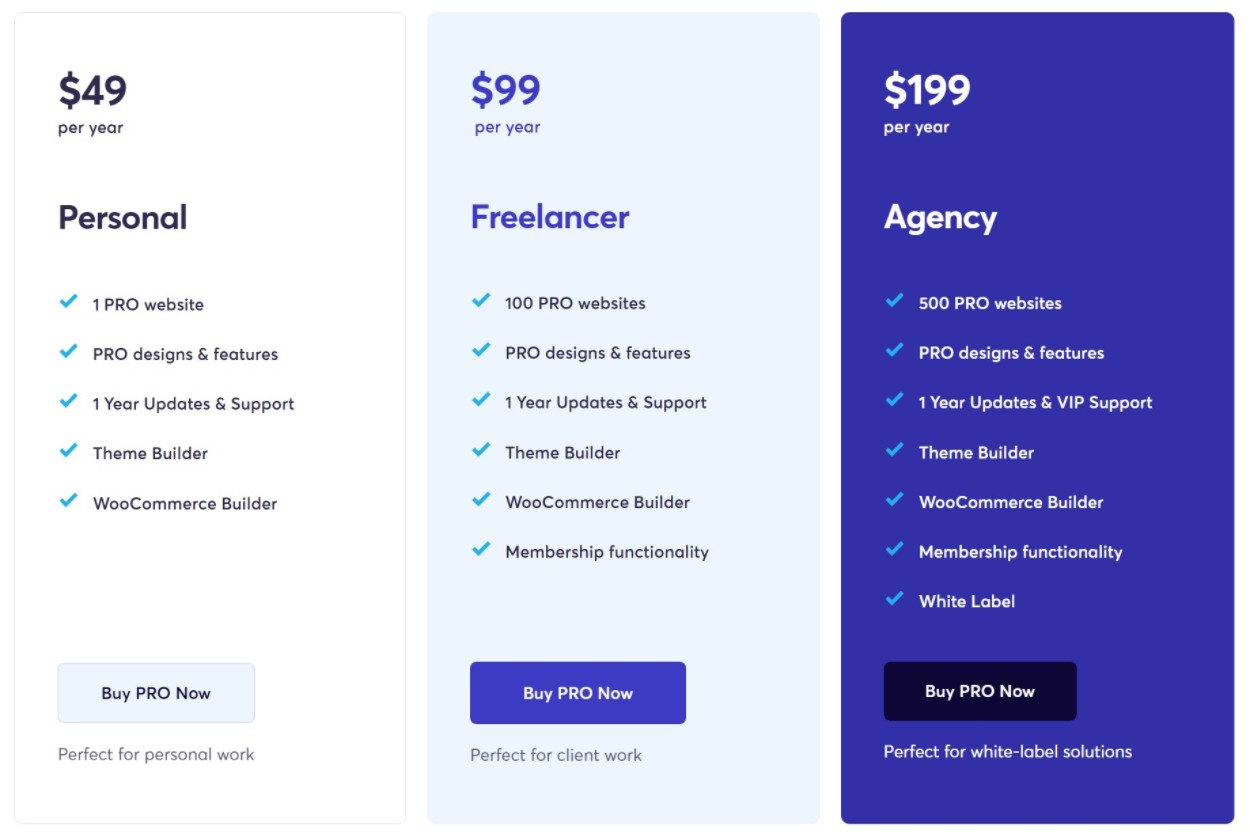
Separate pricing plans are also available for the Brizy Cloud SaaS service.
I'd say those prices offer pretty good value. For example, here's how Brizy's prices compare to Elementor, which is probably Brizy's most direct competitor:
| Number of sites | Price | |
| Brizy Level 1 | 1 | $49 |
| Elementor Level 1 | 1 | $49 |
| Brizy Level 2 | 100 | $99 |
| Elementor Level 2 | 3 | $99 |
| Brizy Level 3 | 500 | $199 |
| Elementor Level 3 | 25 | $199 |
| Elementor Level 4 | 100 | $499 |
| Elementor Level 5 | 1,000 | $999 |
So, although the prices are similar, Brizy has much higher website limits for the same price. Also, Elementor does not offer a lifetime license like Brizy.
The good news is that on our website you can get the Brizy Pro itself at the price of $4.99. Yes, as you read it. With all its incredible functions ready to use at the moment of download. But that's not all, by purchasing Brizy Pro with us, you will benefit from the following features:
- Very cheap price and original product: Get access to Brizy Pro at an unbeatable cost, making sure you receive an original 100% product.
- You will receive unaltered files: We guarantee you that the files are original and are without any alterations.
- Free upgrades: You will enjoy all future upgrades at no additional cost.
- Clean and virus-free 100% files: We assure you a safe and secure download free of any malware.
- Use on unlimited domains: The freedom to use Brizy Pro on as many projects as you want without limitations.
In addition, we offer subscriptions that give you access to more than 7800 downloads. This is a unique opportunity for those looking to maximize their creative and technical potential in the digital world.
Don't miss the opportunity to transform your web projects with Brizy Pro and our exclusive subscription offer. Visit our website and find out how you can take your digital presence to the next level.
Brizy vs. other popular page builder plugins
Now, let's see how Brizy compares to other popular page builder plugins.
For each comparison, we will highlight the comparative advantages that each plugin has.
Brizy vs Elementor
Here is a brief and concise analysis between Brizy and Elementor.
Advantages of Brizy vs Elementor
- Better interface (in our opinion)
- Higher web site limits for the same price
- Lifetime license option
- Brizy Cloud SaaS option
- White label
Advantages of Elementor over Brizy
- More intuitive theme builder (at least in my opinion)
- More templates
- Huge market of third-party extensions, giving you much more flexibility
- More flexible pop-up builder
- Largest community (because it is more popular)
🚀 Everything you need to know about Elementor, the best visual builder for WordPress
Brizy vs Beaver Builder
Here are some quick thoughts on Brizy vs Beaver Builder.
Advantages of Brizy vs Beaver Builder
- Better interface (in our opinion)
- More design options
- More flexible form builder
- Global style
- Pop-up window builder
- Best templates
- Brizy Cloud SaaS option
- Free version much better
- Lifetime license option
Advantages of Beaver Builder over Brizy
- Better performance - lighter from the start
- More stable (less chance of encountering bugs)
- Beaver Themer is more flexible than Brizy's theme builder
- Support for third-party extensions
- More generous pricing with unlimited site limits
- 40% renewal discount
Brizy vs Divi Builder
We briefly explore the differences and similarities between Brizy and Divi Builder.
Advantages of Brizy over Divi Builder
- Better interface (in our opinion)
- Pop-up window builder
- Free version
- Brizy Cloud SaaS option
- White label
Advantages of Divi Builder over Brizy
- More intuitive theme builder (from our perception)
- Support for third-party extensions
- Many more templates
- More generous pricing with unlimited site limits
- Available in theme and plugin version
🚀 Divi vs TheGem | Comparing Premium Themes
Brizy Review Frequently Asked Questions
To finish our Brizy review, let's go over some common questions you may have about this plugin.
Is the Brizy page builder free?
Brizy has a free version on WordPress.org that gives you access to the core builder, but you'll have to pay for Brizy Pro to access all the features and design elements.
Need a theme with Brizy?
It depends on how you build your site. If you use Brizy to design individual posts and pages, you'll still need a theme. But if you use Brizy's theme builder, you can design every part of your site from scratch, which means you can completely replace your theme.
Can you use Brizy with WooCommerce?
Yes, Brizy works great with WooCommerce, and you can even use Brizy theme builder to design your WooCommerce product page templates.
Which is better, Brizy or Elementor?
We think Brizy's interface/design experience is better than Elementor's and Brizy is cheaper, but we think Elementor is a better page builder plugin in almost every other way. That means it really just depends on what you value most.
Can you use Brizy and Elementor together?
You you can technically use Brizy and Elementor together, but we don't really recommend it for performance reasons. It is much better to choose one builder and use it site-wide.
What is Brizy Cloud?
Brizy Cloud is a hosted SaaS version of the Brizy builder. Instead of having to create your own WordPress installation, you can use Brizy to design pages/websites and not worry about hosting.
This can be great for simple websites or landing pages where you'll be using Brizy for everything. However, the downside is that you don't have access to the full flexibility of WordPress (for example, you cannot install your own themes and plugins.).
Brizy review: final thoughts
Overall, we can say that Brizy is undoubtedly one of the best WordPress page builder plugins.
We love the way the Brizy team has approached the design experience and Brizy has one of our favorite interfaces of any page builder plugin.
It also includes all the features you would expect from a top-notch page builder plugin, including a theme builder and a pop-up builder.
Other positives include a robust free version, a lifetime license option and some unique cloud offerings with Brizy Sync (for templates) and the Brizy Cloud hosted SaaS service.
However, the downsides are that Brizy's performance could be a bit better* and that Brizy has no third-party extensions, which limits its flexibility compared to other builders with large third-party extension markets.
*Brizy is no worse than the average page builder in terms of performance. It is comparable to Elementor and Divi Builder, but heavier than Beaver Builder or Oxygen.
In addition, although Brizy includes full theme creation, the theme creation features of other popular creators are preferable, as they are more flexible and intuitive.
If Brizy can do everything you need it to do with its built-in features and you love the design experience, its positives outweigh the negatives for most people.
Just make sure you apply performance best practices to make your site load quickly. Use something like WP Rocket can help eliminate much of Brizy's weight by optimizing scripts and removing unnecessary CSS.
Still have a question about Brizy or our Brizy review? Let us know in the comments.
Si quieres conocer otros artículos parecidos a Análisis de Brizy: Pros y Contras + Pruebas de Rendimiento puedes visitar la categoría Plugins Wordpress.
 Español Español
  English
  Português do Brasil
Leave a Reply